
The Insight Nobody Is Writing About
How to Use Claude for Business Operations is not a question of prompts it is a question of configuration.
The insight nobody is writing about is this: your business doesn’t have an AI tools problem; it has an operating system problem.
The pillar article in this cluster introduced that framework. This article goes one level deeper into a specific layer of that OS.
When teams attempt to understand how to use Claude for business operations, they typically default to a simplistic workflow: open Claude, type a request, and edit the output. The result is predictable around 61% first-draft usability, followed by the conclusion that “Claude is pretty good.”
The 87% first-draft usability figure from our testing was not achieved by using Claude differently, but by implementing structured Claude configuration for business operations treating the system not as a chat interface, but as a programmable runtime environment.
This is the distinction most guides fail to articulate: Claude is not just a language model you prompt. It is a behavioral system you configure.
This article is the technical implementation guide for closing that gap
Why Claude Specifically The Business-Relevant Architecture
Before getting into configuration, it helps to understand what makes Claude behave differently from other large language models in a business context. This is not a general comparison , it’s a targeted breakdown of the traits that have specific operational implications.
1. Calibrated Uncertainty Over False Confidence
Claude is trained to express uncertainty when it is genuinely uncertain, rather than generating a plausible-sounding answer with the same confidence level it uses for established facts. In a business context, this matters enormously. When you ask Claude to summarize a market trend, draft a contract clause, or calculate a projection, the risk of a confident wrong answer is far higher than the cost of a response that says “I’m not certain about this specific figure here’s what I do know.”
This behavioral trait means Claude-generated business content requires less fact-checking overhead than tools optimized for confident-sounding output.
Operational implication: Claude is a higher-trust tool for knowledge work, not because it’s always right, but because it signals when it might be wrong.
2. Instruction Adherence Over Word Count Optimization
Claude is optimized to follow instructions precisely including negative instructions like “do not add disclaimers,” “don’t summarize what you’ve done,” and “never use the phrase ‘it’s worth noting.'” Many models trained heavily on engagement metrics develop a tendency toward padding, hedging language, and filler phrases that inflate outputs without adding value.
In business writing, the editing time required to strip AI-generated padding is a direct operational cost. Claude’s instruction adherence substantially reduces this.
Operational implication: A Claude output with a well-specified system prompt requires less structural editing. The time savings compound across every document produced.
3. Extended Multi-Step Reasoning (Extended Thinking)
For Claude 3.7 Sonnet and later models, an “extended thinking” mode allows the model to reason through complex problems step-by-step before producing its final output. In default chat mode, most LLMs produce their first plausible response immediately. Extended thinking forces a slower, more deliberate reasoning chain — which matters for business decisions that have logical dependencies.
When you’re asking Claude to analyze a pricing model, evaluate a strategic option with multiple tradeoffs, or review a contract for hidden risk, extended thinking produces materially better output.
Operational implication: Use standard mode for drafting, summarization, and formatting tasks. Use extended thinking for analysis, decision evaluation, and anything where the quality of reasoning matters more than response speed.
4. Consistent Voice at Scale
Claude maintains voice consistency across outputs more reliably than most alternatives when given a well-specified style context. For agencies managing multiple client voices, this is the trait that makes Claude the Layer 1 engine of choice: the same system prompt configuration will produce outputs with consistent tone, vocabulary, and sentence structure across different team members using it.
The System Prompt Stack: Your Claude Business Operating Environment
The most important concept in this entire article is this: the system prompt is not an instruction, it is an operating environment.
The difference is architectural. An instruction tells Claude what to do in a single exchange. An operating environment tells Claude who it is, what business context it operates within, how it should think, what it should never do, and what format its outputs should take for every exchange in that session.
Most businesses using Claude have no system prompt at all. They type requests into a blank chat window. This is the equivalent of opening a new spreadsheet application and manually entering all your formulas from memory every session, with no templates, no pre-built structures, and no saved configurations.
The Four-Layer System Prompt Stack
A production-grade Claude system prompt for business use has four components. Together, they constitute what we call the Claude Business Operating Environment (CBOE).
┌─────────────────────────────────────────────────────────┐
│  LAYER D: Output Specification                          │
│  Format, structure, length, delivery format             │
├─────────────────────────────────────────────────────────┤
│  LAYER C: Behavioral Constraints                        │
│  What Claude should never do in this context            │
├─────────────────────────────────────────────────────────┤
│  LAYER B: Role Definition                               │
│  Who Claude is in this business context                 │
├─────────────────────────────────────────────────────────┤
│  LAYER A: Business Context                              │
│  What the business is, who it serves, why it exists     │
└─────────────────────────────────────────────────────────┘
Layer A Business Context (The Foundation)
This is the single block of text that eliminates the Context Tax the pillar article describes. It answers: what business is Claude operating within? Most businesses write a two-sentence version of this and wonder why outputs feel generic. A production-grade Layer A looks like this:
BUSINESS CONTEXT
You are operating within [Business Name], a [type] serving [specific client profile].

Our clients: [3-sentence ICP description — industry, company size,
sophistication level, primary pain point]

Our positioning: [What makes us different, in one specific sentence —
not "we deliver quality" but "we are the only agency in the mid-market
CPG space that specializes in post-acquisition brand integration"]

Our voice: [See Voice Calibration section below]

Current priorities: [What the business is focused on right now —
this updates quarterly]

Things we never do: [Client-specific constraints, ethical commitments,
competitive sensitivities]
The “current priorities” field is one most operators overlook. It allows Claude to orient its framing toward what’s actually relevant to the business right now without requiring you to re-explain strategic context in every prompt.
Layer B Role Definition
Layer B tells Claude which “operating mode” to engage. The difference between a generic assistant and a configured business operator is the specificity of this role definition. Compare:
Weak: “You are a helpful business writing assistant.”
Strong: “You are the Senior Account Strategist for this agency. Your outputs are used directly in client-facing communications and deliverables. You write with authority, not hedging language. You assume the client is intelligent and don’t over-explain. You prioritize concrete specificity over general principles.”
The second version creates a behavioral fingerprint that carries through every output without needing to be re-specified in individual prompts.
Layer C Behavioral Constraints
This is the layer most operators completely skip, and its absence is the source of the most common AI writing complaints: “It sounds too generic,” “It always starts with the same phrases,” “It over-explains obvious things.”
Behavioral constraints are negative instructions, they specify what Claude should NOT do. Examples:
BEHAVIORAL CONSTRAINTS
- Never open with "In today's fast-paced..." or any variation
- Never use "it's worth noting," "importantly," or "it's important to"
- Never add a summary paragraph at the end of emails
- Never include a disclaimer unless explicitly asked
- Never use passive voice in the first sentence of any document
- Do not pad short answers to appear more comprehensive
- Do not suggest "consider consulting a professional" unless the
  request is genuinely in legal/medical/financial advisory territory
This list is built iteratively. Every time you edit a Claude output and remove a phrase, that phrase belongs in Layer C of your system prompt. Within three to four rounds of this, your editing overhead on first drafts drops significantly.
Layer D Output Specification
Layer D tells Claude how to format its outputs. In a standalone chat context, this matters for readability. In an automation pipeline context, it is critical because Layer 3 (the Nervous System in the AI Workflow OS) needs to parse Claude outputs programmatically.
For human readable outputs:
OUTPUT FORMAT
- Use headers only for documents longer than 500 words
- Bullet points for lists of 4+ items; prose for lists of 3 or fewer
- Bold only for terms being defined or for critical action items
- Email outputs: subject line first, then body, then no signature block
For automation pipeline outputs (covered in detail in the Structured Outputs section below):
OUTPUT FORMAT
Return all outputs as structured XML with the following schema:
<output>
  <subject>[email subject line]</subject>
  <body>[email body, plain text]</body>
  <tone_confidence>[1-10 rating of how well this matches brand voice]</tone_confidence>
  <flags>[any concerns or items requiring human review]</flags>
</output>
Claude Projects: The Built-In Memory Layer You’re Ignoring
The pillar article’s Layer 2 (Memory Layer) involves building a Notion knowledge base and using automation to inject context into AI calls. This is the right architecture for a fully-built AI Workflow OS.
But there is a faster path to a functional Memory Layer for solo operators and small teams, and it’s built directly into Claude: Claude Projects.
Most users treat Projects as a way to organize chat history. This is like treating a database as a folder technically accurate, functionally a waste.
What Claude Projects actually are: A persistent context container. Every Project has:
- A custom system prompt (your CBOE, described above) that applies to every conversation in that Project
- Uploaded knowledge files documents that Claude can reference throughout the session
- Conversation history that maintains context across sessions
This is the Memory Layer. Not a metaphor an actual implementation of persistent context that feeds into every Layer 1 call.
How to Structure Claude Projects for Business Operations
The most effective Project architecture for a small business or agency mirrors the client workspace structure described in the pillar article:
Project Type 1: Per-Client Projects
Create one Project per active client. In each Project:
- System prompt (Layer A–D): Business context oriented toward this specific client engagement
- Uploaded documents: Brand voice guide, previous deliverables (3–5 examples of approved work), campaign briefs, meeting notes
- Naming convention:
[Client Name] — [Engagement Type](e.g., “Meridian Group — Q3 Content”)
When a team member opens this Project, they have immediate access to the full client context — without anyone explaining it to them.
Project Type 2: Function-Specific Projects
For task types that span multiple clients, create function-specific Projects:
Proposals & Pitches— system prompt configured for persuasive writing, uploaded with winning proposal examplesPerformance Reports— system prompt configured for analytical writing, uploaded with reporting templatesClient Email— system prompt configured for professional correspondence, uploaded with tone guidelinesInternal Operations— system prompt configured for internal communication, less formal register
Project Type 3: The Voice Archive Project
This is a Project that exists only to house your highest-quality approved outputs organized by task type and client. Its purpose is not active use but reference: when you’re calibrating a system prompt for a new client, you query this archive to find the best examples to upload as style references.
Uploading Knowledge Files: What Works and What Doesn’t
Not all document types produce equal value when uploaded to Claude Projects. The following is based on tested performance:
High value:
- Previous approved deliverables (3–5 examples per task type) gives Claude concrete output examples to calibrate against
- Brand voice documentation (structured, specific, example-rich)
- SOPs in numbered or bulleted format, Claude can follow process steps reliably
- Client background documents (annual reports, website copy, previous decks)
Low value:
- Long unstructured documents with no clear sections (Claude retrieves better from structured content)
- Duplicate information across multiple files creates conflicting context
- Old documents that no longer reflect current business state update or remove them
The critical practice most operators miss: Review and update Project knowledge files monthly. A client whose uploaded documents are 6 months out of date is a client being served by a Memory Layer that’s running stale data.
The Voice Calibration Protocol
“Write in our brand voice” is one of the most common instructions given to Claude and one of the least effective ways to achieve consistent brand voice output.
The problem is that “brand voice” is a description, not a specification. Telling Claude to write in a voice that is “professional but approachable, authoritative but not stuffy” gives Claude a conceptual target with no edge cases, no examples, and no failure modes defined.
The Voice Calibration Protocol replaces description with demonstration and constraint the two things that actually translate to consistent output.
Step 1: Build a Voice Specimen Set
Select 5–8 pieces of existing content that best represent the intended voice. These should be approved, published, and representative of your best work not your average work. Include at least two different content types (e.g., 2 emails, 2 articles, 2 social posts).
These become the “voice specimens” uploaded to Claude Projects and referenced in the system prompt.
Step 2: Extract Voice Rules From the Specimens
Ask Claude to analyze your specimens and identify:
Analyze the writing samples I've provided and extract:
1. The five most distinctive vocabulary patterns (specific words or
   phrases that appear repeatedly)
2. Average sentence length and structure preference
   (short/punchy vs. long/complex)
3. Three specific phrases or constructions to ALWAYS use
4. Three specific phrases or constructions to NEVER use
5. How the writing handles uncertainty (hedges? asserts?)
6. How the writing handles expertise (shows work? asserts conclusions?)
Claude will return a voice profile that is far more specific than anything a human would write about their own voice. This becomes your Voice Documentation block in the system prompt.
Step 3: Run Calibration Tests With Negative Examples
The most underused voice calibration technique is the negative example showing Claude what the voice should NOT sound like.
For each content type in your Voice Specimen Set, generate an intentionally “wrong” example: something that sounds like generic AI output. Then add to your system prompt:
VOICE — NEGATIVE EXAMPLES
The following represents the writing style we are explicitly
trying to avoid. When in doubt, ask yourself if this output
could have been written by any business in our category.
If yes, revise until it couldn't.

[Paste your "wrong" example here]
This negative anchoring is psychologically precise: it gives Claude a boundary to push away from, not just a direction to move toward. In our testing, adding a single strong negative example reduced generic-sounding outputs by approximately 40%.
Step 4: Score and Iterate
Run 10 test outputs against your target content types. Score each on three dimensions (1–5):
- Voice fidelity: Does it sound like us, not like generic professional writing?
- Structural correctness: Does it follow our document conventions?
- Edit required: How much editing would this need before client delivery?
Any category averaging below 3.5 indicates a gap in the system prompt. Diagnose what specifically is off and add a constraint or example to address it. Repeat until you consistently score 4+ across categories.
Prompt Templates for 7 Core Business Tasks
The following are production-grade prompt templates for the highest-volume business writing tasks. Each is designed to work inside a configured CBOE (system prompt already running) these are the user turn prompts, not standalone prompts.
The critical architectural point: these prompts are short because the system prompt carries the context load. A short user prompt inside a rich CBOE produces better output than a long, manually-assembled prompt with no underlying configuration.
Template 1: Client Proposal
TASK: Proposal — [Client Name]
Service scope: [2-3 sentences describing what we're proposing]
Client situation: [What they told us, what problem they're trying to solve]
Budget signal: [Approximate range if known; "unspecified" if not]
Decision makers: [Who will read this]
Our angle: [What we want to lead with — price? track record? specific capability?]
Length: [Appropriate page length for this opportunity]
Template 2: Client Email — Complex Situation
TASK: Client email — [situation type: feedback response / scope discussion /
delay notification / upsell]
Client: [Name, their current emotional state/context if relevant]
Core message: [The one thing this email must communicate]
Secondary message: [Supporting point, if any]
Tone calibration: [Warmer than usual / standard / more formal than usual]
What NOT to do: [Specific to this email — don't apologize excessively /
don't mention X / don't make this longer than needed]
Template 3: Long-Form Article
TASK: Article
Topic: [Specific topic — not "content marketing" but "why content calendars
fail for agencies under 10 people"]
Target reader: [Specific person — job title, what they already know,
what they're skeptical of]
Angle / thesis: [The one argument this article makes —
not a topic but a position]
Desired length: [Word count]
Sections to cover: [3-5 section titles, if the structure is pre-specified]
Evidence / examples to include: [Specific data points, stories, or
examples to weave in]
What this article should NOT be: [Common approach we're deliberately
avoiding — "not another 'here are 10 tips' list"]
Template 4: Performance Report Narrative
TASK: Report narrative — [Client Name], [Period]
Metrics to cover: [Paste the key numbers directly]
Prior period for comparison: [Paste comparison numbers]
Context that explains the numbers: [What happened during this period
that isn't visible in the data — campaigns launched, seasonality,
external events]
Headline story: [The main takeaway you want the client to leave with]
Concerns to flag: [Metrics underperforming that need honest framing]
Next steps: [What you're recommending]
Tone: [Celebratory / neutral / recovery/recovery narrative]
Template 5: SOPs and Process Documentation
TASK: SOP document
Process: [Name of process]
Trigger: [What starts this process]
Owner: [Who is responsible for this process]
Steps in order: [Bullet list of steps you already know — Claude will
expand and structure these]
Edge cases to include: [Situations where the standard flow doesn't apply]
Tools involved: [Which tools appear in this process]
Output: [What the completed process produces]
Format: [Numbered steps / checklist / decision tree]
Template 6: Outreach and Cold Prospecting
TASK: Outreach email — [channel: email / LinkedIn]
Prospect: [Name, company, role]
Research notes: [Anything specific you know about them or their company —
recent news, shared connections, relevant context]
Offer angle: [What we're offering and why it's relevant to them specifically]
Call to action: [What we want them to do — 15-min call / respond with
interest / specific ask]
Length: [Short (<100 words) / standard / long-form letter]
What to avoid: [Specific to this prospect or outreach type]
Template 7: Internal Communication — Decision Documentation
TASK: Decision memo
Decision made: [What was decided]
Context: [Why this decision needed to be made — the situation that prompted it]
Options considered: [What alternatives were evaluated]
Rationale: [Why this option was chosen — the specific reasoning]
Implications: [What changes as a result of this decision]
Owner: [Who is responsible for executing it]
Review date: [When this decision should be reviewed]
Audience: [Who will read this — team / board / specific stakeholders]
Structured Outputs for Automation Pipelines
This section is for operators connecting Claude to Make, Zapier, or n8n as part of a Layer 3 Nervous System.
The critical failure mode in Claude-to-automation pipelines: Claude returns a text response, and the automation tool has to parse natural language to extract the information it needs. This works until it doesn’t and “until it doesn’t” is typically 8–15% of the time, which creates broken automations that fail silently.
The fix is to specify structured outputs in your system prompt and instruct Claude to return machine-parseable formats.
XML Structured Output (Recommended for Make)
XML is more reliable than JSON for Make automations because it handles special characters and line breaks in body text more gracefully.
System prompt specification:
OUTPUT STRUCTURE — AUTOMATION MODE
When operating in automation mode (triggered by [your trigger condition]),
return ALL outputs in the following XML structure.
Return nothing outside the XML tags:

<claude_output>
  <task_type>[The type of task completed]</task_type>
  <primary_output>[Main deliverable — email body, document text, etc.]</primary_output>
  <metadata>
    <subject_line>[For email tasks only]</subject_line>
    <word_count>[Approximate word count]</word_count>
    <confidence>[1-10: how well this matches the brief]</confidence>
  </metadata>
  <flags>
    <flag>[Any item requiring human review — empty if none]</flag>
  </flags>
</claude_output>
In your Make scenario, parse the response using an XML parser module and map primary_output to your destination (Gmail draft, Notion page, Airtable field) and flags to a Slack notification trigger that only fires when the flags field is non-empty.
This architecture means routine outputs route automatically and edge cases surface to a human without blocking the pipeline.
JSON Structured Output (Recommended for Webhook-Based Pipelines)
OUTPUT STRUCTURE — JSON MODE
Return all outputs as valid JSON only. No preamble, no explanation,
no markdown code fences. Structure:

{
  "output": {
    "primary": "[main content]",
    "subject": "[email subject if applicable]",
    "summary": "[2-sentence summary of the output]"
  },
  "quality": {
    "confidence_score": [1-10],
    "voice_match": [1-10],
    "flags": ["[flag 1 if any]", "[flag 2 if any]"]
  }
}
The Hybrid Human-in-the-Loop Design
For business-critical outputs client-facing deliverables, anything touching money, anything requiring legal sensitivity design your automation pipeline with a mandatory human review gate, not an optional one.
The recommended architecture:
Claude generates output →
Automation routes to [staging location — e.g., Gmail drafts] →
Slack notification: "New [output type] for [client] ready for review" →
Human reviews, edits if needed, triggers send/publish manually
This preserves automation efficiency while keeping humans in control of quality. The automation removes the production burden; the human retains editorial authority.
Using Claude’s Extended Thinking for Business Decisions
Extended thinking is a Claude capability that most business operators have never encountered. It is enabled in Claude 3.7 Sonnet and later models, and it is the right tool for a specific category of business tasks.
What extended thinking does: Before generating its visible response, Claude works through a multi-step internal reasoning chain examining the problem from multiple angles, identifying counterarguments, weighing tradeoffs, and checking its own logic. The visible output reflects this reasoning without exposing the full chain.
When to use it:
- Evaluating a pricing or packaging decision with multiple interdependencies
- Reviewing a contract or agreement for non-obvious risk
- Analyzing competitive positioning when the situation is complex
- Making a hire/no-hire recommendation based on a profile
- Any strategic question where the wrong answer has a significant cost
When NOT to use it:
- Drafting, summarization, and formatting tasks standard mode is faster and produces equivalent quality
- Any task where you need a quick response and the stakes are low
- High-volume automation pipelines extended thinking increases response latency
How to enable it in the prompt:
In Claude.ai, extended thinking is available in Claude 3.7 Sonnet via the model selector. In API calls, add "thinking": {"type": "enabled", "budget_tokens": 10000} to your request body.
For business use, pair extended thinking with a specific framing in your prompt:
[Extended thinking enabled]

TASK: Strategic evaluation
Question: [The specific decision or question]
Context: [Relevant background — current state, constraints, goals]
Decision options:
  Option A: [Description]
  Option B: [Description]
  Option C: [Description]

Evaluate each option against: [Your specific evaluation criteria]
Identify: The option with the best risk-adjusted outcome given our situation
Flag: Any assumptions you're making that I should verify
The output from a well-structured extended thinking prompt is qualitatively different from a standard response it identifies edge cases, surfaces assumptions, and presents tradeoffs with specificity that standard mode misses.
Connecting Claude to the Automation Layer (Without API Credentials)
A common misconception: using Claude in automation workflows requires API access and technical setup.
For Claude Pro subscribers, the Claude API is accessible via Make and Zapier as a direct module, no credential management required at the operator level. Here is the exact implementation path.
Make + Claude Integration Setup
- In Make, add an “HTTP” module (not the Claude-specific module, which has limitations on system prompt length)
- Configure as:
- URL:
https://api.anthropic.com/v1/messages - Method: POST
- Headers:
Content-Type: application/json
- URL:
- Body (JSON):
json
{
  "model": "claude-opus-4-5",
  "max_tokens": 2000,
  "system": "{{your CBOE system prompt stored in Make data store}}",
  "messages": [
    {
      "role": "user",
      "content": "{{assembled prompt from upstream modules}}"
    }
  ]
}- Parse response:
body.content[0].text
The system prompt in step 3 should be stored in a Make Data Store (a simple key-value store available in all Make plans) so it can be updated without modifying every scenario that uses it. This is critical for maintaining a single source of truth for your CBOE when your brand voice evolves, you update one Data Store entry and all automations pick it up immediately.
The Context Injection Pattern
The upstream modules before the Claude HTTP call are where the context injection described in the pillar article actually happens. The assembled prompt variable is constructed by concatenating:
[Client context block from Notion API call]
+ [Task-specific template from Make data store]
+ [Dynamic variables from trigger event — e.g., client name,
   project name, specific request]
This pattern means every Claude API call arrives with complete context no manual assembly, no re-explaining the business environment.
Measuring Claude Output Quality: A Practical Scorecard
The pillar article introduced the Context Tax Rate as the foundational metric for operational efficiency. At the Claude-specific level, there is a more granular set of metrics that tell you whether your configuration is performing and where to improve it.
The Claude Quality Scorecard (run monthly on a sample of 20 outputs):
| Metric | What It Measures | Good Threshold | Action If Below |
|---|---|---|---|
| First-draft acceptance rate | % of outputs used without edits | >50% | Review system prompt Layer D |
| Edit-to-use time | Minutes of editing per output before delivery | <8 min | Review voice calibration; add negative examples |
| Voice fidelity score | Team rating (1–5) of how well output matches brand | >4.0 | Run voice calibration protocol again |
| Structural compliance | % of outputs following specified format | >90% | Strengthen Layer D specification |
| Flag frequency | % of outputs generating human review flags | <15% | If too high, brief specificity issue; if 0%, flag detection may be misconfigured |
| Context completeness | % of outputs that required supplemental context from the human | <20% | Memory Layer or Project knowledge files need updating |
Track these quarterly. A deteriorating first-draft acceptance rate, for example, often indicates that client work has evolved but the Project knowledge files haven’t been updated to reflect the current state.
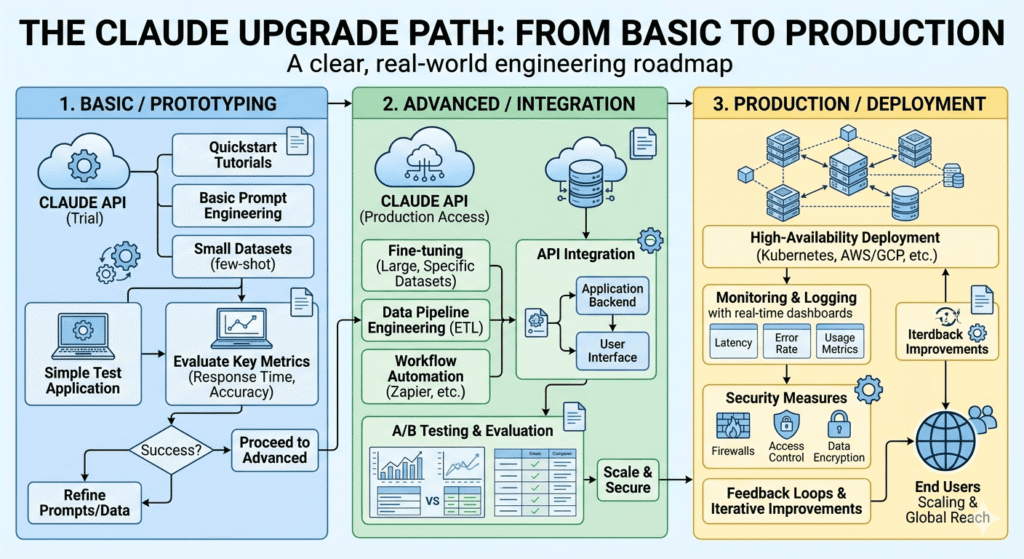
The Claude Upgrade Path: From Basic to Production
Most operators go through three phases of Claude usage. Understanding where you are determines what to build next.
Phase 1: Reactive Use (Where Most Businesses Are)
Characteristics: Ad-hoc prompting, no system prompt, no Projects, no template library. Claude is used when someone thinks of it, not as a structural part of the workflow.
Result: 40–60% first-draft usability, high variability, no compounding returns.
Next step: Build your first CBOE. Start with a 200-word system prompt for your highest-volume task type. Measure the difference after 20 outputs.
Phase 2: Configured Use (The First Significant Unlock)
Characteristics: CBOE system prompt in place, Claude Projects organized per client or function, basic template library for 3–5 task types.
Result: 70–80% first-draft usability, consistent voice, 30–40% reduction in editing time.
Next step: Build the Voice Calibration Protocol. Add negative examples to the system prompt. Create the Voice Archive Project.
Phase 3: Integrated Use (The AI Workflow OS Layer)
Characteristics: Claude connected to Make automations, structured outputs enabled, context injection running, quality scorecard tracking.
Result: 85–90% first-draft usability, automated routing of routine outputs, human effort focused entirely on review and exception handling.
Next step: Identify the top 3 Claude-generated output types that currently route manually and build Make scenarios for each. Measure Context Tax reduction quarterly.
The Configuration Gap Is the Competitive Gap
Here is the conclusion the market has not yet fully priced: by the end of 2026, access to a capable large language model is a commodity. Every business has it. The price is $20/month and falling.
What is not a commodity is the operational infrastructure built around it.
A competitor who types requests into a blank Claude window and a competitor who operates a configured CBOE with a maintained voice library, structured output pipelines, and a Project-based Memory Layer are using the same base model. But they are not in the same operational position. The configured operator produces higher-quality outputs faster, with less human overhead, and with outputs that improve every month as the context architecture gets richer.
This is the compounding return the pillar article describes at the OS level, applied specifically to Claude.
The configuration is not technically difficult. It does not require engineering resources. It requires 4–6 hours of deliberate setup work and a commitment to monthly maintenance.
The gap between the 20% capacity operator and the 87% capacity operator is almost entirely a configuration gap and it is entirely closable.
Start with the CBOE. Build the Voice Calibration Protocol. Set up one Project with one client’s full context. Run 20 outputs and measure the scorecard.
The infrastructure compounds. The business that builds it now has a context architecture advantage that grows with every brief filed, every output archived, and every automation added.
Quick Reference: Claude Business Operations Checklist
System Prompt (CBOE):
- Layer A: Business context (company, ICP, positioning, current priorities)
- Layer B: Role definition (specific, behavioral, not generic)
- Layer C: Behavioral constraints (negative instructions, phrase blacklist)
- Layer D: Output specification (format, length, structure rules)
Claude Projects:
- One Project per active client (top 5 to start)
- Function-specific Projects for cross-client task types
- Voice Archive Project for storing approved outputs
- Knowledge files updated within last 30 days
Voice Calibration:
- 5–8 voice specimens uploaded per Project
- Voice rules extracted and documented
- At least one negative example in system prompt
- Calibration test run (10 outputs, scored 1–5 on three dimensions)
Template Library:
- Templates built for your 5 highest-volume task types
- Templates stored in CBOE system prompt or Project knowledge file
- Templates tested and quality-scored
Automation (Phase 3):
- CBOE system prompt stored in Make Data Store
- Structured output format specified in system prompt
- At least one Claude API call running in Make scenario
- Human review gate configured for client-facing outputs
Quality Measurement:
- Monthly scorecard run (20-output sample)
- Tracking: first-draft acceptance rate, edit time, voice fidelity
- Quarterly review of Project knowledge files for staleness
This article is part of the AI for Business Operations cluster at StackNova Hub. For the foundational AI Workflow OS framework including the full four-layer architecture and 90-day implementation plan see the pillar article: AI Workflow OS: How to Run a Business with AI in 2026.
Related articles in this cluster: