
Quick Verdict
How to Run a Business with AI in 2026 is no longer about choosing better tools, it is about building an operating system that replaces manual coordination.
Most AI productivity guides will tell you to pick better tools.
This one will tell you something different and it’s the difference between businesses that save 3 hours a week and businesses that unlock an entirely new operational ceiling.
The core insight: Your business doesn’t have an AI tools problem. It has an operating system problem. Every founder, operator, and team leader is currently serving as the human operating system of their business holding context in their head, manually routing information between people and tools, making decisions that interrupt execution, and becoming the single point of failure when capacity maxes out.
AI doesn’t solve this by replacing tasks. It solves this by replacing you as the OS.
This guide introduces the AI Workflow OS a four-layer architecture that replaces the founder-as-OS with a system that remembers, decides, routes, and produces. Not a tool list. A blueprint. With real data, real sources, and real implementation steps.
The angle most AI guides miss: the real productivity crisis in most businesses isn’t output speed, it’s context loss. And context loss is measurable, preventable, and eliminable with the right system design.
The Problem Nobody Names: The Context Tax
There is a cost inside every business that never appears on a P&L statement. We call it the Context Tax, the cumulative drag of re-finding, re-explaining, and re-creating information that your organization already generated but cannot reliably surface.
This isn’t a new problem, but the research that quantifies it is striking. McKinsey Global Institute found that the average knowledge worker spends 1.8 hours every day 9.3 hours per week searching and gathering information. That’s one full employee out of every five, not contributing any productive output. The IDC puts the number even higher: approximately 2.5 hours per day, or 30% of the entire workday, lost to information retrieval.
Asana’s Anatomy of Work Index which surveyed over 9,600 knowledge workers across six countries found that 58% of the average workday is consumed by “work about work”: coordination, status updates, chasing information, attending unnecessary meetings, and switching between applications. Only a quarter of the workday is spent on the skilled work employees were actually hired to do.
The time problem verified research
| Avg. time searching for information daily | 1.8 hrs | McKinsey Global Institute |
| % of workday on “work about work | 58% | Asana Anatomy of Work |
| Minutes to refocus after a single interruption | 23 min 15 sec | Dr. Gloria Mark, UC Irvine |
| Knowledge workers who say better processes would improve efficiency | 83% | Asana Anatomy of Work |
The Gloria Mark research at UC Irvine adds an important dimension. Each interruption a Slack message, a re-explanation meeting, a “quick question” doesn’t just cost its own duration. It costs 23 minutes and 15 seconds of refocus time afterward, with an average of two intervening tasks before the original work resumes. For a 5-person team, a single “catch me up on the client context” meeting is never just 30 minutes. It’s closer to two hours of net productivity loss across the group.
Here’s what the Context Tax looks like inside a real workday:
- A team member spends 20 minutes digging through a Slack thread for a client decision made six weeks ago
- A founder re-explains the same business context to a new contractor for the fourth time this quarter
- A proposal gets written from scratch because nobody can locate the version that won the last comparable deal
- Monday morning begins with 40 minutes of status reconciliation before any actual execution starts
- A junior team member produces output at a fraction of a senior’s quality not because they’re less capable, but because the senior has three years of client context in their head that never got written down
These are not execution problems. They are context infrastructure problems and they are solvable.
What AI Actually Fixes Here
AI tools are excellent at eliminating re-creation and re-explanation when given the right inputs. The Harvard Business School / Boston Consulting Group field experiment involving 758 BCG consultants across 18 complex knowledge-work tasks found that consultants using AI completed 12.2% more tasks, finished 25.1% faster, and produced outputs rated 40% higher in quality. Critically, low performers improved by 43% the AI functioned as a context equalizer, giving everyone access to the same quality of starting point.
What that study measured was AI augmenting individual work. The AI Workflow OS takes that one level further: it builds the context infrastructure so AI has the right inputs automatically, every time, for every team member.
What an AI Workflow OS Actually Is
A productivity tool stack is additive three tools save more time than one tool. An AI Workflow OS is multiplicative: each layer makes every other layer more effective. Remove any single layer, and the system underperforms significantly.
The OS analogy is deliberate but specific. Consider what an operating system does for a computer:
| OS Function | Founder-as-OS (current state) | AI Workflow OS (target state) |
|---|---|---|
| Memory | Context lives in founder’s head; lost when they’re unavailable | Structured knowledge base, queryable by anyone, feeds every AI call |
| Process management | Founder decides daily what gets attention and in what order | Automated routing handles standard decisions; founder reviews exceptions |
| I/O routing | Founder manually moves information between tools and people | Automation layer routes outputs to correct destinations without human handoff |
| Abstraction | Founder re-explains business context to every new tool, contractor, AI session | Context library feeds into every AI interaction automatically |
The founder-as-OS is a single point of failure. When capacity maxes out a client crisis, a team illness, a family emergency the business stalls because all the context is in one person’s head. The AI Workflow OS externalizes that context and makes it durable, queryable, and automatable.
The critical insight most AI guides miss: The quality gap between a 28% first-draft usability rate and an 87% first-draft usability rate isn’t caused by choosing a better model. It’s caused by the quality and completeness of the context input. This is why the Memory Layer (Layer 2) and the Nervous System (Layer 3) which most businesses never build generate more ROI per dollar than the AI tool subscriptions themselves.
The Four OS Layers
┌──────────────────────────────────────────────────────────────┐
│  LAYER 4: THE OUTPUT FACTORY                                 │
│  Transforms AI reasoning into client-ready deliverables      │
│  without manual production steps                             │
├──────────────────────────────────────────────────────────────┤
│  LAYER 3: THE NERVOUS SYSTEM                                 │
│  Routes information, triggers actions, eliminates every      │
│  manual handoff between the other three layers               │
├──────────────────────────────────────────────────────────────┤
│  LAYER 2: THE MEMORY LAYER                                   │
│  Stores business context, decisions, and knowledge in        │
│  structured form, the persistent brain of the OS            │
├──────────────────────────────────────────────────────────────┤
│  LAYER 1: THE DECISION ENGINE                                │
│  AI reasoning that processes inputs and generates            │
│  decisions, content, analysis, and responses                 │
└──────────────────────────────────────────────────────────────┘
Most businesses are running Layer 1 only, they use ChatGPT or Claude as a standalone tool with no persistent memory and no automation routing its outputs. This is equivalent to running a powerful CPU with no RAM and no storage. The capability is real; the architecture is what’s missing.
Layer 1 The Decision Engine
Layer 1 is your AI reasoning core: the model that receives inputs and generates outputs. The mistake is treating it as the entire system.
The real decision isn’t “Claude vs. ChatGPT.” It’s: what is the primary bottleneck in your workflow?
| Primary Bottleneck | Best Layer 1 Choice | Rationale |
|---|---|---|
| Writing quality, tone consistency, long-form content | Claude Pro | Consistently lower editing overhead on first-draft prose; superior tone maintenance across document length |
| Data interpretation, spreadsheet analysis, pattern detection | ChatGPT Plus | Advanced Data Analysis (Code Interpreter) runs actual Python output is auditable and repeatable, not pattern-matched text |
| Embedded retrieval across Google Workspace | Gemini Advanced | Query Gmail, Docs, and Drive directly from the chat interface, eliminates a full category of context-loading friction. (Gemini Advanced vs. Claude Pro: full comparison) |
Layer 1 selection matters far less than most guides suggest. The BCG/Harvard study found that 90% of participants improved performance on creative tasks when using AI, the tool selection was less decisive than whether they used it at all, and more importantly, how well they prompted it. A well-built Memory Layer (Layer 2) feeding complete context into any model outperforms a premium model receiving a one-line brief. If you’re weighing Claude against ChatGPT specifically for written deliverables, Claude vs ChatGPT for Business Writing runs a use-case-by-use-case breakdown.
Layer 2 The Memory Layer
This is the highest-ROI layer per hour of setup time. Without it, every AI session starts from zero. With it, your AI engine has access to everything that is true about your business, automatically.
The Memory Layer has three distinct components:
Component A: The Knowledge Base
Tool: Notion (teams) or Obsidian (solo operators wanting local control)
This is where your business context lives brand documentation, strategic decisions, client relationship history, SOPs, project learnings. A critical finding from Ramp, the fintech company now running over 300 active Notion custom agents daily: their Head of Operations reported a 70% reduction in productivity-tool costs after consolidating into Notion, with teams operating 3x faster.
Structure determines retrievability. A Notion workspace with 400 poorly structured pages is less useful for AI retrieval than one with 40 well-structured pages. Every document needs a consistent naming convention, every client gets a standardized workspace template, and every major decision gets logged with its context, reasoning, and outcome. If you want to go deeper on database architecture specifically for AI retrieval, Building a Business Knowledge Base in Notion covers the full structural system this OS layer is built on.
How to Build the Notion Structure Step by Step
- Create a top-level “Business OS” page. Under it, create four main databases:
Clients,SOPs,Context Library, andDecision Log. These are Notion full-page databases (not inline), so they’re each queryable independently by the Nervous System later. - Build the Clients database schema. Each client entry gets these properties:
Name(title),Status(Active/Archived),Industry(select),Tier(select: Retainer/Project),Brand Voice Doc(relation to another page),Last Updated(last edited time auto-fills),Context Score(number: rate how complete the context is, 1–5, fill this manually). The Context Score becomes a filter Layer 3 automations only pull clients where Context Score ≥ 4. - Create a standard client template. Every client page gets five sub-sections: (a) Brand Voice vocabulary, tone spectrum, sentence structure preferences, words/phrases to always use, words to never use; (b) Strategic Context target audience, key differentiators, current priorities; (c) Deliverable History archive of past approved outputs with quality ratings; (d) Decision Log record of significant decisions and their reasoning; (e) Relationship Notes key stakeholders, communication preferences, past friction points.
- Build the Context Library database. Each entry is a reusable prompt block. Key properties:
Block Name(title, e.g. “Task: Proposal Writing”),Task Type(select),Content(text property or linked page this is the actual prompt context text),Version(number),Last Tested(date). Example blocks: “Brand Voice: [Client]”, “Task: LinkedIn Post”, “Task: Monthly Report”, “Output Format: Proposal”. Layer 3 retrieves these blocks by querying the database with the Task Type filter. - Build the SOPs database. Each SOP entry:
Process Name,Trigger(what starts this process),Owner,Steps(page content),AI-Automatable(checkbox). The AI-Automatable filter tells you which processes go into Layer 3 first. - Enable Notion API access. Go to notion.so/my-integrations → Create new integration → Name it “AI Workflow OS” → Copy the Internal Integration Token. Then share each database with this integration (open the database → click ··· → Add connections → select your integration). You’ll need the database IDs (found in the database URL) for Layer 3 configuration.
Component B: The Context Library (Prompt Infrastructure)
This is the most underrated component. Each entry in your Notion Context Library database becomes a reusable prompt block that Layer 3 assembles automatically into a complete AI prompt. An example “Task: Client Proposal” block might read:
You are writing a proposal on behalf of [CLIENT_NAME].

Tone: [Brand Voice block content here]

Proposal structure:
1. Executive summary (2 paragraphs, lead with the client's problem, not our capabilities)
2. Recommended approach (3-5 bullet points, specific and measurable)
3. What success looks like (3 KPIs, tied to client's stated priorities)
4. Investment and timeline
5. Why us (2 paragraphs, reference past results for similar clients)

Past winning language from [CLIENT_NAME] deliverables:
[Deliverable History excerpts here]

Do not use: [words from Brand Voice "never use" list]
When Layer 3 retrieves this block and fills in the variables from the client’s Notion workspace, a junior team member is starting from the same quality of context that a senior account manager has built over years.
Component C: The Operational Database
Tool: Notion Databases or Airtable
This stores structured, queryable operational data CRM records, project status, content calendars, financial metrics. Layer 3 queries this database to make routing decisions: “Is this client on the Retainer tier?” “Is this project in Active or Archived status?” These conditional checks determine which automations fire and which context blocks get pulled.
- Notion Business (includes Notion AI) $15–18/user/month
- Airtable Plus (if separate operational database needed) $10–20/user/month
- Obsidian (solo operators, local control) Free (sync plan: $10/month)
Layer 3 The Nervous System
Without Layer 3, every layer requires manual connection a human physically copying from one tool, pasting into another, and deciding what to do next. Layer 3 eliminates that residual Context Tax.
Layer 3 performs four functions: (1) automatically assembles context from Layer 2 before every AI call; (2) routes AI outputs to their correct destination without human distribution; (3) triggers AI execution when business conditions are met, without human initiation; (4) keeps all layers synchronized without manual updates. If you’re new to automation platforms and want a broader orientation before diving into the step-by-step below, the Business Automation Guide: From Manual to System covers the conceptual framework for Zapier, Make, and n8n from first principles.
Choosing Your Nervous System
| Tool | Best For | Monthly Cost (2026) | Tradeoff |
|---|---|---|---|
| Make.com | Most small businesses; complex multi-step automations; 500–50,000 monthly operations | Core: ~$10.59/mo (10k credits); Pro: ~$29/mo | Credit model changed Nov 2025 monitor usage carefully as complexity grows |
| Zapier | First-time automation builders; simpler workflows; team members who won’t build complex logic | Starter: $19.99/mo (750 tasks) | Per-task pricing becomes prohibitive above 3,000 tasks; less powerful conditional logic |
| n8n | Technical founders; high-volume automation; self-hosting acceptable | Cloud: from $20/mo; Self-hosted: infrastructure cost only | Steeper setup curve; rewards teams with developer resources |
Recommendation for most SMBs: Start with Make.com. The visual scenario builder handles multi-step conditional logic cleanly, the credit model scales better than Zapier per operation, and the native Anthropic Claude module (added in 2024) removes the need to hand-code API calls for basic use cases. For a granular cost breakdown across different operation volumes including the exact point where Zapier becomes more expensive than Make see Zapier vs Make 2026: Full Strategy & Real Cost Breakdown.
Building the Core Automation, Step by Step in Make.com
Below is the complete build for Automation #1: Context Injection + AI Draft + Output Routing. This single automation covers the most valuable function in the entire OS: a new content brief triggers automatic context assembly, a Claude API call with full context, and output routing to the correct destination without any human involvement.
Prerequisites
- Make.com account (Core plan minimum)
- Notion account with API integration set up (see Layer 2, Step 6 above)
- Anthropic API key from console.anthropic.com
- Gmail account (or substitute your email provider)
- Create a new Scenario in Make.com. Click “Create a new scenario.” Name it “Context Injection Content Brief.” You’ll see the visual canvas. Every circle you add is a module.
- Add Module 1: Custom Webhook trigger. Click the first circle → search “Webhooks” → select “Custom Webhook.” Click “Add” to create a new webhook URL. Copy the URL, this is the address you’ll send brief submissions to (via a Typeform, a Notion button, or a form on your site). Click “OK.”
- Add Module 2: Notion Search Objects (pull client context). Add a second module → search “Notion” → select “Search Objects.” Connect your Notion account using your Integration Token. Set Object Type to “Database Item.” Set Database ID to your Clients database ID (from the Notion URL). Add a Filter: Property =
Name, Condition =Contains, Value ={{1.client_name}}(mapping the client_name field from your webhook payload). This returns the matching client’s Notion page data. - Add Module 3: Notion Get a Page (retrieve brand voice content). Add another Notion module → “Get a Page.” Set Page ID to
{{2.results[].properties.Brand Voice Doc.relation[].id}}this retrieves the full content of the brand voice page linked from the client record. - Add Module 4: Notion Search Objects (pull task context block). Add another Notion module → “Search Objects.” Set Database to your Context Library database. Filter: Property =
Task Type, Condition =Equals, Value ={{1.task_type}}(mapping the task_type field from your webhook, e.g. “LinkedIn Post” or “Proposal”). This retrieves the matching prompt template for this task type. - Add Module 5: Text Aggregator build the full prompt. Add “Text Aggregator” from the Tools section. In the text field, assemble your complete prompt by combining: the task context block content from Module 4, the brand voice content from Module 3, the brief details from Module 1, and any additional instructions. This single aggregated text becomes your complete Claude prompt with full context, no manual assembly required.
- Add Module 6: Anthropic Claude Create a Message. Add a module → search “Anthropic Claude” → select “Create a Message.” Connect your Anthropic API key. Set: Model =
claude-sonnet-4-5(or your preferred model); Max tokens =2000; Messages role =user; Messages content ={{5.text}}(the aggregated prompt from Module 5).
If you prefer to use the HTTP module for more control over API parameters (e.g., custom system prompts, temperature settings), configure it as follows:
HTTP Module Make a Request
URL: https://api.anthropic.com/v1/messages
Method: POST
Headers:
  x-api-key: [your Anthropic API key]
  anthropic-version: 2023-06-01
  content-type: application/json
Body type: Raw (JSON)
Content:
{
  "model": "claude-sonnet-4-5",
  "max_tokens": 2000,
  "system": "You are a professional content writer. Use only the context provided. Do not invent client details.",
  "messages": [
    {
      "role": "user",
      "content": "{{5.text}}"
    }
  ]
}
- Parse the Claude response. The API returns a JSON object. The text output is at:
{{6.content[].text}}(if using the native module) or{{6.data.content[0].text}}(if using the HTTP module). Map this to subsequent modules. - Add Module 7: Gmail Create a Draft. Add Gmail module → “Create a Draft.” Set: To = the account manager’s email; Subject =
DRAFT — {{1.task_type}} for {{1.client_name}} — Review before send; Body = the Claude output from step 8. The account manager receives a ready-to-review draft in their Gmail, pre-addressed and labeled as a draft requiring review. - Add Module 8: Notion Create a Database Item (log the output). Add a Notion module → “Create a Database Item.” Set the database to your Clients database or a dedicated Output Archive database. Map: Client name, Task type, Date, AI output text, Status = “Awaiting Review.” This automatically archives every AI-generated output with its context, building the Deliverable History that makes future outputs better.
- Save and activate the scenario. Click “Save” → set the schedule (for webhook-triggered scenarios, it runs instantly when triggered) → toggle to Active. Test by sending a POST request to your webhook URL with a JSON payload containing
client_name,task_type, and your brief content. Monitor the execution in the Scenario history tab.
Operation count for this scenario: Approximately 7–8 operations per run (one per module). At Make Core's 10,000 credits/month, you can run this automation roughly 1,200 times before needing a plan upgrade more than sufficient for most SMBs.
Four Additional High-Value Automations to Build Next
Once Automation #1 is running, these are the next highest-ROI builds, in priority order:
| Automation | Trigger | What It Does | Est. Time Saved |
|---|---|---|---|
| Weekly Status Digest | Schedule: every Friday at 4pm | Queries all Active projects in Notion → assembles status for each → generates client update email drafts in Gmail for account manager review | 3–4 hrs/week |
| New Lead Enrichment | New row added to Airtable CRM | Pulls lead company name → HTTP call to Clearbit or Hunter.io for company data → Claude generates personalized first-contact email → surfaces as Gmail draft | 15–20 min/lead |
| Project Delivery Sequence | Project status changes to “Delivered” in Notion | Claude generates a client satisfaction check-in email + internal retrospective template → creates both as Notion pages + Gmail draft → tags project as Archived | 45 min/project |
| Onboarding Workspace Builder | New client added to Clients database | Duplicates the standard client template into a new Notion workspace → creates placeholder sections → sends account manager a “context-filling checklist” Slack message | 1–2 hrs/client |
Make.com Core (10,000 credits/month)~$10.59/mo
Make.com Pro (150,000 credits/month, for agencies)~$29/mo
Anthropic API usage (claude-sonnet: ~$3/million input tokens)~$5–15/mo at SMB volume
Layer 4 The Output Factory
Layer 4 is where the OS meets your audience. Most businesses already have the tools. The upgrade is how they receive inputs from the other layers and how production gets standardized so any team member can execute at brand-quality.
The Three Layer 4 Roles and Their Implementation Blueprints
Role A: Visual Production Canva Pro
Tool: Canva Pro ($15/mo individual, $12/user/mo team)
The value isn’t AI image generation (which remains mediocre for professional use at this tier). It’s the Brand Kit + Magic Resize combination, which allows any team member to produce on-brand assets without a designer, and the Canva API, which Layer 3 can call to pre-populate templates with AI-generated text.
Implementation Blueprint Canva Brand Kit Setup:
- Create one Brand Kit per client (Canva Pro supports multiple Brand Kits). Upload client logo variations (full color, white, black). Set primary, secondary, and accent colors from brand guidelines. Upload brand fonts (Canva supports custom font upload). Name it exactly as the client appears in your Notion database e.g., “Acme Corp” so team members can find it instantly.
- Create template sets per deliverable type. For each common output (LinkedIn graphic, email header, slide deck, proposal cover), create a locked template in the brand kit. Lock all brand elements (logo position, color fields). Leave only the content fields editable (headline text, image placeholder, date). Name templates with a consistent convention:
[Client] — [Type] — [Dimensions]. - Connect Make.com to Canva via the Canva Connect API (requires Canva for Teams plan and API access request at canva.com/canva-for-developers). Once connected, a Make.com HTTP module can populate a pre-built design template with text content generated by Layer 1. The account manager opens the pre-filled Canva design, reviews it, and publishes, total production time under 3 minutes per asset.
Role B: Document and Presentation Production Gamma
Tool: Gamma ($10/mo Plus)
Gamma is purpose-built for AI-assisted first-draft decks and proposals. The quality ceiling is lower than a professional designer; the speed floor is dramatically higher than manual slide production. For businesses producing 5–15 proposals or decks per month, the ROI is significant.
Implementation Blueprint Gamma Workflow Integration:
- Create an “Import Text” workflow in Gamma. Gamma supports pasting structured text content that it automatically formats into slides or a document. Layer 1 (Claude) generates the full structured outline and content. Layer 3 routes that content into a shared Google Doc or Notion page. The account manager opens Gamma → “Import” → pastes the content → Gamma builds the initial deck in under 60 seconds.
- Create a Gamma workspace template per client. Gamma lets you set brand colors and fonts at the workspace level. Create one workspace per recurring client. New decks inherit the client brand automatically no per-deck brand configuration required.
- Define a standard AI prompt for each deck type. Store these in your Notion Context Library (Layer 2). A “Proposal Deck” prompt instructs Claude to output content in a specific structure: slide title, two-sentence body, speaker note, one bullet visual suggestion. This structure maps directly to Gamma’s import format, eliminating any reformatting step.
Role C: Video and Audio Production Descript
Tool: Descript ($24/mo Creator)
If your business model includes video content, client video presentations, or educational content, Descript changes the unit economics of video production. The ability to edit video by editing a transcript and to correct audio errors with AI voice matching reduces a 20-minute edited video from a 3–4 hour project to under 60 minutes. For businesses producing more than 4 videos per month, the payback period on the subscription is under two weeks.
Implementation Blueprint Descript OS Integration:
- Record → Import → AI Transcribe. Record raw video (Zoom, Loom, or any source). Import to Descript. Descript auto-transcribes within minutes. Edit the transcript like a text document cut filler words, restructure sentences, fix errors. The video edits automatically.
- Layer 1 integration: Generate the script first. For planned videos, have Claude generate a full script from your brief (using the Context Library for tone/brand). Import the script into Descript’s Storyboard view. Record directly from the script, Descript shows it as a teleprompter and auto-aligns the transcript to your recording. Editing a script-first video takes under 20 minutes.
- Create a project template per client. Set up brand color overlays, lower-thirds text style, and intro/outro templates once per client. Duplicate the template for each new video. Consistent brand without per-video configuration.
Canva Pro (individual) / Teams ($12/user/mo)$15/mo
Gamma Plus$10/mo
Descript Creator$24/mo
Layer 4 Total (single operator, all three tools)$49/mo
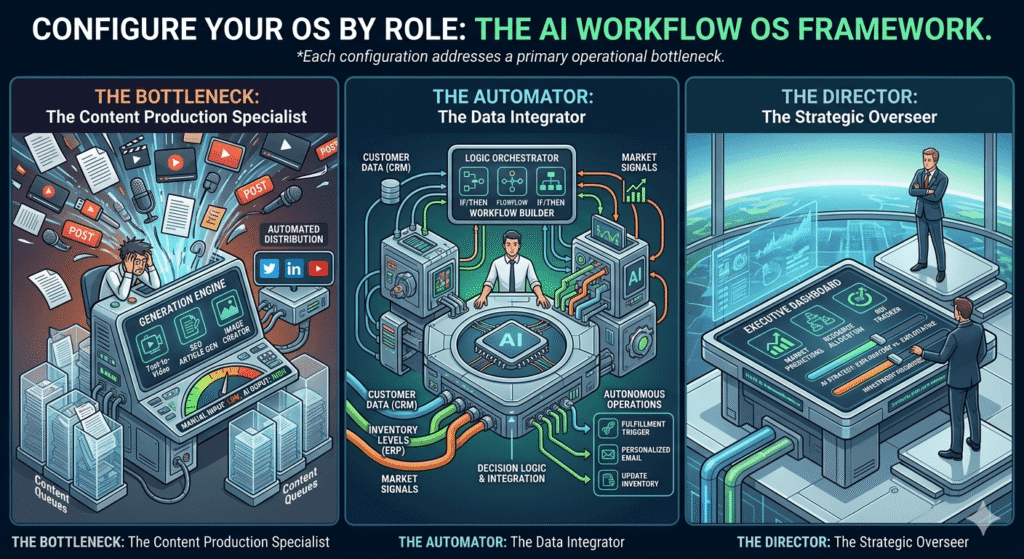
Configurations by Business Profile
Configuration A: The Solo Operator OS
Profile: Founder managing 3–8 client relationships. Primary bottleneck: cognitive load and context portability. (If you’re evaluating which tools to prioritize before committing to this full stack, Best AI Tools for Solopreneurs 2026 maps options by revenue phase.)
Solo Operator Stack Monthly Total: ~$61
| Layer | Tool | Cost/mo | Primary Function |
|---|---|---|---|
| Decision Engine | Claude Pro | $20 | Drafting, analysis, client communication |
| Memory Layer | Notion + Notion AI | $16 | Client knowledge base, SOP library, context library |
| Nervous System | Make Core | $10.59 | Context injection, output routing, trigger automation |
| Output Factory | Canva Pro | $15 | Proposals, presentations, social assets |
Build first: The Notion client workspace structure (Layer 2) before connecting anything else. For a solo operator, the Memory Layer is the highest-priority build because the Context Tax is acute, you are personally the single point of failure for all business context. Getting it out of your head and into a queryable system is the most valuable single action in this stack.
Configuration B: The Agency OS
Profile: 4–12 person team, multiple clients, distinct brand voices. Primary bottleneck: consistency across team members, and onboarding time to client context.
The agency-specific problem: different team members produce different quality outputs for the same client because each person has internalized brand context to different degrees. Senior account managers produce great work; juniors produce work that requires heavy revision. The AI Workflow OS solves this architecturally when every AI call draws from the same context library, output quality is bounded by the library, not by the individual team member’s experience.
Agency Stack Monthly Total: ~$250–$290 (4-person team)
| Layer | Tool | Cost/mo | Primary Function |
|---|---|---|---|
| Decision Engine | Claude Pro (per user) or Anthropic API (via Make) | $20/user or usage-based | All client-facing content generation |
| Memory Layer | Notion Business + Airtable | $18/user + $10/user | Per-client workspaces, content calendar, CRM |
| Nervous System | Make Pro | $29 | Full automation layer, API orchestration |
| Output Factory | Canva Pro Teams + Gamma | $12/user + $10 | Social assets, decks, proposals |
Configuration C: The Operations-Heavy SME OS
Profile: Business with significant operational volume order management, vendor coordination, scheduling, inventory, compliance. Primary bottleneck: operational throughput and data interpretation, not content creation.
SME Operations Stack Monthly Total: ~$100
| Layer | Tool | Cost/mo | Primary Function |
|---|---|---|---|
| Decision Engine | ChatGPT Plus | $20 | Data interpretation, anomaly detection, operational summaries, Code Interpreter runs actual Python on your data |
| Memory Layer | Notion (SOPs) + Airtable (operations) | $16 + $20 | SOPs, vendor database, operational history |
| Nervous System | Make Pro | $29 | Data pipeline automation, alert routing, threshold triggers |
| Output Factory | Google Docs AI / minimal Canva | $15 | Reports, operational communications |
90-Day Rollout Plan
Sequence matters more than speed. The most common failure mode is building all four layers simultaneously, each one shallowly, then discovering that shallow layers produce mediocre results. The correct approach: sequential depth. Before starting Month 1, it’s worth running a quick readiness check The AI Operations Audit gives you a structured diagnostic for identifying which layer is your most acute bottleneck.
Month 1: Memory Layer Foundation
Start with Layer 2, not Layer 1. Most people start with a Layer 1 tool because it produces immediate visible output. But unanchored Layer 1 usage produces mediocre results that reinforce the misconception that “AI isn’t that useful.” Starting with Layer 2 forces you to document your business context before automating anything documentation that has value entirely independent of AI.
Month 1 deliverables:
- Notion workspace built per Layer 2 architecture above (Clients, SOPs, Context Library, Decision Log databases)
- Top 5 clients have completed Notion workspaces (all five sub-sections filled)
- Context Library has 5 prompt blocks covering your highest-volume task types
- Layer 1 tool selected and tested manually using context loaded from Notion
Month 1 success criterion: You can produce a client deliverable using Layer 1 with context loaded from your Notion workspace in under 15 minutes, and the output quality matches your best manual work.
Month 2: Decision Engine + First Nervous System Automation
Month 2 deliverables:
- Make.com (or n8n) account configured
- Automation #1 (Context Injection + AI Draft + Output Routing) live and tested
- One additional automation (from the priority list above) live and tested
- Each automation documented in tool-agnostic language (trigger → logic → action) so it can be rebuilt in any platform if pricing changes
Month 2 success criterion: Your highest-volume repetitive task runs from trigger to review-ready output without any manual information movement.
Month 3: Output Factory + System Expansion
Month 3 deliverables:
- Canva Brand Kits configured per client (or per brand, if internal)
- Gamma or Descript integrated per Layer 4 blueprints above
- Three additional Nervous System automations live
- First Context Tax measurement completed: calculate (hours spent re-finding + re-explaining + re-creating) ÷ (total productive hours) × 100. Document this as your baseline.
Month 3 success criterion: A complete workflow from incoming brief to client-ready deliverable runs with less than 20 minutes of human involvement. Measure your Context Tax rate and compare to baseline.
Conclusion: The OS Is the Moat
AI tools are becoming commodities. Access to a capable large language model is becoming as universal as access to Google Docs a baseline expectation, not a competitive advantage. McKinsey estimates generative AI could add $2.6 trillion to $4.4 trillion annually to the global economy but that value accrues to the organizations that build the infrastructure to deploy it systematically, not to those who use it casually.
The businesses that will build durable competitive positions with AI are not the ones with access to better tools. They are the ones that have built better operational infrastructure an AI Workflow OS that accumulates context over time, reduces decision latency, and runs core functions without requiring the founder to serve as the human operating system.
The Gloria Mark research gives us a concrete frame for the cost of inaction. For a five-person team experiencing 10 context-switching interruptions per day, the 23-minute refocus cost per interruption represents roughly 1.9 hours of lost productive time every day. Asana’s data tells us 58% of the workday is already consumed by work-about-work. The AI Workflow OS doesn’t solve all of this, but it systematically eliminates the largest, most automatable components of it.
The OS is not a one-time setup. It is a compound-return asset every client brief added to the Memory Layer improves every future call for that client, every automation added to the Nervous System creates a permanent reduction in operational overhead, and every output archived in the Deliverable History improves the quality bar for every future output of that type.
Start with the Context Tax audit. Map your five highest-volume information flows. Quantify the time. Then run the 90-day rollout in sequence: Memory Layer first, Nervous System second, Output Factory third.
The moat isn’t the tools. It’s the context architecture that makes those tools twice as good as anyone else who subscribes to the same model. For a broader view of how this OS fits into a complete business productivity system, The Complete AI Productivity Stack for Business Operators maps the full picture across team sizes and use cases.
Key sources cited in this article
McKinsey Global Institute: The Social Economy (2012) Information search time data
Asana: Anatomy of Work Global Index (2023) Work-about-work data, 9,615 workers
Gloria Mark, UC Irvine: The Cost of Interrupted Work 23-minute refocus time
BCG / Harvard / MIT: Navigating the Jagged Technological Frontier (2023) 758-consultant AI productivity study
McKinsey: The Economic Potential of Generative AI (2023) $2.6T–$4.4T annual impact estimate
Notion: Ramp Customer Case Study (2025) 300+ agents, 70% cost reduction, 3x speed
Make.com: Pricing Page (verified May 2026) Current plan pricing
Tool pricing, API specifications, and feature sets change frequently. All pricing cited reflects published rates as of May 2026. Verify current specifications directly with each vendor before committing to a plan. All research studies are linked to original or primary sources; the author has not conducted independent studies cited data is from third-party researchers.