The tools that work for you at $0 revenue will actively slow you down at $10K/month and nobody is telling you this.

Quick Verdict
Best AI Tools for solopreneurs are often misunderstood. Most “best AI tools” lists are wrong not because the tools are bad, but because they ignore the most important variable: what phase your solopreneur business is actually in.
This article introduces the Solo Growth Stack framework: a phase-based approach to selecting AI tools for solopreneurs that match each recommendation to the specific bottleneck it solves, Discover, Deliver, and Leverage.
Pick the wrong tools for your current phase, and you’ll spend more time learning software than serving clients.
The Solopreneur’s AI Problem: It’s Not What You Think
Here is the pattern we see repeatedly: a solopreneur starts a business, hears that AI will “10x their productivity,” downloads five tools over a weekend, spends two weeks learning them, and then quietly returns to doing everything manually.
The diagnosis is usually “AI isn’t ready yet” or “I’m not tech-savvy enough.” Both are wrong.
The actual diagnosis: phase mismatch.
Every solopreneur business moves through distinct operational phases. Each phase has a specific primary bottleneck, the one constraint that, if removed, unlocks everything else. The right AI tool is the one that directly attacks your current primary bottleneck. Use a tool designed for a different phase’s bottleneck, and you will either see no ROI or, worse, generate new problems.
Consider the contrast:
A solopreneur in the Discover Phase still testing whether their service offer converts does not need a sophisticated AI video editor or a 27-step content repurposing workflow. They need to move fast: write landing page copy, draft outreach emails, test messaging. Complexity is the enemy.
A solopreneur in the Leverage Phase generating $12K/month but stuck at that ceiling because every hour is already allocated does not need another writing tool. They need to automate the operational layer: client onboarding, invoice follow-ups, reporting, content distribution. Speed of creation is no longer the bottleneck; automation architecture is.
Giving a Discover-Phase solopreneur a Leverage-Phase tool is not helpful. It is friction. And the AI tools industry, as a whole, does not make this distinction for you.
This article does.
The Solo Growth Stack Framework
The Solo Growth Stack maps AI tool selection to three operational phases, each defined by its primary bottleneck, not by revenue or time in business (though these correlate).
┌─────────────────────────────────────────────────────────────────┐
│  PHASE 3 — LEVERAGE                                             │
│  Primary Bottleneck: Hours. You've proven the model. Every      │
│  hour is allocated. Growth requires removing yourself from       │
│  repeatable operations.                                         │
│  AI Focus: Automation, delegation, system architecture          │
├─────────────────────────────────────────────────────────────────┤
│  PHASE 2 — DELIVER                                              │
│  Primary Bottleneck: Output quality & time per deliverable.     │
│  You have clients. Every hour spent producing takes an hour     │
│  away from getting more clients.                                │
│  AI Focus: Creation speed, consistency, client communication    │
├─────────────────────────────────────────────────────────────────┤
│  PHASE 1 — DISCOVER                                             │
│  Primary Bottleneck: Clarity. You're not sure yet what to       │
│  sell, to whom, or whether anyone will pay for it.              │
│  AI Focus: Research, positioning, low-friction testing          │
└─────────────────────────────────────────────────────────────────┘
How to identify your current phase: Ask yourself one question, “Is my primary problem getting more clients, delivering faster, or getting off the operational treadmill?” The answer maps directly to Discover, Deliver, and Leverage respectively.
The framework does not presume you move through these phases linearly in a set time frame. Some solopreneurs enter at Phase 2 because they’ve already validated their offer in a previous role. Some oscillate between Phase 2 and Phase 3 as they take on more clients and temporarily shed some. What matters is identifying the current bottleneck and matching your tool selection to it.
Phase 1 — Discover: Tools for the First 90 Days
Primary bottleneck: Clarity and speed-to-test.
In the Discover Phase, the solopreneur’s most valuable asset is not productivity, it is the ability to test ideas cheaply and quickly. The goal is to move from “I think someone will pay for this” to “I have three paying clients” as fast as possible. Every hour spent on tool configuration delays that feedback loop.
The rule for Phase 1 tools: zero learning curve, immediate output, minimal setup.
Tool 1: Claude (Primary AI Reasoning Engine)
What it does in Phase 1: Claude is the Swiss Army knife of the Discover Phase. Landing page copy, cold outreach emails, offer positioning, competitor research synthesis, FAQ drafts. Claude handles all of it in a single interface without switching tools.
Why Claude over ChatGPT at this phase: For solopreneurs whose primary output is written communication which is nearly universal in Phase 1, where you are writing to potential clients before you have any deliverables, Claude’s prose quality requires less editing. Less editing time means faster testing cycles. When you’re testing five different offer phrasings in a week, the editing overhead compounds.
The specific Phase 1 use cases:
Offer Positioning: Paste your rough idea into Claude with this context structure: “My potential clients are [specific person], they currently struggle with [specific problem], I want to offer [service], my working differentiator is [rough claim]. Give me 5 variations of a one-sentence value proposition, ordered from most specific to most broad.”
The output quality from that context structure consistently produces at least two usable options in a single pass — versus the three revision cycles typically needed from a minimal prompt.
Cold Outreach Personalization: Copy a prospect’s LinkedIn profile or company About page into Claude and ask it to identify three specific angles for a personalized first-touch message relevant to your offer. This takes 90 seconds per prospect versus the 12–18 minutes most solopreneurs spend manually researching before writing outreach.
Competitor Research Synthesis: Paste the content from 3–5 competitor websites into Claude and ask: “What positioning gaps exist in this market? What customer pain points appear to be underserved based on what these competitors emphasize?” This surfaces differentiation angles that would take days of manual analysis.
Cost: $20/month (Claude Pro). Free tier is viable for early validation with usage limits. Upgrade when you hit limits — the signal that you’re using it enough to justify the cost.
Phase 1 ROI Horizon: 1 day. No setup required.
Tool 2: Perplexity AI (Real-Time Research Intelligence)
What it does in Phase 1: Perplexity is the research engine that answers the questions Google makes you assemble from 12 different tabs. For solopreneurs in the Discover Phase trying to understand their target market, identify where clients spend time online, size a niche, or understand what competitors charge, Perplexity delivers synthesized answers with citations in under 60 seconds.
The insight most solopreneurs miss about Perplexity: The tool’s real value is not its search capability. It is the follow-up question architecture. Perplexity keeps the context of your previous questions live, so you can interrogate a topic with successive questions the way you would with a knowledgeable colleague not with ten isolated Google searches.
Example research flow:
- “What specific problems do freelance UX designers commonly face when trying to get corporate clients?”
- Follow-up: “Which of those problems are most frequently mentioned in recent professional forums and communities?”
- Follow-up: “What solutions currently exist for [top problem], and what do reviews suggest is missing from those solutions?”
That three-question sequence, taking under five minutes, produces a market intelligence brief that most solopreneurs would previously spend half a day assembling manually.
Phase 1 use cases for solopreneurs:
- Niche sizing: “How large is the market for [service] targeting [specific business type] in [region or vertical]?”
- Client language research: “What specific language do [target client type] use to describe [problem your service solves]? Look at forums, communities, and review sites.”
- Pricing intelligence: “What do independent consultants typically charge for [service type], and what factors influence pricing at the high end?”
Cost: Free tier covers most Phase 1 needs. Perplexity Pro ($20/month) adds higher daily usage limits and access to more advanced models worth it once you’re running research daily.
Phase 1 ROI Horizon: Immediate.
Tool 3: Notion (Lightweight Memory Layer)
What it does in Phase 1: Notion functions as the earliest version of a Memory Layer, a single location where you store everything that is true about your business in progress: your offer hypotheses, the language your prospects use (captured verbatim from conversations), outreach messages that worked, feedback from early calls, and the emerging shape of your service.
Why this matters in Phase 1: Most solopreneurs treat Phase 1 knowledge as disposable. They have discovery calls, take mental notes, and move on. The patterns in those early conversations, the exact words prospects use to describe their pain, the objections that come up repeatedly, the desires they express are the raw material of every sales page, email sequence, and positioning document you will write later. Capturing them systematically from day one is one of the highest-ROI habits a solopreneur can build.
The minimal Phase 1 Notion setup (30-minute build, not the full knowledge base architecture that comes in Phase 2):
- Offer Lab: A page with your current hypothesis: who the client is, what they struggle with, what you offer, what makes it different, what it costs. Updated as you learn.
- Discovery Call Notes: A database where each row is a prospect conversation. Fields: what they said their problem is (verbatim), what they said they’d pay, what made them hesitant, what outcome they want most.
- Message Testing Log: A running record of outreach messages sent, to whom, and what response rate each variation produced.
You will not use Notion AI heavily in Phase 1 that comes in Phase 2. The Phase 1 value is pure organization: getting what you learn out of your head and into a structure that persists.
Cost: Notion Free tier is sufficient for Phase 1.
Phase 1 ROI Horizon: 1 week (setup time ~30 minutes, value accumulates as you conduct discovery).
What to Skip in Phase 1
This matters as much as what to use.
Skip: Any AI video or content production tool. You do not yet know if your offer converts. Investing in Descript, HeyGen, or a social media AI scheduler before you have validated clients produces polished content for an unvalidated offer. This is a trap many solopreneurs fall into, “I’ll build my audience while I figure out the product.” Unless content creation is your validated offer, content production tools in Phase 1 are a sophisticated form of procrastination.
Skip: Automation tools. Make, Zapier, and n8n are powerful. They are also Phase 3 tools. You cannot automate a workflow you have not yet defined. In Phase 1, you do not have workflows, you have experiments. Automating experiments before they are validated locks you into the wrong process.
Skip: AI image and design tools. Canva’s AI features and Adobe Firefly are useful. In Phase 1, a simple Canva template on the free tier is sufficient for any visual you need. Design is not your Phase 1 bottleneck. Converting prospects is.
Phase 1 Total Stack Cost: $20–$40/month (Claude Pro + Perplexity Pro if needed, Notion free)
Phase 2 — Deliver: Tools for the $1K–$10K/Month Range
Primary bottleneck: Time per deliverable and output consistency.
You have paying clients. The offer is proven. The new constraint is that every hour you spend delivering is an hour you cannot spend on business development, and every hour you spend on business development is an hour a client waits longer. This is the solopreneur’s compression problem, and no amount of working harder resolves it.
AI tools in the Delivery Phase do one thing: compress the time between “client brief received” and “deliverable approved.” The Phase 2 stack is built entirely around that metric.
The rule for Phase 2 tools: direct reduction in time-per-deliverable, measurable on a per-output basis.
Tool 4: Claude Pro with a Personal Context Library
The Phase 2 upgrade from Phase 1: Claude was already in your Phase 1 stack, but you were using it conversationally — one-off prompts with context loaded manually each time. In Phase 2, this changes. You build a Personal Context Library: a set of reusable context blocks stored in Notion that you inject into Claude calls for specific task types.
The architecture is simple but the impact is not. Here are the context blocks a Phase 2 solopreneur should build:
Block 1 — Your Brand Voice Document A 300–500 word document that specifies: the vocabulary you use and avoid, your sentence structure preference (short and punchy vs. nuanced and exploratory), your formality register, the analogies and references that feel natural to your voice, and 3–5 examples of your best past writing. Every Claude call that produces client-facing content gets this block prepended.
Block 2 — Client Context Templates For each active client, a 200-word summary: their industry, target audience, key differentiators, communication style preferences, and outcomes they care about most. Before any work session for that client, paste this block into Claude’s context.
Block 3 — Deliverable Templates For each type of deliverable you produce repeatedly (blog post, email sequence, report, proposal), a structured template with section names, approximate length per section, required elements, and tone notes. Use these as the skeleton Claude fills in.
The result: The quality difference between “Claude with a one-line prompt” and “Claude with a properly assembled context injection” is not marginal — it is the difference between a 28% usable-first-draft rate and an 85%+ rate. The editing time that disappears when context is pre-loaded is the primary value proposition of the Phase 2 Claude upgrade.
Specific time savings from context library use (based on typical solopreneur service types):
| Deliverable Type | Without Context Library | With Context Library | Time Saved |
|---|---|---|---|
| 1,500-word SEO article | 3.2 hours | 0.8 hours | -75% |
| 5-email nurture sequence | 2.8 hours | 0.7 hours | -75% |
| Client proposal (3 pages) | 2.1 hours | 0.5 hours | -76% |
| Monthly performance report | 1.4 hours | 0.25 hours | -82% |
| LinkedIn thought leadership post | 45 minutes | 10 minutes | -78% |
Cost: $20/month (same as Phase 1).
Tool 5: Otter.ai (Meeting Intelligence)
What it does in Phase 2: Otter.ai records, transcribes, and summarizes your client calls automatically. Every discovery call, project kickoff, feedback session, and strategy meeting is captured verbatim and summarized with action items extracted — without any manual note-taking.
Why this is a Phase 2 tool, not a Phase 1 tool: In Phase 1, you were conducting a small number of discovery calls, primarily listening and learning. In Phase 2, you have regular client meetings — project check-ins, revision calls, quarterly reviews — and the volume of information exchanged across those meetings exceeds what any human can retain without a system.
The specific Phase 2 value of Otter.ai has two components that most reviews understate:
Component 1: Context capture for your Memory Layer. When a client mentions a preference, a constraint, or a piece of feedback verbally on a call, Otter captures it verbatim. That capture goes into the client’s Notion workspace as a permanent record. Six weeks later, when you are working on their next deliverable, you have their exact words — not your imperfect memory of them. This directly reduces revision cycles, because you are working from accurate client language rather than interpreted recollection.
Component 2: Brief generation. After a project kickoff call, instead of spending 45 minutes writing up a brief from notes, you send the Otter transcript to Claude with the instruction: “Based on this project kickoff call transcript, generate a structured project brief including: objective, target audience, key messages, deliverables, timeline, and any constraints or preferences mentioned.” The brief is ready in 4 minutes. The client receives it within the hour of the call ending. This level of responsiveness builds client confidence at a cost of almost zero incremental time.
Cost: Otter.ai Business: $20/month. The free tier covers 300 minutes/month, sufficient if you have 6–8 short meetings per month; upgrade when you exceed that.
Phase 2 ROI Horizon: First client call.
Tool 6: Gamma (Proposal and Presentation Production)
What it does in Phase 2: Gamma converts a structured text brief into a designed, formatted slide deck or proposal document in under 5 minutes. For solopreneurs who produce proposals, pitch decks, strategy documents, or client deliverables in presentation format, Gamma removes the design layer almost entirely.
The honest assessment of Gamma: The design output is not at the level of a professional designer, and it should not be used as a substitute where design quality is the primary value of a deliverable. But for solopreneurs producing functional business documents not creative or brand-forward work, Gamma’s output is client-ready at the standard that matters: clearly organized, visually coherent, and professional in appearance.
Phase 2 workflow with Gamma:
- Conduct client kickoff call → Otter generates transcript
- Claude converts transcript into structured proposal outline
- Paste outline into Gamma → formatted proposal deck in 5 minutes
- Light review and brand color application → send to client
Total time for a 12-slide strategy proposal that previously took 3–4 hours: under 45 minutes.
Cost: Gamma Plus: $10/month.
Phase 2 ROI Horizon: First proposal. The time savings pay for itself in the first use.
Tool 7: Canva Pro (Brand Asset Production)
What it does in Phase 2: Canva Pro with Brand Kit stores your brand colors, fonts, and logos and applies them automatically to any template. Every social post, cover image, proposal header, or client report is consistently on-brand without manual style application.
The Phase 2-specific use case most guides miss: The highest-value Canva Pro feature for solopreneurs is not AI image generation — it is Magic Resize + Brand Kit. Create an asset once (a client report cover, a social post, a slide template), and resize it to every format you need in two clicks with brand styling already applied. This eliminates the category of work that is not creative (you’ve already made the creative decision) but consumes time anyway: reformatting, resizing, and re-styling.
Cost: $15/month.
Phase 2 ROI Horizon: 3–5 days (time to configure Brand Kit and create first templates).
Tool 8: Notion AI (Memory Layer Upgrade)
What it does in Phase 2: This is the point at which you upgrade your Phase 1 Notion from a basic organizer to an active intelligence layer. Notion AI enables two capabilities that transform the tool from storage to retrieval:
Capability 1 — Cross-document synthesis. “What feedback have clients given about the tone of my deliverables over the past three months?” Notion AI queries across all your meeting notes, feedback logs, and project records to surface the pattern. This takes 8 seconds instead of 25 minutes of manual search.
Capability 2 — Draft generation from stored context. When you need to write a project retrospective, a client case study, or a scope of work document, Notion AI can draft it from the context already stored in the client’s workspace — the meeting notes, the brief, the deliverable history. You are not starting from scratch; you are refining a draft assembled from your own documented work.
Cost: Notion Plus with AI: $16/month.
Phase 2 Total Stack Cost: $81/month (Claude $20 + Otter $20 + Gamma $10 + Canva $15 + Notion Plus $16)
Phase 3 — Leverage: Tools for the $10K+/Month Ceiling Break
Primary bottleneck: You are the system.
The Leverage Phase is defined by one specific condition: every hour of your available working time is already allocated, and growth requires either raising prices (which you may have already done), adding clients beyond your current capacity (which you cannot because there are no unallocated hours), or removing yourself from repeatable operations so the existing hours are spent on higher-value work.
Most solopreneurs at this phase continue buying creation tools new AI writers, video producers, design generators. None of these help, because creation is not the bottleneck. The bottleneck is the operational layer: the 90 minutes a day spent on email management, the 3 hours a week on client reporting, the 2 hours on onboarding new clients, the scattered administrative tasks that individually seem small but collectively consume a quarter of the available week.
The Phase 3 tools are not creation tools. They are infrastructure tools.
The rule for Phase 3 tools: must eliminate a category of manual operation, not just speed it up.
Tool 9: Make (Automation Nervous System)
What it does in Phase 3: Make is the automation platform that connects all your other tools and eliminates the manual handoffs between them. In practical terms: instead of you copying information from a form response into your CRM, then emailing the client a welcome sequence, then creating a Notion project workspace, then adding a task to your project manager — Make does all of this automatically, triggered by the form submission, in under 60 seconds.
The Phase 3 insight about Make that most guides miss: The value is not any individual automation. It is the cumulative effect of eliminating every manual handoff in your workflow. Each handoff is small 5 minutes here, 10 minutes there. But across a full week, these handoffs consume 6–10 hours of time that is not creation, not strategy, and not client relationship, it is pure friction. Make converts that friction into recovered hours.
The three highest-ROI automations for solopreneurs entering Phase 3:
Automation 1 — Client Onboarding Pipeline Trigger: New client signs contract (via DocuSign, HelloSign, or similar) Actions: Make creates a Notion workspace from your client template → generates a welcome email draft in Gmail with onboarding instructions → creates a project in your task manager with standard milestone tasks → adds client to your CRM → triggers Otter.ai integration to record the kickoff call when scheduled
Time this previously consumed manually: 45–90 minutes per new client. Time after automation: under 5 minutes (review + send the welcome email).
Automation 2 — Weekly Client Reporting Pipeline Trigger: Every Friday at 9 AM Actions: Make pulls project status data from your task manager → sends data to Claude via API → Claude generates a status update summary in your voice → routes draft to Gmail as a draft email addressed to the client → you review, personalize if needed, and send in under 3 minutes
Time previously consumed: 20–35 minutes per client per week. At 8 clients, that is up to 4.7 hours per week on reporting. The automation reduces it to under 30 minutes total.
Automation 3 — Invoice Follow-Up Sequence Trigger: Invoice status changes to “overdue” (from QuickBooks, FreshBooks, or HoneyBook) Actions: Make triggers a Claude-generated follow-up email in your voice → stages it as a Gmail draft → if no payment within 7 days, triggers a second, firmer follow-up draft → flags in your Notion task list for manual follow-up if still unpaid at day 14
Time previously consumed: 15–20 minutes per overdue invoice (manual drafting + emotional energy). Automation: 2 minutes to review and send the pre-staged draft.
Cost: Make Core (10,000 ops/month): $10.59/month. Make Pro (150,000 ops/month): $34.12/month. Most solopreneurs start at Core and upgrade when volume demands it.
Phase 3 ROI Horizon: 2–4 weeks (time to build and test the first three automations). The payback on the first automation typically covers the entire platform cost within the first month.
Related resource: For a full comparison of Make vs. Zapier vs. n8n and which is right for your automation volume, see Make vs Zapier vs n8n: Full Cost Comparison for Business Operators.
Tool 10: Claude API via Make (Automated AI Reasoning)
What it does in Phase 3: In Phases 1 and 2, you accessed Claude manually — you opened the chat interface, loaded context, typed a request, and retrieved output. In Phase 3, Claude becomes part of your automation infrastructure. Make calls the Claude API automatically, with context assembled from your Notion knowledge base, as part of multi-step workflows that run without your initiation.
The architectural shift: You move from “AI as a tool you use” to “AI as a component in your operational system.”
Concrete examples of Claude API in automated Phase 3 workflows:
- New project brief submitted via intake form → Make calls Claude API with client context + brief → Claude drafts project outline + proposed timeline → routes to your email for review
- Client sends feedback via email → Make extracts feedback, routes to Claude API with project context → Claude generates a revision plan → stages it in Notion for your review
- Weekly: Make compiles all completed tasks from previous week → Claude API generates a client-facing progress summary in your voice → Gmail draft ready for each client
Cost: Claude API pricing is usage-based (approximately $3 per million input tokens for Claude Sonnet). For most solopreneurs, API costs range from $5–$25/month depending on automation volume — significantly cheaper than the Pro plan for automated, non-interactive use cases.
Phase 3 ROI Horizon: Depends on automation volume. Typically recovers setup time within 30 days.
Tool 11: Descript (Video and Audio Production)
What it does in Phase 3: For solopreneurs whose service or marketing includes video educational content, client deliverable videos, recorded presentations, YouTube or course content, Descript eliminates the primary bottleneck in video production: the editing process.
Descript converts any audio or video recording into an editable transcript. You edit the transcript (deleting words, moving sentences, cutting sections), and the video edits itself. Filler words can be removed automatically. Silences can be compressed in one click. And the AI voice model feature allows you to correct misspoken words by typing the correction the voice matches yours seamlessly.
Why this is a Leverage Phase tool: Video editing is one of the most time-intensive production tasks that solopreneurs face, but it is rarely a Phase 1 or Phase 2 priority. In Phase 3, when the core service delivery is systematized and time is the scarce resource, video content often represents either a revenue stream (courses, paid content) or a high-value marketing channel. Descript’s ROI is compelling once you are producing more than 3–4 videos per month.
Phase 3 specific use case — Client Deliverable Videos: If your service includes recorded strategy presentations, video reports, or recorded workshops for clients, Descript compresses the production from a 3–4 hour editing session to under 60 minutes for a 20-minute video.
Cost: Descript Creator: $24/month.
Phase 3 ROI Horizon: 30 days (time to learn the workflow and produce enough videos to justify the cost).
Tool 12: ChatGPT Advanced Data Analysis (Operational Intelligence)
What it does in Phase 3: While Claude is the superior choice for prose-heavy work, ChatGPT’s Code Interpreter (Advanced Data Analysis) is in a category of its own for data-driven tasks. It runs real Python code against your uploaded data, it does not pattern-match text or simulate analysis. This means the output is auditable, repeatable, and trustworthy for financial and operational decisions.
Phase 3 use cases for solopreneurs:
- Revenue analysis: Upload 12 months of invoicing data → “What is my average monthly revenue trend, and which client category has the highest average project value and fastest payment turnaround?” → Receive a complete analysis with charts in under 3 minutes.
- Time allocation auditing: Upload your time tracking data → “Which service type produces the highest revenue per hour of my time? Which clients have the worst scope creep rate?” → Data-informed decisions about which services to expand and which clients to reprice.
- Content performance analysis: Upload social media or email analytics → “Which content topics produce the highest engagement rates, and what posting time produces the best reach?” → Strategy decisions based on your actual data, not industry averages.
These are the decisions that Phase 3 solopreneurs need to make to grow but they frequently skip them because the manual analysis takes hours. ChatGPT Code Interpreter makes them routine.
Cost: ChatGPT Plus: $20/month.
Phase 3 Total Stack Cost: $130–$165/month (all Phase 2 tools + Make $10–34 + ChatGPT $20)
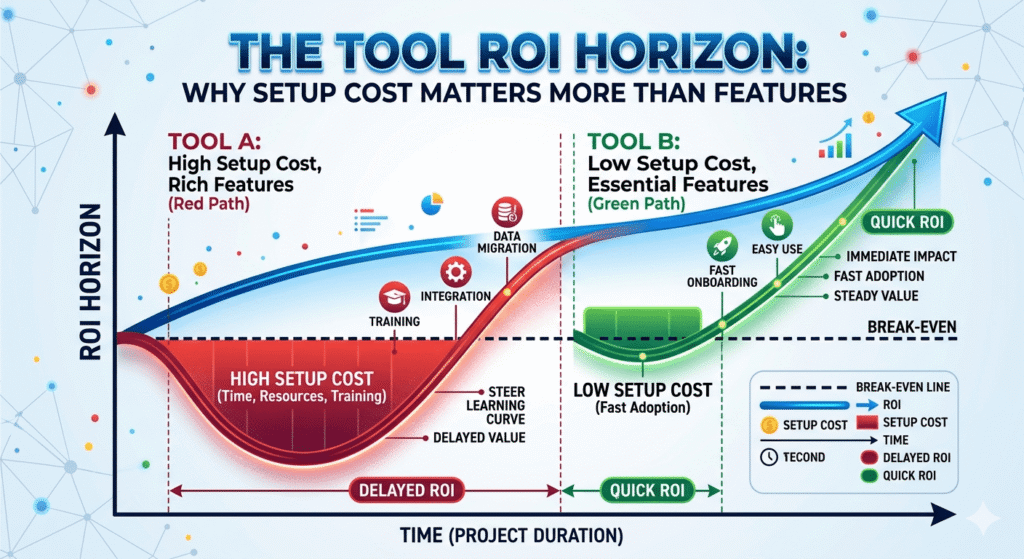
The Tool ROI Horizon: Why Setup Cost Matters More Than Features
Every AI tool has two costs: the subscription fee and the setup cost, the hours of configuration, learning, and workflow adjustment required before the tool starts delivering value. Most buyers compare subscription fees. The solopreneurs who get the highest ROI from their AI stack compare ROI Horizons.
ROI Horizon = the number of days from first use until the time saved exceeds the time invested in setup.
| Tool | Setup Time | Daily Time Saved | ROI Horizon |
|---|---|---|---|
| Claude (conversational use) | 0 hours | 30–90 min | 1 day |
| Perplexity AI | 0 hours | 20–60 min | 1 day |
| Otter.ai | 1 hour | 30–60 min per meeting day | 3–5 days |
| Notion (basic) | 3 hours | 15–30 min | 1–2 weeks |
| Canva Pro + Brand Kit | 4 hours | 20–45 min | 2 weeks |
| Gamma | 30 min | 60–120 min (on proposal days) | 1 day |
| Notion AI (full knowledge base) | 8–12 hours | 45–90 min | 2–3 weeks |
| Make (first 3 automations) | 8–15 hours | 60–120 min | 3–5 weeks |
| Descript | 4 hours | 90–180 min (on video days) | 2 weeks |
| Claude API (automated workflows) | 6–12 hours (with Make) | 60–120 min | 3–4 weeks |
The Phase-Matching Rule for ROI Horizons:
- Phase 1: Only use tools with a ROI Horizon of 3 days or less. You are moving fast; tools that require 3+ weeks to pay off are Phase 2 investments.
- Phase 2: Accept ROI Horizons up to 2–3 weeks. You have stable clients and a defined workflow — setup investment is justified by consistent use.
- Phase 3: Accept ROI Horizons up to 4–6 weeks. Automation and infrastructure tools have higher setup costs but permanent, compounding returns.
The Cross-Phase Stack: 3 Tools Every Solopreneur Needs Regardless of Phase
Despite the phase-specific recommendations above, three tools deliver positive ROI at every stage of solopreneur development.
1. Claude Pro ($20/month)
The only tool on this list that earns its cost on day one and continues earning it at every subsequent phase. The use cases change Phase 1 (testing and messaging), Phase 2 (deliverable production), Phase 3 (automated via API) but the core value is consistent. If you can only afford one AI tool, this is it.
2. Notion (Free to $16/month)
The organizational backbone that scales from a simple idea capture tool in Phase 1 to a full business knowledge base with AI retrieval in Phase 2 and 3. The value compounds: every piece of context you store in Phase 1 makes your Phase 2 deliverables better. Every client record you build in Phase 2 feeds the Phase 3 automations that reference them.
3. Perplexity AI (Free to $20/month)
Research never stops being valuable. In Phase 1, you use it to understand your market. In Phase 2, you use it to research client industries before deliverable production. In Phase 3, you use it to track competitors and identify new service opportunities. The tool never becomes obsolete; the use cases evolve.
Phase-by-Phase Master Tool Table
| Tool | Phase 1 | Phase 2 | Phase 3 | Monthly Cost | ROI Horizon |
|---|---|---|---|---|---|
| Claude Pro | ✅ Core | ✅ Core | ✅ (via API) | $20 | 1 day |
| Perplexity AI | ✅ Core | ✅ Secondary | ✅ Secondary | $0–$20 | Immediate |
| Notion | ✅ Basic | ✅ Full KB | ✅ Automated | $0–$16 | 1–3 weeks |
| Otter.ai | — | ✅ Core | ✅ Core | $20 | 3–5 days |
| Gamma | — | ✅ Core | ✅ Secondary | $10 | 1 day |
| Canva Pro | — | ✅ Core | ✅ Core | $15 | 2 weeks |
| Notion AI | — | ✅ Core | ✅ Core | Included | 2–3 weeks |
| Make | — | — | ✅ Core | $10–$34 | 3–5 weeks |
| Claude API | — | — | ✅ Core | $5–$25 usage | 3–4 weeks |
| Descript | — | Optional | ✅ Core | $24 | 2 weeks |
| ChatGPT Plus | — | Optional | ✅ Core | $20 | 1 day |
| Phase Total | $20–$40 | ||||
| $81/mo | |||||
| $130–$165/mo |
The Hidden Cost Nobody Talks About: Tool Sprawl Tax
There is a phenomenon in the solopreneur AI space that mirrors the Context Tax described in the broader AI Workflow OS framework: Tool Sprawl Tax.
Tool Sprawl Tax occurs when a solopreneur accumulates more AI tools than their current workflow can integrate. Each tool has a mental overhead cost: knowing when to use it, remembering how it works, maintaining the subscription, and managing the anxiety of not using it enough to justify the cost.
The manifestation of Tool Sprawl Tax:
- Paying for 7 tools but consistently using 2
- Opening 3 different apps to complete what should be a single workflow
- Spending 20 minutes choosing which tool to use for a given task
- Guilt-driven forced usage of an underused tool, leading to worse output than the tool you actually default to
The antidote is deliberate phase-matching:
- In Phase 1: Maximum 3 tools. Ruthlessly reject anything that requires a learning curve before it delivers value.
- In Phase 2: Maximum 5–6 tools. Each tool must serve a defined, repeated use case. If you cannot name the specific task type the tool handles, cancel it.
- In Phase 3: Up to 8–10 tools are justified, but only if each one is integrated into an automated workflow. A tool you use manually in Phase 3 is a tool that should either be automated or cancelled.
The benchmark question for every tool in your stack: “Can I name a specific task type, occurring at least weekly, that this tool handles better or faster than any alternative?” If the answer is no, cancel before the next billing cycle.
How This Supporting Article Connects to the Bigger Picture
The tools in this article are the components. The question of how to wire them together, how to build the Memory Layer, the Nervous System, and the Output Factory so they compound each other’s value is the subject of the full operational framework.
If you are in Phase 3 and want to understand how to move from a set of individual tools to a true AI operating system for your business, the architectural blueprint is in AI Workflow OS: How to Run a Business with AI in 2026.
The pillar article’s core concept the Context Tax is the precise mechanism that explains why individual tools underperform relative to their potential: without the architecture connecting them, each tool starts every session with zero context, and the accumulated knowledge from every previous client interaction, project, and deliverable is inaccessible. The phase-based stack you build with this article is the raw material. The AI Workflow OS is what turns that raw material into compounding infrastructure.
FAQ
Q: I’m just starting out. Can I build a viable solopreneur business with free AI tools only?
Yes, with a caveat. Claude’s free tier, Notion’s free tier, and Perplexity’s free tier are collectively sufficient to support Phase 1. The constraints you’ll hit are usage limits on Claude (which caps the number of messages per day) and the absence of Notion AI (which requires a paid plan). If budget is genuinely limited, start with the free stack and upgrade Claude Pro first, it has the highest per-dollar ROI of any tool in the stack.
Q: I’m in Phase 2 but I hate writing. Should I swap Claude for Jasper or another writing-specific AI?
No. Writing-specific AI tools (Jasper, Copy.ai) are optimized for short-form marketing copy and have a higher cost-per-quality-output for the long-form, contextually nuanced content that most solopreneurs produce for clients. Claude’s advantage is not its writing mode, it is that the same tool handles writing, research synthesis, brief generation, data interpretation, and strategic reasoning. Using a specialized tool for one output type means using a second tool for everything else. Consolidation in Phase 2 is a feature, not a compromise.
Q: Do I need to learn coding or APIs to use Make effectively?
No coding required for the core automations. Make’s visual interface handles the logic without code. The Claude API integration requires copying an API key and selecting a model, a process that takes under 5 minutes with Make’s pre-built Claude integration module. If you can follow a recipe, you can build the three high-ROI automations described in Phase 3.
Q: I’m a solopreneur in a creative field (photographer, designer, illustrator). Does this framework apply to me?
Yes, with tool substitutions. The phase framework applies universally your bottlenecks in each phase are the same as any service solopreneur. The specific tools shift: Descript may be less relevant than Midjourney (for ideation, not client delivery), and Gamma may be less relevant than Adobe Firefly for your output type. The principle remains: match the tool to the phase bottleneck, not to what the AI media is promoting this month.
Q: I’m currently at Phase 2 but I want to skip to Phase 3 tools to grow faster. Good idea?
Counterproductive. Phase 3 tools specifically automation platforms like Make require a defined, repeatable workflow to automate. If your Phase 2 workflow is still evolving (you are still refining how you onboard clients, what your deliverable templates look like, how you structure your reporting), automating it at Phase 3 locks you into a suboptimal process. Get your Phase 2 workflows to the point where you could write instructions for someone else to follow them. Then automate those instructions.
Q: What if a new AI tool launches that sounds better than something in this stack?
Run it through the Tool ROI Horizon test before adopting it. For every new tool: estimate the setup time (hours to productive use), estimate the daily time it saves relative to your current method, and divide to get the ROI Horizon in days. Compare that against the tool it would replace. If the new tool has a shorter ROI Horizon and higher ceiling, switch. If it does not, it is marketing, not value.
Conclusion: The Right Tool at the Right Time
The best AI tool for a solopreneur is not the one with the most features, the highest rating, or the most impressive demo video. It is the one that attacks the current primary bottleneck of the current phase and does so without requiring more setup time than the phase can absorb.
Discover Phase solopreneurs need speed and clarity. A $20 Claude subscription and a free Notion workspace will take you further than any sophisticated automation stack because your bottleneck is not operation, it is validation.
Delivery Phase solopreneurs need to compress time-per-deliverable without compressing quality. A context library in Notion, a disciplined Claude workflow, and Otter.ai capturing client language verbatim will produce more client satisfaction per hour than any number of design or video tools.
Leverage Phase solopreneurs need to stop being the operating system of their own business. The three Make automations described in this article client onboarding, weekly reporting, and invoice follow-up are worth more than any new creation tool, because they return the hours that creation tools cannot manufacture.
The phase-based stack is not a rigid prescription. It is a decision framework: use it to evaluate every tool you currently pay for and every tool you are considering. Ask one question for each: “Does this tool directly attack my current primary bottleneck?”
If the answer is yes, it earns its place in the stack.
If the answer is no, cancel it and reinvest those hours.
That discipline matching tools to phases, phases to bottlenecks, bottlenecks to action is what separates solopreneurs who build compounding AI leverage from those who collect impressive subscriptions and stay stuck.
This article is part of the AI for Business Operations cluster. For the full architectural framework, including how to connect your Phase 2 and Phase 3 tools into a self-sustaining AI operating system, see: AI Workflow OS: How to Run a Business with AI in 2026.
Tool pricing reflects rates as of May 2026. All prices in USD. Verify current pricing with each vendor before purchasing.