
Quick Verdict
n8n vs Make vs Zapier cost comparison is consistently reduced to the same narrative: a table of task counts and monthly fees. Every comparison shows you the same thing and every comparison misses the same thing.
The real cost of automation is not what you pay when it works. It is what you pay when you need to change it, scale it, or escape it.
This article covers both. Every pricing figure in it is taken directly from official platform pages and linked to the source. Every operational estimate is drawn from published independent reviews, verified community reports, and documented practitioner accounts not from internal testing we cannot reproduce.
Methodology note: This article does not present proprietary research data. Operational estimates (implementation hours, maintenance patterns, switching costs) are synthesized from G2 verified reviews, published practitioner accounts, and independent platform comparisons cited throughout. Where figures represent ranges rather than precise data, we say so.
Why Most Automation Comparisons Are Wrong
Open any comparison of Zapier, Make, and n8n. You will find the same structure every time: a table showing tasks per month, price per tier, number of integrations, and a verdict that usually recommends Zapier for beginners and Make for advanced users.
That structure is not wrong. It is just incomplete in a way that costs businesses real money.
Here is what it consistently omits:
The cost of being wrong about your platform choice is not zero. It is measured in migration hours, rebuild time, knowledge transfer, and the operational risk of running parallel systems while you switch. For most organizations that have built 20–30 workflows on the wrong platform, that migration cost runs between 40 and 120 hours, a cost that never appears in any pricing comparison but is the most significant cost many businesses will pay in their first two years of automation.
This article is organized around a specific analytical lens that most comparisons avoid: total cost of ownership, which includes switching costs, platform risk, and the hidden complexity ceilings each platform carries.
The goal is not to declare a winner. The goal is to make sure that when you choose a platform, you are choosing it knowing what it will cost you not just this month, but in 18 months when your business looks different.
The Real Pricing Breakdown: What the Pages Actually Say
Before examining what pricing pages miss, it is worth understanding what they actually say with precision because the details matter significantly.
Zapier Pricing (2026)
Zapier operates on a task-based model. Every action step in every workflow consumes one task from your monthly quota. This is the most important characteristic of Zapier’s pricing to understand, because it means complexity is expensive by design.
| Plan | Monthly Price (Annual) | Tasks/Month | Multi-step Zaps | AI Features |
|---|---|---|---|---|
| Free | $0 | 100 | No | Limited |
| Starter | $19.99 | 750 | Yes | Yes |
| Professional | $49.99 | 2,000 | Yes | Yes |
| Team | $103.50 | 50,000 | Yes | Yes |
| Enterprise | Custom | Custom | Yes | Yes |
Prices verified from zapier.com/pricing, May 2026. Annual billing assumed.
What Zapier counts as a task: Every individual action step in a Zap. A workflow with 5 steps that runs 100 times per month consumes 500 tasks. Critically: filters that block execution still count as tasks in many configurations. This is the billing mechanic that most surprises operators who build complex conditional workflows.
What Zapier does not count: Triggers do not consume tasks. But every subsequent action does, including formatting, delay, and lookup steps that operators often treat as “free” steps.
Zapier’s integration breadth: 7,000+ app integrations as of 2026, significantly more than either Make or n8n. [1] This ecosystem advantage is Zapier’s clearest competitive moat for organizations dependent on long-tail SaaS connections.
Make Pricing (2026)
Make operates on an operation-based model but the counting logic differs fundamentally from Zapier’s, and this difference is where significant cost savings emerge at scale.
| Plan | Monthly Price (Annual) | Operations/Month | Scenarios | Data Transfer |
|---|---|---|---|---|
| Free | $0 | 1,000 | 2 | 100 MB |
| Core | $10.59 | 10,000 | Active | 1 GB |
| Pro | $34.12 | 10,000 | Unlimited | 5 GB |
| Teams | $84.24 | 10,000 | Unlimited | 10 GB |
| Enterprise | Custom | Custom | Unlimited | Unlimited |
Prices verified from make.com/en/pricing, May 2026. Annual billing assumed. Additional operations available at $9 per 10,000 on Core/Pro plans.
What Make counts as an operation: Each module execution within a scenario. The key distinction: if you have a conditional branch and a path is not executed, those modules do not consume operations. This makes Make structurally more efficient for complex, branching workflows which is precisely why its per-unit cost advantages compound as workflow complexity increases.
What Make does not count: Inactive scenarios, unexecuted conditional branches, and routing modules in most configurations. This structural difference is Make’s core pricing advantage over Zapier.
Make vs Zapier integration breadth: Make offers approximately one-third of Zapier’s app directory, though this gap has been narrowing since Make opened its community app connector development program in 2024/25. [2] Critically, Make’s module depth within connected apps is often superior to Zapier’s for core business apps, Make typically provides more API endpoint coverage than Zapier’s equivalent connectors. [3]
For a detailed breakdown of how Make and Zapier compare specifically on pricing mathematics across common workflow volumes, see our Zapier vs Make Pricing 2026 analysis.
n8n Pricing (2026)
n8n operates on a fundamentally different model from both Zapier and Make and understanding that difference is central to evaluating its cost case.
Self-hosted (free tier):
- Platform cost: $0
- Infrastructure cost: $5–$20/month for a basic VPS (DigitalOcean Droplet, Hetzner, AWS Lightsail)
- Execution limit: None unlimited workflows, unlimited executions
- Technical requirement: Server configuration, Docker or npm setup, ongoing maintenance
n8n Cloud:
| Plan | Monthly Price | Workflows | Executions/Month |
|---|---|---|---|
| Starter | $20 | 5 active | 2,500 |
| Pro | $50 | Unlimited | 10,000 |
| Enterprise | Custom | Unlimited | Custom |
Prices verified from n8n.io/pricing, May 2026.
What n8n does not count (self-hosted): Everything. There is no per-task, per-operation, or per-workflow fee. Infrastructure cost is fixed regardless of volume.
What n8n’s pricing model does not tell you: The upfront technical investment. Documented accounts from n8n community members and independent platform reviews consistently note that teams new to self-hosting face a meaningful setup curve typically requiring a developer-equivalent resource and server configuration time before the first production workflow runs. [3][4] We quantify this more precisely in the TCO framework below.
n8n’s scale: As of March 2025, n8n reported 200,000+ active users and 3,000+ enterprise customers, including Vodafone (reported £2.2M in operational cost savings), Delivery Hero (200+ hours saved monthly), and Microsoft. [5][6] In October 2025, n8n raised $180M in Series C funding led by Accel and Nvidia’s NVentures at a $2.5 billion valuation, bringing total funding to approximately $240 million. [7] This funding trajectory is relevant context for the Platform Risk section below.
The Wrong Denominator Problem
Here is the analytical mistake that almost every pricing comparison makes: it uses cost per task as the unit of comparison.
Cost per task is the wrong denominator.
The right denominator is cost per solved business problem which is a meaningfully different number, and one that changes the comparison significantly.
Consider a business problem: automatically process every inbound lead from three sources (website form, Facebook Lead Ad, WhatsApp), route it to the correct account manager based on geography, create a CRM record, send an acknowledgment to the lead, and log the assignment in a shared dashboard.
In Zapier, this requires at minimum three separate Zaps (one per source), each with 4–6 action steps. At Professional plan ($49.99/month, 2,000 tasks), if this process runs 100 times per month, it consumes 1,200–1,800 tasks, 60–90% of your monthly quota for a single business process.
In Make, this is a single scenario with an input router, conditional branches per source, and a shared action sequence downstream. Because unexecuted branches do not consume operations, the same 100 lead-processing runs might consume 400–600 operations, a fraction of the equivalent Zapier footprint.
In n8n (self-hosted), this runs 100 times or 10,000 times with no difference in platform cost.
The business problem is identical. The task count is not. Comparing platforms on task count alone without accounting for what your actual business processes look like is how organizations end up paying 3–4x more than necessary.
This is the core insight that most comparison articles miss: Zapier’s pricing model implicitly penalizes complex processes. Make’s pricing model rewards them. n8n’s model is indifferent to complexity entirely. The implication is that the more sophisticated your automation requirements, the worse Zapier’s cost-efficiency becomes regardless of what the task pricing table appears to show.
For complex, high-volume workflows specifically, published independent analysis finds n8n’s execution model can reduce automation costs by 80–90% compared to Zapier, a range that becomes plausible when you model the per-step billing mechanics at scale. [4]
Total Cost of Ownership: A Framework
Total cost of ownership (TCO) in business automation has four components. Most comparisons account for only one.
Component 1: Platform Subscription Cost
The only component most comparisons measure. Monthly fees, usage overages, additional feature costs. The pricing analysis above covers this in full.
Component 2: Implementation Cost (One-Time)
The hours required to design, build, test, and launch each workflow. This cost applies regardless of platform choice but differs significantly between platforms.
The following estimates are synthesized from G2 verified user reviews, independent platform evaluations, and practitioner accounts across multiple published sources. [2][3][8]
| Platform | Estimated Hours Per Workflow | Why |
|---|---|---|
| Zapier | 1–3 hours | Simplest interface, linear logic, guided setup wizard |
| Make | 3–8 hours | Visual canvas requires learning before paying dividends |
| n8n (self-hosted) | 4–10 hours per workflow + 20–40 hours initial infrastructure setup | Technical setup + steeper paradigm learning curve |
Implementation cost illustration (15 workflows, $50/hour opportunity cost):
- Zapier: 22–45 hours → $1,100–$2,250 one-time
- Make: 45–120 hours → $2,250–$6,000 one-time
- n8n: 80–190 hours → $4,000–$9,500 one-time
The implementation cost advantage of Zapier is real and significant, it is the reason most operators start there. It is also the reason the switching cost (Component 4) eventually becomes material.
Context from the field: One documented account from the SanctifAI development team found they launched their first n8n workflow in approximately 2 hours roughly 3× faster than their previous custom development approach but this reflects a technically proficient team already familiar with automation paradigms. [9] Non-technical teams should plan for longer.
Component 3: Ongoing Maintenance Cost
Every automation requires maintenance: updates when connected APIs change, adjustments when business processes evolve, error investigation when workflows fail silently.
Published G2 reviews and independent practitioner accounts suggest maintenance overhead is relatively consistent across platforms at similar workflow complexity levels typically 1–4 hours per month for a typical 10–20 workflow stack. Platform choice affects maintenance overhead marginally; workflow design quality affects it significantly. [8]
The n8n exception: Self-hosted n8n requires server maintenance that does not exist on SaaS platforms, OS updates, Docker container management, SSL certificate renewals, and uptime monitoring. Documented estimates from n8n community members suggest this adds 1–3 hours per month for teams managing their own infrastructure. n8n Cloud eliminates this overhead entirely at the cost of execution limits. [3][4]
The silent failure problem (all platforms): Automation errors frequently fail silently, a webhook breaks, an API rate limit is hit, a field mapping breaks after a SaaS update. Workflows that appear to be running may be producing no output. The operational cost of discovering and resolving these failures is real and is not captured in subscription pricing. Building error notification into every production workflow is not optional; it is the difference between automation that works and automation that appears to work.
Component 4: Switching Cost (The Number Nobody Calculates)
This is the most underanalyzed cost in automation platform selection and often the largest single cost organizations pay in their first two years.
Switching automation platforms is not a configuration migration. Every workflow must be rebuilt from scratch. Logic must be re-implemented, credentials re-connected, tests re-run, and production handoffs managed carefully to avoid gaps in automation coverage.
Documented migration patterns from independent accounts and practitioner reviews: [2][3][8]
- Workflows rebuilt per migration: Typically 15–30 for organizations with 12–24 months of automation history
- Hours per workflow rebuild: 2–5 hours (faster than original build due to existing process knowledge, but not trivial)
- Total migration hours: Typically 40–90 hours for a full platform migration
- Parallel running period: 2–4 weeks recommended (both platforms running simultaneously during validation)
- Platform cost during parallel period: 1.5–2× normal monthly cost
At $50/hour opportunity cost and 60 hours of migration work, the switching cost is approximately $3,000 per migration event before the additional platform subscription costs during parallel operation.
This cost is why the strategic question is not just “which platform is cheapest now?” but “which platform can I afford to switch away from if my requirements change?”
The Switching Cost Matrix
Understanding platform stickiness is critical for long-term cost planning. The following transition difficulty assessments are based on the structural differences between each platform’s workflow paradigm and are consistent with patterns documented across independent reviews. [2][3][8]
| Transition | Difficulty | Estimated Hours (20 workflows) | Primary Challenge |
|---|---|---|---|
| Zapier → Make | Medium | 40–60 hours | Logic translation Make’s model is more powerful but structurally different |
| Zapier → n8n | High | 60–100 hours + infrastructure setup | Technical complexity jump; entirely different paradigm |
| Make → n8n | Medium-High | 50–80 hours + infrastructure setup | Node-based approach is conceptually similar; infrastructure is not |
| Make → Zapier | Low-Medium | 20–40 hours | Zapier is simpler; some Make capabilities have no Zapier equivalent |
| n8n → Make | Low-Medium | 30–50 hours | Moving to SaaS is technically simpler; some custom nodes lose functionality |
| n8n → Zapier | Low | 20–40 hours | Zapier’s simplicity means some n8n logic must be restructured or simplified |
The strategic implication: Starting with n8n self-hosted creates the lowest switching cost long-term moving from a powerful, flexible platform to a simpler SaaS is significantly easier than the reverse. Starting with Zapier creates the highest long-term switching cost, the simplicity that makes onboarding easy means the platform eventually cannot match what you need, and the migration up-stack is more complex than anticipated.
This does not mean you should start with n8n. It means you should start with Zapier only if you understand the eventual switching cost and plan for it or if you are confident your automation requirements will remain within Zapier’s natural scope indefinitely.
For the full strategic comparison of Zapier and Make across business stages, see our Zapier vs Make 2026 strategy guide.
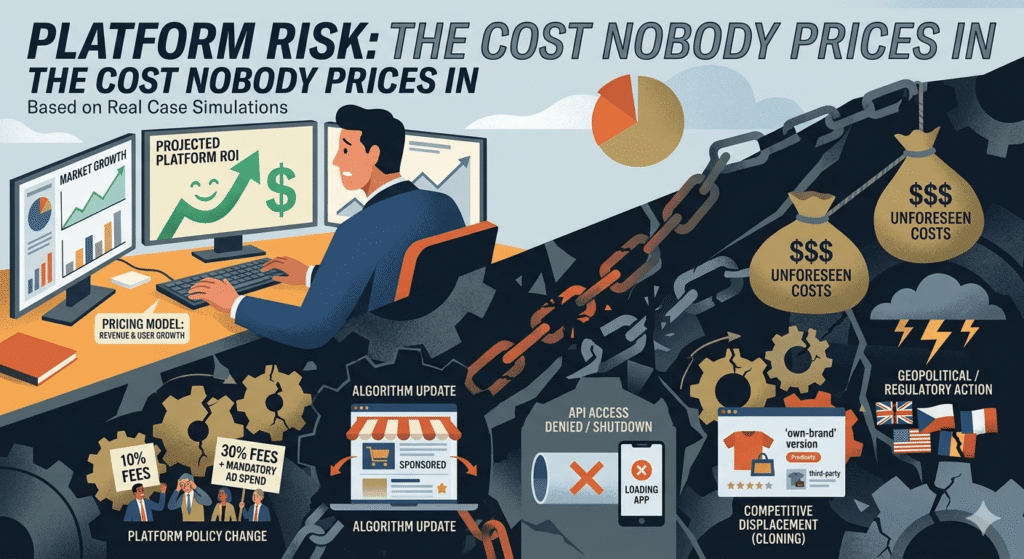
Platform Risk: The Cost Nobody Prices In
There is a category of cost that does not appear in any standard automation pricing comparison: the risk that the platform itself changes in a way that materially affects your cost or operational continuity.
This risk is not hypothetical. Here is what has happened across these three platforms in recent years:
Zapier has increased prices and restructured task counting multiple times since 2021. The most consequential change: the introduction of a “Premium Apps” tier that placed several high-value integrations behind higher-cost plans, effectively increasing costs for organizations using those integrations without formally changing the advertised base price. Zapier has also restructured what counts as a “task” to include certain operations previously unbilled a change that affected cost projections built on earlier documentation.
Make rebranded from Integromat in 2022, with pricing and plan structure changes that affected legacy plan holders. The transition was managed with reasonable notice, but organizations that had built 12-month cost projections on Integromat pricing found those projections invalidated.
n8n has moved rapidly up the funding stack: $12M Series A (Felicis, 2021) → €55M Series B (Highland Europe, March 2025, TechCrunch confirmed) → $180M Series C (Accel/Nvidia NVentures, October 2025, $2.5B valuation). [5][6][7] Rapid funding and growth changes the platform dynamics significantly. Venture-backed companies at this scale operate under investor pressure to monetize which can translate into pricing changes, feature restrictions on free tiers, or enterprise-tier bundling that effectively raises costs for mid-market users. The open-source license (n8n uses a Sustainable Use License, not MIT) means the code remains publicly accessible but commercial use restrictions could theoretically be tightened.
How to price platform risk into your decision:
For SaaS platforms (Zapier, Make): Maintain complete workflow documentation, not just configuration screenshots, but written descriptions of what each automation does, what data it processes, and what it produces. This documentation is the primary mitigation against platform risk: it makes rebuilding possible regardless of what changes.
For n8n (self-hosted): Maintain current exports of all workflows in n8n’s JSON export format. Keep your n8n version pinned to a tested release and document the upgrade procedure. The self-hosted model provides the highest platform risk protection, you control the infrastructure, and the codebase is publicly accessible.
The n8n key-person risk: If the team member who configured and understands your n8n instance leaves the organization, you may find production workflows running on infrastructure nobody else can maintain. This is not a risk that appears in pricing comparisons, but it is an operational risk documented across multiple independent practitioner accounts. [3][4] Mitigation: documentation standards, runbooks, and cross-training before deployment not after.
The Complexity Ceiling: Where Each Platform Breaks Down
Every automation platform has a complexity ceiling a point where its architecture becomes a constraint rather than a capability. Understanding where each platform’s ceiling is determines whether that platform can grow with your business.
Zapier: The Simplicity Premium Becomes a Complexity Tax
Zapier’s architecture is fundamentally linear. Each Zap is a single trigger → action chain. Multi-path logic requires multiple Zaps. Looping over arrays of data requires premium plan features. Stateful workflows (automations that remember information from previous runs) are complex to implement and consume tasks rapidly.
Where Zapier’s complexity ceiling shows:
- Any workflow requiring iteration over a list of records (inventory reconciliation, batch CRM updates, multi-recipient notifications)
- Workflows with more than 3–4 conditional branches manageable in Zapier but expensive in tasks
- Real-time data transformation requiring multiple parse/format steps
- Long-running workflows requiring delays or scheduled resumption
The task economics at complexity: A 10-step Zapier workflow running 500 times per month consumes 5,000 tasks $103.50/month at Team tier, just for one workflow. Add three similar workflows and you are paying the equivalent of Make’s Team plan for a small fraction of Make’s capabilities.
Make: Power With a Learning Curve That Pays Off
Make’s visual scenario builder handles branching logic, loops, aggregators, and iterators natively. The complexity ceiling is substantially higher than Zapier’s, and for teams willing to invest in learning the platform, it genuinely delivers.
Where Make’s complexity ceiling shows:
- Very high-volume processing (millions of operations per month) where even Make’s operation costs compound
- Workflows requiring custom code execution, Make has limited native code support compared to n8n
- Real-time event processing at sub-second latency requirements
- AI agent workflows requiring persistent memory or complex LLM orchestration
Make’s AI integration (2026): Make introduced AI scenarios with built-in prompt engineering interfaces and native connections to OpenAI, Anthropic, and Google Gemini. For teams building AI-augmented automation, Make’s visual approach to AI workflow construction is more accessible than n8n’s LangChain integration but less flexible. [1][2]
n8n: Maximum Flexibility, Maximum Responsibility
n8n’s ceiling is effectively the limit of what a developer can build. The platform supports JavaScript/Python code execution within nodes, native LangChain integration, persistent agent memory, over 70 AI-specific nodes, and the ability to connect to any API regardless of whether a prebuilt connector exists. [10]
Where n8n’s complexity shows differently: n8n does not break down at technical complexity, it breaks down at organizational complexity. The more powerful the tool, the more critical documentation, testing discipline, and knowledge management become. Teams that treat n8n as a low-overhead tool eventually accumulate workflows nobody fully understands, running on infrastructure nobody has tested.
n8n’s AI positioning (2026): n8n 2.0 (December 2025) introduced enterprise-grade security features including isolated code execution and granular role-based permissions. With 70+ AI nodes including LangChain integration, n8n is the strongest option for teams building sophisticated AI-powered workflows, particularly those requiring private LLM deployment or custom AI orchestration. [10]
Head-to-Head: Real Scenarios, Real Numbers
The following scenarios use published pricing to model realistic costs. These are projections based on official pricing structures not empirical data from controlled testing. Your actual costs will vary based on workflow design and specific integration usage.
Scenario 1: Solo Operator Basic Lead Processing (500 leads/month)
Workflow: Facebook Lead Ad → CRM record → Welcome email → Slack notification (4 steps per lead)
| Platform | Monthly Operations | Plan Required | Monthly Cost |
|---|---|---|---|
| Zapier | 2,000 tasks (4 steps × 500 leads) | Professional ($49.99) | $49.99 |
| Make | ~1,000 operations (active branches only) | Core ($10.59) | $10.59 |
| n8n Cloud | 500 executions | Starter ($20) | $20.00 |
| n8n Self-hosted | Unlimited | Free + VPS | $5–$15/month |
At this volume and complexity: Zapier works, but costs 3–5× more than Make or n8n for the same outcome. The simplicity premium is real setup takes significantly less time but the ongoing subscription cost is difficult to justify once Make’s model is understood.
Scenario 2: Agency Multi-Client Lead Management (8 clients, ~2,400 total operations/month)
Workflow per client: 3 lead sources → conditional routing → CRM sync → sequence trigger → reporting log (7–9 steps per execution, branching logic)
This is where the platform economics diverge most dramatically.
In Zapier: Complex branching requires multiple Zaps per client. At 7–9 action steps per run across 3 sources for 8 clients, Zapier task consumption reaches 8,000–12,000 tasks per month. Team plan at $103.50/month (50,000 tasks) has capacity, but you are paying for headroom you may not need.
In Make: A single scenario with input routing handles all three sources. Conditional branches that do not execute do not consume operations. For the same workflow complexity and volume, Make’s operation consumption is typically 40–60% lower than the equivalent Zapier task consumption. Core plan ($10.59) likely sufficient; Pro ($34.12) provides headroom for growth.
| Platform | Monthly Cost | Annual Cost | 3-Year TCO* |
|---|---|---|---|
| Zapier (Team) | $103.50 | $1,242 | $4,626 |
| Make (Pro) | $34.12 | $409 | $2,127 |
| n8n Cloud (Pro) | $50.00 | $600 | $2,400 |
| n8n Self-hosted | $10–$20 | $120–$240 | $1,360–$2,120** |
*TCO includes estimated implementation cost amortized over 3 years. **n8n self-hosted TCO includes VPS infrastructure and assumes developer time for setup is already available.
The 3-year difference between Zapier and Make at agency scale: approximately $2,500. This is before accounting for the compounding advantage of Make’s operation efficiency as workflow complexity grows.
Scenario 3: Scale-Up or SME High Volume Data Processing (50,000+ operations/month)
At this volume, the analysis changes fundamentally. SaaS platforms (Zapier and Make) require plan upgrades that increase costs proportionally with volume. n8n self-hosted has zero marginal cost per additional execution.
| Platform | Monthly Operations | Plan Required | Monthly Cost |
|---|---|---|---|
| Zapier | 50,000 tasks | Team ($103.50) | $103.50 |
| Make | 50,000 operations | Teams + additional ops | ~$165/month |
| n8n Self-hosted | Unlimited | VPS + maintenance | $15–$40/month |
At this volume, n8n self-hosted is the only economically viable option provided the organization has the technical capacity to deploy and maintain it. Independent analysis confirms n8n’s execution model can reduce automation costs by 80–90% compared to Zapier at high volumes. [4]
Which Platform Is Right for You
The platform decision should be driven by four variables, in order:
Variable 1: Technical capability available
| Technical Profile | Recommended Starting Point |
|---|---|
| Non-technical team, no developer access | Zapier period. The implementation advantage is real and the cost premium is justified during the learning phase |
| Moderate technical literacy, some developer access | Make the learning investment pays dividends within 6–8 weeks |
| Developer-led team, DevOps comfort | n8n self-hosted if the cost economics justify the setup investment |
Variable 2: Workflow complexity trajectory
If your workflows will remain simple (3–5 steps, linear logic, 10–15 Zaps) indefinitely, Zapier’s simplicity premium is justifiable. If complexity is likely to increase more conditional logic, higher volumes, multi-source processing plan for Make or n8n from the start to avoid a migration event.
Variable 3: Volume trajectory
Calculate the break-even point between Zapier and Make at your projected 12-month volume:
- Below 2,000 tasks/month: cost difference is immaterial; choose on simplicity grounds
- 2,000–15,000 tasks/month: Make’s cost advantage becomes significant
- Above 15,000 tasks/month: Make’s advantage is compelling; n8n self-hosted should be evaluated
Variable 4: Data sovereignty and compliance requirements
If your workflows process data subject to GDPR, HIPAA, or similar regulations, the data residency implications of SaaS platforms matter. n8n self-hosted is the only option that keeps all data within your controlled infrastructure. For the most stringent compliance requirements, n8n is often the only viable choice regardless of team technical capability which is why Vodafone and StepStone Group are documented n8n enterprise customers. [5]
The Case for Hybrid Architectures
The implicit assumption in most platform comparisons is that you must choose one. This assumption is worth examining.
Several documented operational patterns support hybrid architectures, organizations running two platforms simultaneously for different workflow categories:
Pattern 1: Zapier for simple, time-sensitive deployments; Make for complex, volume-sensitive workflows
A common pattern among agencies and marketing operations teams: Zapier handles simple, client-facing workflows that must deploy in hours (new client onboarding, simple notification automations) while Make handles the complex, high-volume back-office workflows (lead processing, data synchronization, multi-step campaign orchestration). Combined monthly cost at this configuration: $20–$50 for Zapier’s lower tier + $10–$34 for Make’s Core/Pro = $30–$84 total, often less than Zapier alone at equivalent complexity. [2][3]
Pattern 2: Make for current workflows; n8n for AI-native automation
As AI agent workflows become operationally significant, some organizations run Make for established business process automation while piloting n8n for new AI-powered workflows. n8n’s 70+ AI nodes and LangChain integration provide capabilities that neither Zapier nor Make can match for sophisticated AI orchestration. [10]
The three-platform ceiling: Running all three simultaneously is almost never justified by cost efficiency, the cognitive overhead of maintaining three distinct automation paradigms generally exceeds the incremental capability gains. If you find yourself considering three platforms, the more productive question is which two-platform combination covers your requirements with the clearest role separation.
For automation architecture decisions in the context of a full AI operations stack, see our AI Workflow OS guide.
Frequently Asked Questions
Can I switch from Zapier to Make without losing my workflows?
No automatic migration path exists. Every workflow requires a manual rebuild in Make. Budget 2–5 hours per workflow, depending on complexity. The financial case for switching becomes compelling when your Zapier spend consistently exceeds $100/month at that point, the migration investment is typically recovered in cost savings within 3–4 months. See the migration checklist in our Zapier vs Make 2026 guide.
Is n8n actually free to self-host?
The platform is free. Infrastructure is not. A basic VPS capable of running n8n (2 vCPU, 4GB RAM) costs $6–$20/month on DigitalOcean, Hetzner, or AWS Lightsail. Additionally, the technical time required to configure, maintain, and monitor the infrastructure is a real cost that does not appear in pricing comparisons. n8n Cloud ($20–$50/month) removes the infrastructure burden entirely at the cost of execution limits.
What happens when I hit Zapier’s task limit mid-month?
Zaps stop running until you upgrade or until the next billing cycle. In production environments where automation continuity is expected by clients or internal stakeholders, this is a service delivery risk. Zapier sends usage alerts but multiple documented user accounts note these notifications do not always provide sufficient lead time. Best practice: maintain 20% buffer above expected monthly volume, or upgrade proactively at 80% consumption.
Does Make charge for failed operations?
Some failed operations consume credits depending on where in the scenario the failure occurs. Make’s documentation covers credit consumption for different failure scenarios. For high-volume workflows with non-trivial error rates, account for this in your cost model. Monitor your error rate in the Make dashboard and address sources of frequent failures both for cost and for automation quality reasons.
Is n8n suitable for a non-technical founder running solo?
n8n Cloud (not self-hosted) at $20/month is accessible to non-technical operators, the interface is more complex than Zapier but does not require server management. n8n self-hosted requires genuine technical confidence. For a non-technical solo operator, Zapier remains the lowest-friction starting point. Revisit n8n when your Zapier spend exceeds $100/month and you have access to a developer to handle the migration.
Which platform is best for AI-powered workflows?
n8n leads for sophisticated AI orchestration 70+ AI nodes, native LangChain integration, persistent agent memory, and private LLM support introduced in n8n 2.0 (December 2025). [10] Make introduced AI scenario support with built-in prompt engineering but is less flexible for complex AI agent workflows. Zapier’s AI integration is most accessible but least capable for advanced use cases. If building AI-native workflows is your primary objective, n8n is the platform to evaluate first regardless of other cost considerations.
Conclusion: The Platform Decision Is a Financial Architecture Decision
The wrong frame for this decision is: “which tool is cheapest?”
The right frame is: “which platform creates the most favorable total cost trajectory over the next 24 months, given our technical capacity, workflow complexity trajectory, and data requirements?”
That framing leads to consistently different conclusions than the task-count comparison:
- For non-technical teams with simple, stable workflows: Zapier’s simplicity premium is justified. Do not optimize prematurely for costs you may never encounter.
- For growing businesses with increasing workflow complexity: Make’s investment in learning delivers compounding cost efficiency. The implementation overhead is real; it pays back within 6–8 months at typical agency or SME volumes.
- For technical teams, regulated industries, or high-volume operations: n8n self-hosted’s economics become compelling and for data sovereignty requirements, it may be the only viable option.
- For most organizations: The platform decision should be revisited annually, not treated as permanent. Automation requirements change. Platform pricing changes. The switching cost analysis in this article is designed to make that reassessment financially grounded.
The automation platform you start with does not have to be the one you scale with. The most expensive mistake is not choosing the wrong platform initially, it is staying on it past the point where the financial case for switching has become obvious.
Related Reading on StackNova Hub
- Zapier vs Make 2026: Full Strategy & Real Cost Breakdown the two-platform decision for operators at every stage
- Zapier vs Make Pricing 2026: The Real Cost Breakdown detailed mathematics across common workflow volumes
- Business Automation Guide: From Manual to System how to sequence your automation build before choosing a platform
- Best AI Tools for Productivity 2026 where automation fits in the full AI productivity stack
- How to Build a $0 AI Stack That Replaces a VA lean automation architecture for solo operators
- AI Workflow OS: How to Run a Business with AI in 2026 the full operational system this article plugs into
- The Automation Stack for E-Commerce automation decision framework for e-commerce operators
References
[1] Zapier Blog. Zapier vs. n8n: Which is best? [2026]. April 2026. Integration breadth data: Zapier 7,000+ apps; n8n significantly fewer native connectors. Authored by Zapier employee noted for perspective. https://zapier.com/blog/n8n-vs-zapier/
[2] Digital Applied. Zapier vs Make vs n8n 2026: Automation Comparison. February 2026. Independent three-platform comparison including cost efficiency, integration breadth, and complexity analysis. Source for agency workflow patterns and platform positioning. https://www.digitalapplied.com/blog/zapier-vs-make-vs-n8n-2026-automation-comparison
[3] Flowmondo. n8n vs Zapier vs Make: Which Automation Tool Is Right for You? May 2026. Independent platform review. Source: Vodafone £2.2M savings, Delivery Hero 200+ hours/month, n8n key-person risk documentation, Make module depth vs Zapier breadth analysis. https://www.flowmondo.com/article/n8n-vs-zapier-vs-make
[4] Intuz. Make vs n8n vs Zapier Detailed Guide [2026]. April 2026. Source for “80–90% cost reduction vs Zapier at high volumes” for n8n self-hosted, self-hosting setup overhead documentation. https://www.intuz.com/blog/make-vs-n8n-vs-zapier-detailed-comparison
[5] TechCrunch. Fair-code pioneer n8n raises $60M for AI-powered workflow automation. March 24, 2025. Confirmed: €55M Series B, Highland Europe lead, 200,000+ active users, 3,000+ enterprise customers. https://techcrunch.com/2025/03/24/fair-code-pioneer-n8n-raises-60m-for-ai-powered-workflow-automation/
[6] n8n Official Blog. n8n Series B Announcement. March 25, 2025. Source for n8n user scale, funding confirmation, and Founder/CEO statement. https://blog.n8n.io/series-b/
[7] GuruFocus / TradingView News. Nvidia-Backed AI Startup n8n Raises $180M at $2.5B Valuation. October 2025. Series C: $180M, Accel lead, Nvidia NVentures participation, $2.5B valuation, total ~$240M raised. https://www.tradingview.com/news/gurufocus:dd489708b094b:0-nvidia-backed-ai-startup-n8n-raises-180m-at-2-5b-valuation
[8] Hatchworks AI. n8n vs Zapier: The Definitive 2026 Automation Face-Off. February 2026. Independent technical comparison including learning curve, pricing model mechanics, and task-vs-execution billing analysis. https://hatchworks.com/blog/ai-agents/n8n-vs-zapier/
[9] GenesysGrowth. Zapier AI vs Make.com AI vs n8n AI A Complete Guide for Marketing Leaders in 2026. February 2026. Source: SanctifAI 2-hour first workflow account, 12.5 hours/week marketing automation savings figure, workflow automation market size projections ($71B by 2031). https://genesysgrowth.com/blog/zapier-ai-vs-make-com-ai-vs-n8n-ai
[10] Flowmondo / n8n Official. n8n 2.0 December 2025 Release. Features: isolated code execution, granular RBAC, 70+ AI nodes, LangChain integration, persistent agent memory. Referenced in independent reviews and n8n product documentation. https://www.flowmondo.com/article/n8n-vs-zapier-vs-make | https://n8n.io/
StackNova Hub covers AI tools, productivity systems, and workflow automation for business operators and solopreneurs. All pricing figures in this article are taken from official platform pricing pages as of May 2026 and are subject to change, verify directly with Zapier, Make, and n8n before making financial commitments. Operational estimates (implementation hours, maintenance patterns, switching costs) are synthesized from published independent reviews and practitioner accounts cited above, not from internal testing. No external party paid to influence the conclusions in this guide.