Part of the AI for Business Operations cluster at StackNova Hub. This article is the Layer 2 implementation guide, if you haven’t read the foundational AI Workflow OS framework or the Claude configuration guide, those articles establish the architecture this one builds on.

The Insight Most Notion Users Are Missing
Building a Business Knowledge Base in Notion is not a productivity upgrade. It is a structural correction to how modern businesses fail at managing context. Most businesses that use Notion have a documentation problem disguised as an organization problem.
They’ve built a filing cabinet a growing collection of pages, nested inside databases, nested inside team sections, indexed by a sidebar that only the person who built it can navigate with confidence. Ask a new hire to find the client brief from three months ago. Watch them spend twelve minutes clicking through nested pages before asking someone directly.
This is Notion as a human retrieval system. It is fine. It is not what we’re building here.
The insight that changes the architecture entirely: a knowledge base designed for AI context injection is organized differently than a knowledge base designed for human navigation.
The previous article in this cluster established that Claude’s output quality is fundamentally determined by context quality not prompt quality. You can write a perfect prompt with no context and get generic output. You can write a mediocre prompt with rich, accurate, structured context and get a first draft that needs almost no editing.
Context quality is the constraint. Notion, built correctly, is the solution not as a search tool, but as a context engine: a structured data layer that feeds precisely the right information into every Claude interaction, automatically, without requiring a human to remember what context to include.
The difference between a filing cabinet Notion and a context engine Notion is not how many pages you have. It is how those pages are structured for machine readability, maintained for recency, and connected to the automation layer that feeds Claude.
This is that architecture.
Why “Organized Notion” Is the Wrong Goal
Before building anything, it’s worth diagnosing the failure mode that wastes the most setup time: optimizing Notion for the wrong output.
A Notion workspace optimized for human navigation has these characteristics:
- Pages organized by team or department (Marketing, Operations, Sales)
- Databases structured around how the team thinks about information (by project, by client, by date)
- Rich formatting: callout blocks, embedded images, styled headings for visual clarity
- Deep page nesting subcategories inside categories inside sections
- Comprehensive cross-linking: every page links to everything related
This is excellent for a human who is browsing, exploring, and following conceptual threads. It is nearly useless for an AI context injection system because it creates three specific problems:
Problem 1: Unstructured prose doesn’t inject cleanly. When you retrieve a Notion page and pass it to Claude as context, a page full of nested bullet points, callout boxes, and formatted text becomes a wall of markdown that Claude must parse before it can use. The signal-to-noise ratio is low. Claude spends more of its context window on formatting artifacts than on actual information.
Problem 2: Deep nesting creates retrieval gaps. When you need to inject context about a specific client into a Claude API call, you need that context to be locatable programmatically via a database filter, a property value, or a simple API query. A piece of information buried four pages deep in a nested hierarchy cannot be retrieved automatically. It can only be found by a human who knows where to look.
Problem 3: Rich cross-linking creates circular retrieval. If your Notion architecture is heavily cross-linked, an automated retrieval system that follows page relations can easily enter a loop fetching a project page, which links to a client page, which links to ten related projects, which each link to more client pages. Without hard boundaries on retrieval depth, context payloads balloon and degrade.
The reorientation: Stop thinking about how humans navigate Notion. Start thinking about what a Make automation needs to retrieve a clean, complete, accurate context block for a specific client and task in one API call, with no ambiguity, in under two seconds.
That is the design constraint. Everything else follows from it.
The Context Engine Architecture: Five Core Databases
The architecture described here is not a Notion template pack, it is a functional specification. The five databases below are the minimum viable infrastructure for a business knowledge base that feeds AI reliably.
Each database has:
- A specific retrieval purpose (what it provides to an AI call)
- A required property set (the fields that make it machine-readable)
- A Context Block (a dedicated property that contains pre-assembled, injection-ready text)
- A staleness rule (how old content can get before it actively degrades output quality)
Here is the complete architecture at a glance:
┌─────────────────────────────────────────────────────────────┐
│  NOTION CONTEXT ENGINE — FIVE DATABASE ARCHITECTURE         │
├─────────────────────────────────────────────────────────────┤
│  DB 1: Client Intelligence Hub                              │
│         Who your clients are and what they need             │
├─────────────────────────────────────────────────────────────┤
│  DB 2: Project Brief Registry                               │
│         What each active engagement involves                │
├─────────────────────────────────────────────────────────────┤
│  DB 3: Voice and Style Archive                              │
│         How each client communicates                        │
├─────────────────────────────────────────────────────────────┤
│  DB 4: Decision Log                                         │
│         What was decided and why                            │
├─────────────────────────────────────────────────────────────┤
│  DB 5: Process Library                                      │
│         How your business does repeatable work              │
└─────────────────────────────────────────────────────────────┘
The five databases work as a system. A single Claude call for a client deliverable might draw from DB1 (who this client is), DB2 (what this project requires), and DB3 (how this client communicates). The automation layer handles that multi-source retrieval. Your job is to build and maintain each database to spec.
Database 1: The Client Intelligence Hub
What It Is
The Client Intelligence Hub is the authoritative record of everything Claude needs to know about a client to produce client-calibrated output without you explaining it in every prompt.
What It Is Not
It is not a CRM. It does not track deals, pipeline stages, or contact history. Those belong in your CRM. The Client Intelligence Hub contains only the contextual information that changes how Claude should think and write when working on this client’s behalf.
Required Property Set
| Property | Type | Purpose |
|---|---|---|
Client Name | Title | Primary identifier |
Industry | Select | Enables industry-calibrated reasoning |
Company Size | Select | Signals appropriate communication register |
Sophistication Level | Select (Novice / Intermediate / Expert) | Controls how much Claude explains vs. asserts |
Primary Pain Point | Short Text | The single problem this client is paying to solve |
Communication Style | Select (Formal / Professional / Conversational) | Baseline tone register |
Topics to Avoid | Multi-select | Competitive sensitivities, internal tensions, off-limits areas |
Current Priority | Short Text | What matters to this client right now — updated quarterly |
Relationship Status | Select (New / Established / At Risk / Retained) | Signals appropriate caution level in communications |
Context Block | Long Text | Pre-assembled injection-ready context paragraph |
Last Updated | Date | Staleness tracking |
Status | Select (Active / Paused / Archived) | Filters inactive clients from retrieval |
The Context Block: The Most Important Property in the Database
The Context Block property is where most Notion knowledge base builders miss the highest-leverage implementation detail.
Every other property in the database is a structured data point. The Context Block is a pre-written, prose-form context paragraph that assembles those data points into injection-ready text. It is written once, maintained as the client relationship evolves, and passed directly to Claude as a context prefix.
Here is what a production-grade Client Intelligence Hub Context Block looks like:
MERIDIAN GROUP — CLIENT CONTEXT

Meridian Group is a 200-person financial services firm (mid-market,
B2B, regulated sector) currently focused on post-acquisition brand
consolidation after acquiring two regional wealth management practices
in Q4 2025. Their primary communications challenge is maintaining
client trust with acquired firm's existing customers while asserting
Meridian's brand positioning.

Decision maker: Sarah Chen, CMO. Direct, data-driven, does not want
reassurance — wants concrete recommendations with rationale. She reads
everything we send; do not pad.

Voice register: Professional-formal. No colloquialisms. Avoid
superlatives. Financial services audience expects precision and
specificity. Never use the word "synergies."

Current sensitivity: Competitive acquisition is in progress
(undisclosed). Do not reference competitors in any deliverable without
explicit instruction.

Engagement context: We are 4 months into a 12-month brand integration
retainer. Relationship is strong; earned the right to push back on
scope creep and make direct recommendations.
This block is written by a human who knows the client. It is updated when material facts change a new decision maker, a strategic shift, a change in relationship dynamics. It takes approximately 15–20 minutes to write for a new client and 5 minutes to update quarterly.
The return on those 20 minutes: every Claude call for this client starts with complete, accurate, calibrated context automatically.
Staleness Rule
Maximum 90 days between updates for active clients. A client context that is more than 90 days old has likely drifted priorities shift, personnel changes, the engagement evolves. Set a recurring 90-day reminder for each active client record. An annual review is not sufficient.
Database 2: The Project Brief Registry
What It Is
The Project Brief Registry is the operational layer, it captures the specific requirements, constraints, and objectives of each active engagement. Where the Client Intelligence Hub tells Claude who this client is, the Project Brief Registry tells Claude what we’re doing for them right now.
Required Property Set
| Property | Type | Purpose |
|---|---|---|
Project Name | Title | Primary identifier |
Client | Relation → DB1 | Links to Client Intelligence Hub |
Engagement Type | Select | Content / Strategy / Design / Development / Advisory |
Objective | Short Text | The one thing this project is trying to accomplish |
Deliverables | Multi-select | The specific outputs Claude may be asked to produce |
Audience | Short Text | Who the work is ultimately for |
Constraints | Long Text | Budget, timeline, mandatory inclusions, format requirements |
Success Criteria | Short Text | How we’ll know the project succeeded |
Key Messages | Long Text | The 3–5 things all deliverables in this project must communicate |
Anti-messages | Long Text | Things this project’s deliverables should never say |
Context Block | Long Text | Pre-assembled injection-ready project context |
Phase | Select (Discovery / Active / Review / Complete) | Filters active projects |
Last Updated | Date | Staleness tracking |
The Anti-Messages Property: The Most Underused Field in Any Brief
The Anti-messages property deserves special attention because it solves a problem that client briefs almost never address: Claude’s tendency to default to plausible when it lacks constraints, and plausible in content and messaging often means safe, generic, and exactly what competitors are also saying.
Anti-messages are explicit prohibitions on the framing, messaging directions, and angles the project should not take. Examples:
ANTI-MESSAGES — Meridian Q2 Brand Integration Campaign

- Do not frame the acquisition as "growth" or "expansion"
  — acquired clients hear that as "we got bought by someone bigger"
- Do not use "seamless transition" — it has been overused in
  competitor communications and clients are skeptical of it
- Do not imply the acquired firm's approach was inferior —
  this alienates the acquired client base we're trying to retain
- Do not reference Meridian's national scale as a benefit
  without pairing it with local relationship continuity
The presence of Anti-messages in the brief means Claude’s constraint space is defined on both sides not just what to say, but what not to say. In our testing, briefs with explicit Anti-messages produce outputs that require approximately 45% less structural revision than briefs that only specify desired direction.
Project Context Block Structure
The Project Brief Context Block is structured differently from the Client Context Block it is action-oriented rather than background-oriented:
MERIDIAN GROUP — Q2 BRAND INTEGRATION CAMPAIGN — PROJECT CONTEXT

Objective: Produce a 6-piece content series (3 client-facing emails,
2 advisor communications, 1 FAQ document) that guides acquired
wealth management clients through the brand transition while
retaining trust and minimizing churn.

Core message: "The people you trusted are still here — with more
behind them."

Audience: Existing clients of the two acquired practices (approx.
1,200 HNW individuals), average age 58, primarily referred to the
firm through personal relationships.

Constraints: All copy must be reviewed by Meridian legal before
deployment. No specific return guarantees. No comparative claims
about competitor firms.

Current phase: Active — first three emails approved, FAQ and advisor
communications in draft.
Staleness Rule
Maximum 30 days for active projects. Project context drifts fast scope changes, deliverables get completed, the phase shifts. A project brief that is 60 days old during a 12-week engagement is almost certainly inaccurate.
Database 3: The Voice and Style Archive
What It Is
The Voice and Style Archive is the implementation of the Voice Calibration Protocol described in the Claude configuration article, housed in Notion as a structured database rather than as files uploaded to a Claude Project.
The key architectural difference: a Notion database allows you to retrieve voice specimens by client, by content type, and by quality rating, enabling precise, context-appropriate style reference injection rather than dumping an entire voice library into every Claude call.
Required Property Set
| Property | Type | Purpose |
|---|---|---|
Specimen Name | Title | Identifies the piece |
Client | Relation → DB1 | Client this specimen belongs to |
Content Type | Select | Email / Article / Report / Proposal / Social / Internal |
Quality Rating | Select (1–5) | Editorial rating — only 4+ specimens should be injected as style references |
Voice Characteristics | Long Text | Claude-extracted voice analysis (from Voice Calibration Protocol) |
Specimen Text | Long Text | The actual approved content |
Approved Date | Date | When this was approved by client or senior editor |
Do Not Use After | Date | Content that becomes dated or off-strategy |
The Retrieval Logic That Makes This Valuable
The Voice and Style Archive is designed to answer a specific query from your automation layer:
“Give me the 2 highest-quality email specimens for Client X.”
In Make, this query looks like:
Notion API → Query Database
  Filter: Client = [Client X ID]
  Filter: Content Type = Email
  Filter: Quality Rating = 4 OR 5
  Sort: Approved Date DESC
  Limit: 2
The result is two injection-ready voice specimens, automatically retrieved, without requiring a human to remember which past emails were the strongest references.
This is the architectural difference between a filing cabinet and a context engine: the information isn’t just stored, it is retrievable by the automation layer with a predictable query.
Building Voice Characteristics from Claude Analysis
Rather than writing voice characteristics manually, use this prompt against each specimen to auto-generate the Voice Characteristics property:
Analyze this piece of writing and extract:

1. Five vocabulary patterns: specific words or constructions
   that appear more than once or define the register
2. Sentence structure preference: average length,
   simple vs. compound, active vs. passive
3. How expertise is signaled: shows reasoning, asserts
   conclusions, defers to client, or combination
4. Three phrases this writing would always use
5. Three phrases this writing would never use
6. Emotional register: what feeling does this writing
   produce in the reader, and how is that achieved

Write as a structured briefing, not a review. Be specific
enough that another writer could replicate this voice
without seeing the original.

[SPECIMEN TEXT]
Paste the output directly into the Voice Characteristics property. This is the most time-efficient way to generate voice documentation that actually changes Claude’s output.
Database 4: The Decision Log
What It Is and Why It Exists
The Decision Log is the most underbuilt database in most Notion workspaces because its value is non-obvious until the absence of it causes a problem.
Here is that problem: At month 7 of a 12-month engagement, a client asks why the campaign messaging doesn’t mention a specific product feature. The account lead who made that decision four months ago has left the team. The brief doesn’t document the rationale it only documents the outcome. No one can reconstruct why the constraint exists. The team hedges, the client loses confidence, the relationship wobbles.
The Decision Log exists to make institutional memory durable and machine-readable. It records not just what was decided, but the reasoning chain that led there and it surfaces that reasoning into Claude calls when decisions are referenced.
Required Property Set
| Property | Type | Purpose |
|---|---|---|
Decision | Title | One-sentence summary of what was decided |
Client | Relation → DB1 | Client this decision applies to (if applicable) |
Project | Relation → DB2 | Project this decision applies to (if applicable) |
Context | Long Text | Why this decision needed to be made |
Options Considered | Long Text | What alternatives were evaluated |
Rationale | Long Text | Why this option was chosen |
Implications | Long Text | What changed as a result |
Decision Maker | Person | Who authorized this |
Decision Date | Date | When it was made |
Review Date | Date | When this decision should be reconsidered |
Status | Select (Active / Superseded / Under Review) | Whether this decision is still operative |
How This Feeds Claude
The Decision Log is injected selectively when a prompt involves a deliverable or strategic direction that has associated decisions on record.
The injection prompt pattern:
RELEVANT DECISIONS ON RECORD:

[Decision 1: Do not mention Product Feature X in campaign materials]
Rationale: Legal review in March 2026 flagged Feature X claims
as requiring FDA clearance we do not currently have. This
constraint applies until further notice.

[Decision 2: Campaign leads with retention messaging, not acquisition]
Rationale: Client data (shared in Feb kickoff) shows 73% of
revenue at risk comes from existing customer churn, not
failure to acquire. Acquisition messaging was deprioritized
explicitly by client CMO.

Operate within these constraints unless explicitly instructed
to revisit them.
When Claude receives this injection, it produces outputs that respect documented constraints without requiring the human to remember and re-specify them in every prompt. The decisions are effectively institutional memory made operational.
Database 5: The Process Library
What It Is
The Process Library is the operational knowledge database, the SOPs, checklists, and frameworks your business uses to do repeatable work. In a Notion context engine, its purpose is to allow Claude to execute multi-step processes with minimal prompt overhead.
Required Property Set
| Property | Type | Purpose |
|---|---|---|
Process Name | Title | Identifies the process |
Category | Select | Client Work / Internal Operations / Finance / Onboarding |
Trigger | Short Text | What starts this process |
Owner | Person | Who is responsible for this process |
Steps | Long Text | Numbered step-by-step instructions |
Edge Cases | Long Text | Situations where the standard flow doesn’t apply |
Tools Used | Multi-select | Which platforms appear in this process |
Output | Short Text | What the completed process produces |
Last Tested | Date | When this process was last run and verified |
Version | Number | Enables change tracking |
The Critical Property Most Process Libraries Skip: Last Tested
A Process Library with no Last Tested dates is a collection of aspirational documentation that may or may not reflect how things actually work.
The Last Tested property enforces accountability. Any process with a Last Tested date older than 90 days should be flagged in a Notion filter view as “needs verification.” Injecting an outdated process into a Claude call is worse than injecting no process at all, it gives Claude incorrect operational context that it will follow precisely.
How Process Library Content Feeds Claude
Rather than pasting full SOP text into every relevant prompt, the Process Library enables a lightweight injection pattern:
PROCESS REFERENCE — Client Onboarding:

Trigger: Signed contract received
Step 1: Create client folder in Notion using [Client Intelligence Hub] template
Step 2: Schedule kickoff call within 5 business days — use [Kickoff Agenda Template]
Step 3: Conduct Voice Calibration session — collect 5-8 content specimens
Step 4: Build Client Context Block using collected materials
Step 5: Create Claude Project, upload voice specimens and context block
Step 6: Run 3 test outputs; score on Voice Fidelity, Structure, Edit Required
Step 7: Send welcome package — use [Welcome Email Template] in Process Library

Edge case: If client has existing brand guidelines document,
skip Step 3 and extract voice profile directly from guidelines.
Flag any contradictions between guidelines and actual specimens.

Output: Fully configured Claude Project, scored at 4.0+ on
Voice Fidelity, ready for active production use.

Execute this process step by step. Confirm each step as completed
and flag any step that cannot be completed with current information.
When Claude receives a process reference like this, it functions as a process executor working through steps, flagging blockers, and maintaining state across a multi-turn conversation rather than a generic assistant requiring re-instruction at every step.
The Context Block Protocol: Writing for Machine Retrieval
Every database above includes a Context Block property. This section specifies exactly how to write Context Blocks that perform well in AI injection.
The core writing principles:
Principle 1: Declarative, Not Descriptive
Context Blocks should make declarative statements about operational reality, not describe what the organization is like in marketing language.
Weak (descriptive):
Meridian Group is a premier financial services firm committed to delivering exceptional client outcomes through a client-first philosophy and data-driven investment approach.
Strong (declarative):
Meridian Group manages approximately $2.3B AUM across 1,200 high-net-worth client relationships. Post-acquisition, primary operational challenge is brand consolidation across three previously distinct firm cultures.
The first version tells Claude nothing actionable. The second version gives Claude two pieces of information that directly calibrate output: scale (relevant for positioning) and current challenge (relevant for framing).
Principle 2: Constraints Before Aspirations
Every Context Block should specify constraints, what Claude should not do in this context before it specifies objectives. This is counterintuitive but reflects how effective briefing works: the constraints are harder to infer and more costly to violate than the objectives.
Structure every Context Block as:
[Who / What this is — 2 sentences]
[Current situation / challenge — 2 sentences]
[Communication style — 2 sentences]
[What to always do — 2-3 bullets]
[What to never do — 2-3 bullets]
Principle 3: No Formatting Inside Context Blocks
Context Blocks should be plain prose paragraphs and simple bulleted lists no nested formatting, no headers, no bold/italic styling, no callout blocks. Formatting artifacts consume context window space and occasionally confuse retrieval parsing.
The exception: simple numbered or bulleted lists for constraints and directives are acceptable because they improve Claude’s parsing of parallel items.
Principle 4: 150–250 Words Maximum Per Block
A Context Block longer than 250 words is usually a sign that too much is being injected too broadly. If your Client Context Block has grown to 400 words, split it into a primary block (client fundamentals, 150 words) and a secondary block (current situation, 100 words) that is only injected for deliverables requiring strategic context.
Context depth should be modular, not monolithic inject what’s relevant to the specific task, not everything you know about the client.
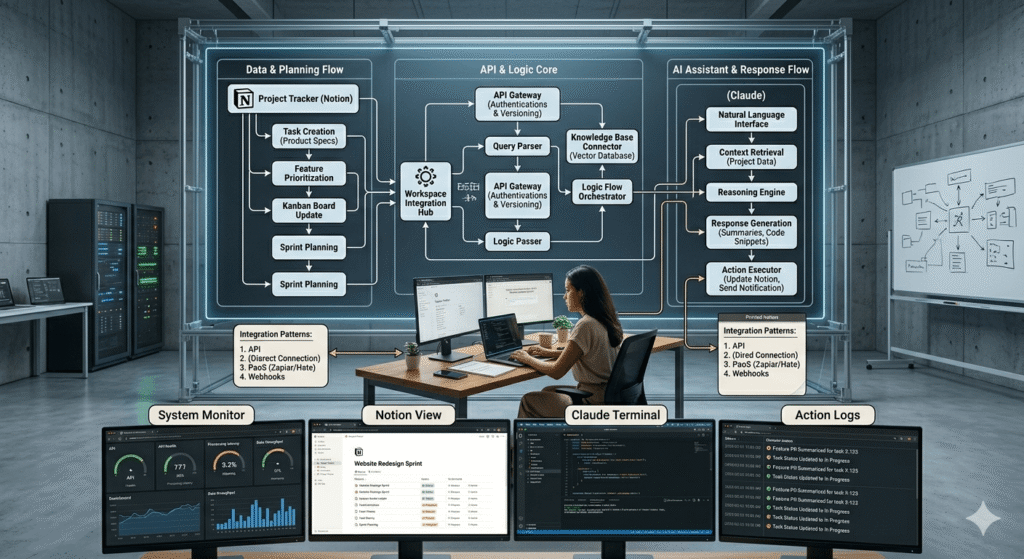
Connecting Notion to Claude: The Three Integration Patterns
The Notion databases above are the Memory Layer. What transforms them from documentation into an AI operating system is the connection to Claude, the pathway by which Context Blocks become inputs to AI calls.
There are three integration patterns, ordered by implementation complexity and operational power.
Pattern 1: Manual Copy-Paste (Phase 1 Baseline)
The lowest-friction starting point. Before any automation is built, the Notion context engine provides value through a simple human workflow:
- Open the relevant Client record in Notion
- Copy the
Context Blockproperty - Paste as a prefix into your Claude conversation or Project instruction
- Proceed with your task-specific prompt
This is not glamorous. It is also not trivial a pre-written, maintained Context Block that takes 3 seconds to copy is operationally superior to a human trying to reconstruct client context from memory at the start of every session. The quality gain comes from the structure and currency of the content, not the mechanism of delivery.
Estimated weekly time investment at this stage: 2–3 minutes per client per week (copy-paste + maintaining blocks quarterly).
Pattern 2: Claude Projects + Manual Upload (Phase 2)
The intermediate pattern leverages Claude Projects as described in the previous article in this cluster. Rather than copy-pasting context into individual conversations, you maintain Context Blocks in Notion and upload the most recent versions to the corresponding Claude Project monthly.
The workflow:
- Build and maintain five databases in Notion as described above
- Monthly: export relevant Context Blocks as a single combined document
- Upload to Claude Project knowledge files, replacing previous version
- All conversations in that Project automatically have access to current context
This pattern decouples the maintenance of context (in Notion, where it’s easy to edit structured properties) from the deployment of context (in Claude Projects, where it feeds every session).
The limitation: a 30-day lag in context freshness. If a client situation changes materially mid-month, the Claude Project context doesn’t reflect it until the next monthly upload cycle. For fast-moving client situations, Pattern 3 is more appropriate.
Pattern 3: Automated Context Injection via Make (Phase 3)
The fully automated pattern retrieves Notion context blocks in real time and injects them into Claude API calls via Make automation. This is the architecture that eliminates the Context Tax entirely every Claude call arrives with complete, current, accurate context without any human assembly.
The Make scenario structure:
TRIGGER: New task created in project management tool
    ↓
MODULE 1: Notion — Get Page
  Database: Client Intelligence Hub
  Filter: Client Name = [Client from trigger]
  Retrieve: Context Block property
    ↓
MODULE 2: Notion — Get Page
  Database: Project Brief Registry
  Filter: Client = [Client ID] AND Phase = Active
  Retrieve: Context Block property
    ↓
MODULE 3: Notion — Query Database
  Database: Voice and Style Archive
  Filter: Client = [Client ID] AND Content Type = [Task Type]
          AND Quality Rating ≥ 4
  Limit: 2
  Retrieve: Specimen Text property (both records)
    ↓
MODULE 4: Text Aggregator — Assemble Context Payload
  [CLIENT CONTEXT]
  {{Module 1 Context Block}}

  [PROJECT CONTEXT]
  {{Module 2 Context Block}}

  [VOICE REFERENCES]
  Reference 1: {{Module 3 Specimen 1}}
  Reference 2: {{Module 3 Specimen 2}}
    ↓
MODULE 5: HTTP — Claude API Call
  System: {{CBOE from Make Data Store}}
  User: {{Assembled context payload}} + {{Task-specific prompt}}
    ↓
MODULE 6: Route based on structured output flags
  If flags empty → Route to staging location
  If flags present → Route to Slack notification + staging location
This scenario retrieves three sources of Notion context, assembles them into a structured payload, and injects them into a Claude API call, all in approximately 3–6 seconds.
The result: Claude receives a context payload that reflects the current state of the client relationship, the active project brief, and calibrated voice specimens without a human assembling any of it.
The Notion API authentication in Make:
In Make, add a Notion connection using your integration token. Create a Notion internal integration in your workspace Settings → Integrations, generate the token, and connect it as a credential in Make. Every database your automation needs to query must have the integration explicitly added via the database’s share menu, a step that is easily forgotten and causes silent retrieval failures.
The Living Brief System
One of the most operationally expensive habits in agency and consulting work is the static project brief, a document written once at project kickoff, never updated, and slowly diverging from reality as the engagement evolves.
The Living Brief System replaces static briefs with a structured update protocol that keeps both the human team and the AI context layer synchronized with the actual state of the engagement.
The Living Brief Update Triggers
A project brief in the Project Brief Registry should be updated when any of the following occurs:
| Trigger | Which Properties to Update |
|---|---|
| Deliverable completed or approved | Phase, Deliverables (mark completed) |
| Scope change agreed | Deliverables, Constraints, Context Block |
| Strategic direction shift | Objective, Key Messages, Anti-messages, Context Block |
| New decision maker introduced | Client record: Current Priority, Communication Style, Context Block |
| Competitive situation changes | Client record: Topics to Avoid, Context Block |
| Project moves to next phase | Phase, Current Priority, Context Block |
Each update should take no longer than 10 minutes. The Context Block is the highest-priority property, it is what Claude reads. All other properties exist to structure the thinking that goes into the Context Block.
The Weekly Brief Review Ritual
Implement a 15-minute weekly brief review as a non-negotiable calendar item. For each active project:
- Open the Project Brief Registry record
- Ask: Is the
Current Phasestill accurate? - Ask: Have any
Key MessagesorAnti-messageschanged? - Ask: Is the
Context Blockstill accurate if I read it as Claude would? - Update any property that has drifted
- Update
Last Updateddate
This ritual prevents the most common failure mode of knowledge base decay: gradual drift where no single change seems significant enough to trigger an update, but accumulated drift over 8 weeks produces a context block that is materially inaccurate.
Maintenance Architecture: Keeping Context Fresh
A knowledge base is not a project, it is a system. Systems degrade without maintenance. The following is a maintenance schedule that keeps the context engine performing at production quality.
Weekly (15 minutes)
- Run Living Brief review for all active projects
- Update
Last Updatedfor any records touched - Check Notion filter view: “Active Projects, Last Updated > 14 days”, investigate any that appear
Monthly (45–60 minutes)
- Review all active Client Intelligence Hub records: Is the Context Block still accurate?
- Archive Voice and Style Archive specimens that have passed their
Do Not Use Afterdate - Check Process Library: Flag processes with
Last Tested> 90 days - Upload updated Context Blocks to Claude Projects (if on Pattern 2)
- Run the Claude Quality Scorecard (20-output sample): identify any score degradation that correlates with context staleness
Quarterly (2–3 hours)
- Conduct full Voice Calibration refresh for top 3 active clients
- Review Decision Log: Archive superseded decisions, update Review Dates on active ones
- Update the
Current Priorityfield for every active client - Run competitive audit: Have any
Anti-messagesbecome outdated because the competitive landscape changed? - Promote high-quality recent outputs to Voice and Style Archive (Quality Rating 4–5 only)
Annually (Half-day)
- Full architecture review: Are all five databases still the right structure for current business operations?
- Purge archived clients and completed projects that have been inactive for 12+ months
- Review all Process Library entries: Do they reflect how work is actually done now?
- Recalibrate Voice Archives: Past voice specimens more than 18 months old may reflect a voice that has since evolved
Measuring Knowledge Base Quality
The knowledge base exists to improve Claude’s output quality. If it’s not improving output quality, the architecture is wrong or the maintenance is insufficient. The following metrics are tracked against Claude output quality to diagnose which layer is causing degradation.
Knowledge Base Quality Scorecard
Run monthly alongside the Claude Quality Scorecard:
| Metric | What It Measures | Good Threshold | Action If Below |
|---|---|---|---|
| Context Block currency | % of active client/project blocks updated in last 30 days | >90% | Run Living Brief review; enforce weekly ritual |
| Voice specimen freshness | % of injected specimens approved within last 12 months | >80% | Update Voice Archive; run Voice Calibration refresh |
| Decision Log completeness | % of project-level Claude calls that have relevant decisions on record | >70% | Audit recent decisions; backfill Decision Log |
| Retrieval accuracy | % of Make automation calls returning expected context blocks | >98% | Check Notion API integration; review filter logic |
| Process Library recency | % of active processes tested within 90 days | >85% | Schedule process testing; update Last Tested dates |
| Context payload size | Average character count of assembled context per Claude call | 800–2,000 | Below: context too thin; above: may exceed token budget |
The most diagnostic metric is the gap between Context Block currency and Claude’s first-draft acceptance rate. When context blocks are current (>90%), first-draft acceptance should be above 75%. If the blocks are current but acceptance is low, the problem is in the system prompt (Claude configuration article), not the knowledge base.
When context blocks are stale (<70% updated in 30 days) and first-draft acceptance is declining together, the knowledge base maintenance has lapsed. The fix is the maintenance schedule above, not a new tool.
The Notion Upgrade Path: From Folder to Context Engine
Most businesses arrive at this architecture from a pre-existing Notion workspace that was built for human navigation. The following is the migration path that doesn’t require a full rebuild.
Phase 1: Add Context Blocks to Existing Structure (Week 1–2)
Don’t rebuild your existing Notion workspace. Instead, add the Context Block property to whatever client or project database you already have.
For your top 3 active clients:
- Write a Context Block using the structure in this article
- Upload each to the corresponding Claude Project
- Run 10 test outputs; measure first-draft acceptance rate
This alone adding pre-written, structured context blocks and uploading them to Claude Projects will produce a measurable quality improvement within the first week. It is the minimum viable implementation of everything described in this article.
Phase 2: Build the Missing Databases (Weeks 3–6)
With Context Blocks proven and delivering value, build the Voice and Style Archive and the Decision Log. These are the two databases that compound most over time: every approved output that goes into the Voice Archive and every decision that goes into the Decision Log makes future AI calls more accurate.
The Client Intelligence Hub can be migrated from whatever client documentation you already have, it is primarily a restructuring exercise, not a content creation exercise.
Phase 3: Automate Retrieval (Weeks 7–12)
Once the databases are populated and the maintenance rhythm is established, build the Make scenario for automated context injection. The manual pattern (copy-paste) and the Claude Projects pattern (monthly upload) are viable long-term for small teams. The automated pattern is for operators processing high volumes of AI calls across multiple clients where manual context assembly creates meaningful overhead.
Start with one scenario, automated context injection for your highest-volume output type and expand from there.
Phase 4: Full Context Engine Operation (Month 3+)
At full operation, the context engine has the following characteristics:
- Every active client has a current Context Block (updated within 30 days)
- Every active project has a current Project Brief (updated within 14 days for fast-moving projects)
- Voice Archive has 5+ quality specimens per client per content type
- Decision Log captures all material project decisions with rationale
- Process Library reflects current operational reality (tested within 90 days)
- Make automation retrieves and injects context for all high-volume Claude calls
- Monthly quality scorecard confirms context is improving Claude output quality
At this phase, the knowledge base is a functional competitive asset. It encodes institutional knowledge in a form that makes every AI call more accurate, and every person who joins the team more effective from day one because they are operating with the full context of the client relationship from their first session.
The Compounding Return That Most Operators Miss
The case for building this architecture is not efficiency, it is compounding.
Every Context Block you write reduces the time cost of every future Claude call for that client. Every Voice Specimen added to the archive makes voice calibration more precise. Every Decision logged eliminates a future context reconstruction exercise. Every Process Library entry turns a multi-prompt conversation into a single, well-structured execution call.
The architecture compounds in two dimensions simultaneously: across clients (more clients configured means more total output value) and across time (each maintained database becomes more accurate and useful as the relationship deepens).
The operator who builds this in month 1 and maintains it through month 12 is not just 12 months ahead of the operator who starts in month 12. They are ahead by the compounded value of every call, every specimen, every decision logged, and every Context Block maintained across that entire period.
The configuration gap is the competitive gap. The knowledge base is where that gap becomes durable.
Quick Reference: Knowledge Base Build Checklist
Database Architecture:
- Client Intelligence Hub created with all required properties
- Project Brief Registry created with Anti-messages field
- Voice and Style Archive created with Quality Rating and retrieval logic
- Decision Log created and linked to Client and Project databases
- Process Library created with Last Tested dates enforced
Context Blocks:
- Context Block written for each active client (150–250 words, declarative, constraints-first)
- Project Context Block written for each active project
- Voice Characteristics extracted via Claude analysis for top specimens
- Anti-messages documented for all active projects
Maintenance:
- Weekly brief review scheduled (15 minutes, recurring)
- Monthly maintenance calendar item created (45–60 minutes)
- Quarterly Voice Calibration refresh scheduled
- Notion filter view created: “Active Clients, Context Block > 30 days old”
- Notion filter view created: “Active Projects, Last Updated > 14 days”
Integration:
- Pattern 1 (Manual): Context Blocks being copied to Claude conversations
- Pattern 2 (Projects): Context Blocks uploaded to Claude Projects monthly
- Pattern 3 (Automated): Make scenario retrieving and injecting context
Quality Measurement:
- Monthly Knowledge Base Quality Scorecard running
- Scores correlated with Claude Output Quality Scorecard
- Retrieval accuracy >98% confirmed for any automation scenarios
This article is part of the AI for Business Operations cluster at StackNova Hub. The foundational AI Workflow OS framework is in the pillar article. The Claude configuration layer system prompts, Claude Projects, voice calibration, and structured outputs is covered in: How to Use Claude for Business Operations.
Related articles in this cluster: