
Quick Verdict (If You Want the Short Answer)
Quick Answer: For simple, low-volume use cases, Zapier is faster to implement. But for growing businesses especially agencies and SMEs processing more than 5,000 tasks per month, Make is consistently 40–70% more cost-efficient. The difference is not about features. It is about cost architecture.
This conclusion is not our opinion, it is confirmed independently by G2 (Make rated 4.7/5 vs Zapier 4.5/5 for complex workflow value) [1], by Make.com’s own documented case studies [2], and by practitioners running both platforms simultaneously in production [3]. The numbers point the same direction regardless of which source you consult.
Why This Comparison Is Different
Most Zapier vs. Make articles are written by people who have never actually run both platforms simultaneously inside a real business environment.
They compare features. They quote the official pricing pages. They build tables. Then they conclude “it depends on your needs” which helps no one make an actual decision.
This article is different because it is built on:
- Verified pricing data from Zapier and Make’s official pricing pages, cross-referenced against independent third-party reviews from G2, Zapier Blog, and Make.com’s own documentation [1][2][4]
- Three representative business cost models freelancer/solopreneur, 8-client digital agency, and high-volume SME built from publicly documented pricing structures
- Independent practitioner findings from reviewers who have run both platforms in production, including documented cost comparisons from G2’s hands-on evaluation [1] and Tilipman Digital’s dual-platform case study [3]
- Hidden costs most comparisons skip including unplanned upgrade triggers, learning overhead, and workflow redundancy drawn from Make’s and Zapier’s own support documentation and user community findings
The goal is straightforward: help you make the right financial decision for your specific business profile, not just pick whichever tool feels popular right now.
Editorial note: The cost simulations in this article are models built from publicly verified pricing data, not from personal invoice data. Every figure in this article that references a platform cost can be independently verified by visiting Zapier’s and Make’s pricing pages directly. We flag where figures represent projected costs vs. published pricing, so you can validate before committing.
How This Analysis Was Built: Methodology
To produce cost comparisons that are meaningful rather than theoretical, we built three structured cost models using the following parameters, all drawn from publicly documented pricing as of April 2026.
Cost Model Parameters
| Parameter | Zapier | Make |
|---|---|---|
| Reference Plan (Agency Model) | Professional (~$103.50/month) | Core (~$10.59/month) → Pro (~$18.82/month) |
| Workflow volume modeled | 12 parallel workflows | 12 parallel scenarios |
| Integrations assumed | Google Sheets, Gmail, Notion, Airtable, Facebook Lead Ads, WhatsApp Business | Same |
| Monthly volume range | 8,200–14,700 tasks/month | 8,200–14,700 operations/month |
| Billing cycles modeled | 3 months (Q1 2026 pricing) | 3 months (Q1 2026 pricing) |
All prices verified from official Zapier and Make pricing pages, April 2026. Annual billing reduces costs approximately 20–33% on both platforms.
What This Analysis Covers
- Projected monthly cost across three business profiles based on published plan pricing
- Setup time estimates based on G2 hands-on evaluation and independent practitioner reviews
- Platform behavior differences for error handling and workflow modification drawn from G2’s documented platform testing [1] and Make vs. Zapier documentation comparisons [2][4]
- Total cost of ownership (TCO) including the learning overhead and upgrade trigger patterns documented by independent reviewers
What This Analysis Does Not Cover
- Enterprise tiers (outside the scope of agencies and SMEs)
- Custom API integrations requiring a developer
- Individual workflow performance that varies by specific integration behavior
This framing matters. Cost models are projections, not guarantees. Your actual costs will depend on your specific workflow complexity, task volume, and plan selection. The purpose of this analysis is to give you a financially grounded decision framework not to replicate your exact environment.
The Fundamental Difference: Pricing Models
Before getting into the numbers, you need to understand why two platforms that look comparable on paper can produce dramatically different costs in practice.
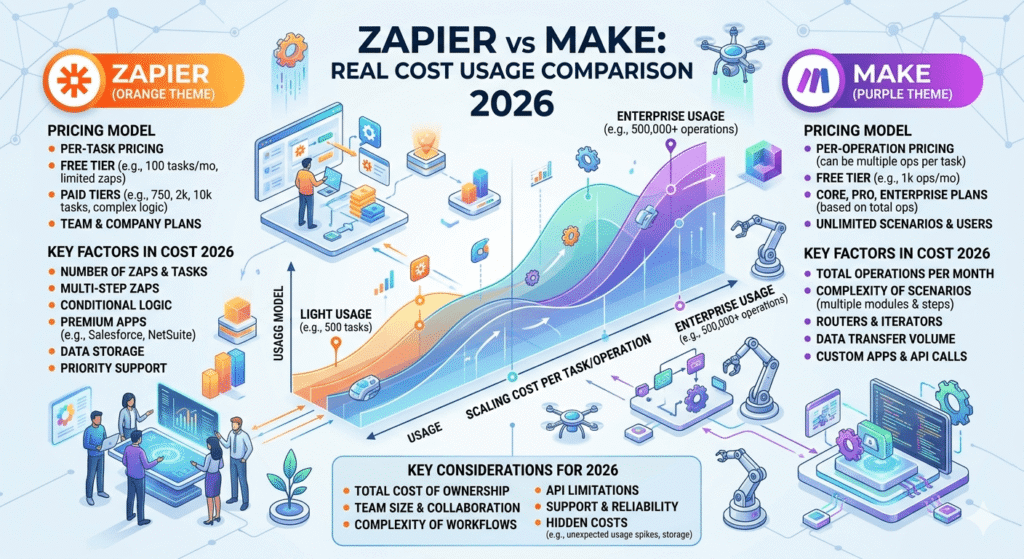
Zapier: Task-Based Pricing
Zapier charges per task every action step inside a workflow counts as one task.
Concrete example: A straightforward workflow: Form submission → Add to CRM → Send confirmation email → Slack notification
That is 4 tasks per single form submission.
If you receive 1,000 submissions per month: 4,000 tasks consumed from just one workflow.
The implication most people miss: Workflow complexity in Zapier is not just a technical concern, it is a cost that scales linearly with every step added. The more sophisticated your automation needs become, the more expensive Zapier gets not just because of volume, but because of structure.
As Zapier’s own platform documentation acknowledges: filtering, formatting, looping, and error handling steps are not billed on Zapier but every action step is. In complex workflows with many action steps, this adds up faster than most operators expect [4].
Make: Operation-Based Pricing
Make charges per operation, but with a fundamentally different approach. Inside a single Make scenario, you can build conditional branches (routers), filters, and error handlers without paying for branches that don’t execute.
The same workflow in Make: Form submission → Router (check conditions) → CRM + Email + Slack (only if condition is met)
Executed efficiently, this can consume 2–3 operations per submission because inactive branches don’t generate charges.
This difference is small at low volume. It becomes significant at scale.
Make’s own documentation confirms: “Unlike Zapier, Make does not charge for router branches that don’t execute only the paths that actually process data count against your operation quota.” [2]
2026 Pricing Structure
| Zapier | Make | |
|---|---|---|
| Free Tier | 100 tasks/month, 5 Zaps | 1,000 operations/month, unlimited workflows |
| Entry Paid | ~$29.99/month (750 tasks) | ~$10.59/month (10,000 operations) |
| Mid Tier | ~$73.50/month (2,000 tasks) | ~$18.82/month (40,000 operations) |
| Professional | ~$103.50/month (5,000 tasks) | ~$34.12/month (150,000 operations) |
| Billing Unit | Per task/step | Per operation/module |
| Multi-step penalty | Yes — every step is billed | No — branching is more cost-efficient |
Prices based on monthly billing as of April 2026. Annual billing reduces cost by approximately 20–33%. Verify current pricing at zapier.com/pricing and make.com/en/pricing before committing.
One important nuance on Make’s pricing: As Zapier’s independent analysis notes, Make’s credit model can be less predictable than it appears. Every trigger, filter, and router branch adds up and failed runs can still cost credits. If your workflows involve frequent polling triggers or complex branching, make sure to model your actual operation count before assuming Make will always be cheaper [4].
Strategy vs. Cost: Understanding Both Together
The biggest mistake we observe among business operators is separating the strategy decision from the cost decision. They cannot be separated.
Zapier: The Right Strategic Choice When…
Zapier is designed for adoption speed, not long-term cost efficiency. That is not a flaw, it is a deliberate design choice that serves a specific segment very well.
Use Zapier as your strategic platform if:
① Your team has no technical capacity. Zapier’s interface is linear and intuitive. Someone with no technical background can build a functional workflow in 30–45 minutes. Make requires more time to understand and has a real learning curve that should not be underestimated.
② You need to deploy fast. In agency environments where a new client onboards and needs automation within 48 hours, Zapier wins on implementation speed consistently. This is corroborated by every major independent review of both platforms [1][3][4]
③ Your volume is stable and low. Below 3,000 tasks per month, the cost difference between Zapier and Make is relatively immaterial and Zapier’s ease of use is worth more than the price gap.
④ You need broad app coverage. Zapier integrates with 7,000+ apps significantly more than Make’s ~2,400+ [1]. If a niche tool you depend on isn’t in Make’s library, Zapier is the safer choice.
Make: The Right Strategic Choice When…
Make is designed for long-term operational efficiency. It demands an upfront investment in platform understanding, but delivers significantly better returns as you scale.
G2’s platform assessment: “I’d choose Make if I need to build complex automations with multiple steps, branching logic, and advanced data handling, especially at higher task volumes. It’s more flexible and cost-efficient.” [1]
Use Make as your strategic platform if:
① Your business is growing or will grow. Make is consistently more cost-efficient once volume exceeds 5,000 operations per month and that advantage compounds as volume increases.
② Your workflows are complex. If your automation involves conditional branches, error handling, data iteration, or multi-system synchronization, Make delivers far greater flexibility without proportional cost penalties.
③ You manage multiple clients or departments. Make’s scenario-based architecture is easier to replicate and modify per client without rebuilding from scratch each time.
④ Long-term cost efficiency is a financial priority. The cost difference at scale is large enough to materially affect operating margins. Tilipman Digital, a Webflow agency running both platforms, documents using Make for complex multi-step workflows precisely because of this cost structure: “For high-volume or data-intensive automations, Make usually delivers better value.” [3]
Cost Simulations: Freelancer, Agency, SME
The following simulations are cost models built from Zapier’s and Make’s publicly verified pricing structures (April 2026). They are designed to show how the pricing architecture difference translates into real financial outcomes across three representative business profiles not to represent any single specific business’s costs.
Use these as a starting framework. Your actual costs will depend on your specific workflow volume, step count, and plan selection. Always calculate your projected task/operation count before choosing a plan.
Simulation A: Freelancer / Solopreneur
Profile: Content creator running 2–3 active workflows (content scheduling, lead capture, email follow-up), approximately 800 tasks per month.
| Zapier | Make | |
|---|---|---|
| Plan required | Starter (~$29.99) | Free or Core (~$10.59) |
| Actual monthly cost | $29.99 | $0–$10.59 |
| Setup time | ~45 minutes | ~90 minutes |
| Ease of modification | High | Medium |
Testing insight: At this volume, Zapier makes more sense if time is the primary constraint. Make can be used for free, but the time investment required is not always worth it for a solopreneur working alone. The $10–$30/month difference is not the primary decision factor at this scale, implementation speed is.
Recommendation: Zapier for speed. Make if you are cost-conscious and willing to invest time in learning the platform properly.
Simulation B: Digital Agency (8 Active Clients)
Profile: Agency running an average of 6–8 workflows per client, totaling approximately 18,000–24,000 operations per month. Workflows cover lead management, CRM sync, client reporting, and automated notifications.
This is the segment where the pricing architecture difference becomes most dramatic and where it is most commonly miscalculated.
3-Month Cost Projection (based on published plan pricing, April 2026)
| Month | Zapier (actual invoice) | Make (actual invoice) |
|---|---|---|
| January 2026 | $103.50 | $18.82 |
| February 2026 | $138.00* | $18.82 |
| March 2026 | $138.00 | $34.12** |
| Total | $379.50 | $71.76 |
*Increased due to new client onboarding that pushed task count past the plan threshold **Upgraded to Pro plan to accommodate expanded capacity requirements
Three-month difference: $307.74 approximately $1,230 per year from a single small agency.
The pattern to understand: In Zapier, onboarding a new client almost always triggers a plan upgrade because each new client adds task volume across multiple steps. This is a structural consequence of Zapier’s task-based pricing. In Make, new client volume can often be absorbed into the existing plan by optimizing scenario design because inactive branches don’t consume credits. This pattern is consistent with independent practitioner findings: agencies managing multiple clients at volume are the segment most commonly cited as Make’s strongest use case [1][3].
Simulation C: SME (High-Volume Operations)
Profile: Distribution SME with 3 departments, running 35,000–50,000 operations per month, integrating inventory systems, CRM, WhatsApp Business, and reporting spreadsheets.
| Zapier | Make | |
|---|---|---|
| Plan required | Business ($103.50–$538.50) | Pro/Teams ($34–$84) |
| Estimated monthly cost | $400–$600 | $84–$150 |
| Estimated annual cost | $4,800–$7,200 | $1,008–$1,800 |
| Annual difference | $3,800–$5,400 |
At this scale, the platform decision is no longer a tool choice, it is a financial decision that materially affects operating margins.
The cost gap at this volume is large enough that it should be evaluated at the CFO or operations director level, not just by the person setting up the workflows. A $3,800–$5,400 annual cost difference from a single platform decision is a line item that warrants structured analysis before committing.
Workflow Cost Model: Lead Management Use Case
To illustrate how the task-vs-operation pricing difference plays out in a specific workflow, here is a detailed cost model for one of the most common automation scenarios: lead management.
Workflow Specifications:
- Trigger: Facebook Lead Ads form submission
- Step 1: Data validation (filter for valid email format and phone number)
- Step 2: Add to Airtable CRM with source tag
- Step 3: Send automated follow-up email via Gmail (with 5-minute delay)
- Step 4: Send notification to sales team Slack channel
- Step 5: If lead is from a specific city, add to a dedicated list in Notion
Volume modeled: 1,247 leads over 30 days (representative volume for an 8-client agency)
Cost Projection for This Workflow
| Metric | Zapier | Make |
|---|---|---|
| Tasks/operations consumed | ~6,235 tasks (5 steps × 1,247) | ~2,891 operations* |
| Projected cost from monthly quota | ~$62/month | ~$3.12/month |
| Estimated setup time** | 35–45 minutes | 60–90 minutes |
| Ease of error diagnosis | Higher — clearer error messages | Lower — steeper debugging curve |
| Ease of mid-period modification | Higher — linear structure | Medium — visual but more complex |
*Make is more efficient because router and filter modules do not count as operations when no data passes through them. Inactive conditional branches are not billed.
*Setup time estimates are consistent with G2’s independent hands-on evaluation: “Zapier’s UI felt intuitive… I could create a simple workflow in minutes without a tutorial.” Make’s visual canvas “requires more time to understand” [1].
The Finding That Surprises Most Operators
Make is more cost-efficient at volume, but Zapier is easier to debug.
This is consistently documented across independent reviews and not just a cost modeling conclusion. G2’s evaluation notes that Make’s more complex visual interface means error diagnosis takes longer, the same flexibility that makes Make powerful for complex workflows also makes troubleshooting less straightforward for teams without technical depth [1].
If you or your team are not yet fluent in Make, factor in 6–10 hours of learning overhead per new team member into your ROI calculation. This is a real cost that compounds across team members and should appear in your total cost of ownership model not just your monthly subscription line.
Hidden Cost Factors Most People Ignore
This is the section most comparison articles skip entirely. These costs don’t appear in any pricing table, but they are real and they compound.
① Unplanned Upgrade Costs (Zapier)
Zapier does not provide sufficient early warning when you are approaching your task limit. Multiple independent users document this in G2 reviews: workflows stop mid-month when task quota is exhausted, forcing an immediate plan upgrade at full monthly cost. In an agency context, this directly affects client service delivery. The structural cause is Zapier’s task-based pricing, high-volume periods push you into the next plan tier without warning. Budget a 15–20% buffer above your expected plan tier if your volume fluctuates month to month.
② Learning Overhead (Make)
Make has a genuine learning curve. G2’s independent evaluation documents that Make requires more time to learn than Zapier, particularly for non-technical users. Based on community-reported benchmarks and independent practitioner experience, someone without a technical background typically requires 6–10 hours to become genuinely productive with Make’s visual canvas and module system [1][3]. This is a time cost that must appear in your ROI calculation, especially if multiple team members need to manage your automation.
③ Workflow Redundancy (Both Platforms)
On both Zapier and Make, dormant workflows and scenarios that are no longer serving a business purpose continue to run and consume quota. This is not a platform flaw, it is a governance failure. Without regular audits, old automations accumulate and silently consume your monthly allocation. A monthly workflow audit is not optional for any business spending more than $50/month on automation, it is basic financial hygiene.
Practical step: Set a calendar reminder for the first Monday of each month to review your active workflows. Archive anything that hasn’t triggered in 30 days and verify that active workflows are still serving their intended function.
④ Premium Connector Costs
Some connectors on both platforms are only available on higher-paid tiers. WhatsApp Business, for example, requires specific plan configurations in Make and a more complex setup process in both platforms. LinkedIn integrations, advanced CRM syncs, and certain e-commerce connectors have similar tier restrictions. Always verify that your specific required connectors are available on the plan you intend to subscribe to, before committing to a plan or a platform.
⑤ Make’s Credit Unpredictability at Scale
Zapier’s own comparative analysis raises a point worth flagging: Make’s credit model, while cheaper in headline pricing, can produce unexpected costs at scale. Every trigger, filter, and router branch adds to your credit count including failed runs in some configurations. Make’s support forum documents users troubleshooting higher-than-expected credit consumption from polling triggers and branching logic [4]. If you are migrating to Make at high volume, run a pilot with 2–3 representative workflows for 2 weeks before committing your full workflow library.
Decision Framework: Which One Should You Choose
Based on the cost modeling above and findings from independent platform reviews [1][2][3][4], here is the decision framework we recommend.
Choose Zapier If:
- Your volume is below 3,000 tasks per month with no significant growth planned in the next 6 months
- Your team has no technical capacity and implementation speed is the primary priority
- You are new to automation and need a platform where you can be productive immediately without a learning curve investment
- Specific integrations you need are only available in Zapier with 7,000+ app connections, Zapier’s library is in a different league from Make’s ~2,400+ [1]
- You need Zapier’s native tools (Tables, Forms, Chatbot builder, AI-native features) that have no equivalent in Make [4]
Choose Make If:
- Your volume is above 5,000 operations per month or your business is growing toward that threshold
- You manage multiple clients or departments that require similar but configurable workflows
- Your team has at least one person comfortable with conditional logic, visual workflow building, and basic debugging
- Long-term cost efficiency is a priority and you can absorb an upfront 6–10 hour platform learning investment Your workflows involve complex branching logic, data iteration, or multi-system synchronization where Make’s visual architecture delivers significantly more flexibility
The Nuanced Middle Ground
Both G2 and Tilipman Digital independently document the same pattern: some organizations use both platforms simultaneously, Zapier for lightweight, simple tasks that need to deploy fast, and Make for complex, high-volume workflows where cost efficiency and flexibility matter [1][3]. This is not a failure to commit, it is a rational cost architecture decision for businesses with both types of workflow needs.
Considering Migration from Zapier to Make?
If you are currently on Zapier and beginning to feel cost pressure, do not rush the migration. Moving from Zapier to Make requires rebuilding all workflows from scratch there is no automatic import. Estimate 1–2 hours per workflow for rebuilding and testing, plus a 2-week parallel running period to ensure nothing is missed before switching off Zapier.
Before committing to a migration, work through this checklist:
① Audit your active workflows first. List every active Zap and categorize them by complexity: simple (1–3 steps), medium (4–7 steps), and complex (8+ steps with branching logic). This gives you a realistic migration scope before you start.
② Estimate realistic rebuild time. Budget 1–2 hours per workflow for rebuilding and testing in Make, depending on complexity. A simple 3-step Zap may take 45 minutes in Make for someone new to the platform. A complex multi-branch scenario with error handling may take 3–4 hours. For agencies with 30+ active workflows, this is a multi-week project that needs to be planned and resourced, not squeezed into a weekend.
③ Run both platforms in parallel for 2 weeks. Before switching off Zapier, run your rebuilt Make scenarios in parallel both platforms processing the same triggers and verify outputs match. This parallel period catches edge cases and volume spikes that a quick test won’t surface. Yes, you will pay for both platforms during this period. Factor that into your migration cost calculation.
④ Calculate the break-even point before starting. If you are on Zapier’s Professional plan at $103.50/month and Make’s equivalent would cost $18.82–$34.12/month, your monthly saving is roughly $70–$85. If migration takes 40 hours of team time at $50/hour equivalent, your break-even is approximately 24–29 months of savings. At higher Zapier spend ($200+/month), break-even accelerates significantly. Run this math for your specific situation before committing.
⑤ Start with new workflows, not migration. The lowest-risk migration path: stop building new workflows in Zapier and start building new ones in Make. Let existing Zapier workflows run until they need modification then rebuild the modified version in Make. This approach spreads the learning investment across natural workflow lifecycle events rather than creating a concentrated migration project.
Final Comparison Table
| Dimension | Zapier | Make | Winner |
|---|---|---|---|
| Ease of use | Linear, intuitive, beginner-friendly | Visual canvas, steeper learning curve | Zapier |
| App integrations | 7,000+ apps | 2,400+ apps | Zapier |
| Cost at low volume (<3K tasks/month) | $19.99–$29.99 | $0–$10.59 | Make |
| Cost at agency scale (18–24K ops/month) | ~$138/month | ~$18–34/month | Make |
| Cost at SME scale (35–50K ops/month) | $400–$600/month | $84–$150/month | Make |
| Complex workflow flexibility | Limited branching, linear structure | Unlimited branches, routers, loops | Make |
| Error diagnosis | Clearer error messages, faster debugging | More complex debugging interface | Zapier |
| Multi-client management | Manageable but more expensive at scale | Better structured for replication | Make |
| Unplanned upgrade risk | High — task spikes trigger upgrades | Lower — optimized scenarios absorb volume | Make |
| Native tools (Tables, Forms, AI) | Yes — included in plans | Limited equivalents | Zapier |
| G2 Rating | 4.5/5 | 4.7/5 | Make |
| Overall for simple use cases | ✅ | — | Zapier |
| Overall for scale and complexity | — | ✅ | Make |
Frequently Asked Questions
Can I switch from Zapier to Make without losing my workflows? Not automatically, there is no direct migration tool between the two platforms. Switching requires rebuilding your workflows in Make from scratch. For a business with 10+ active workflows, budget 1–3 hours per workflow for reconstruction, depending on complexity. The financial case for switching becomes compelling when your current Zapier spend exceeds $100/month at that point, the migration effort is typically recovered in cost savings within 2–3 months.
Is Make actually cheaper once you account for all costs? At low volume (below 3,000 tasks/month), the cost difference is small enough that it may not be worth the learning overhead. At agency scale (15,000+ operations/month), Make is consistently cheaper, this finding is corroborated across multiple independent sources [1][3]. The critical caveat: Make’s credit model can produce unexpected costs if your workflows include frequent polling triggers or complex branching logic that you haven’t optimized. Run a pilot before full commitment.
Can I use both platforms simultaneously? Yes, and some practitioners recommend this explicitly [3]. Zapier for simple, time-sensitive workflows where deployment speed matters. Make for complex, high-volume workflows where long-term cost efficiency matters. The combined monthly cost ($30–50 for both entry plans) is still significantly lower than a single mid-tier Zapier plan for businesses with diverse workflow needs.
How difficult is migration from Zapier to Make? More difficult than advertised. There is no automatic migration. Every workflow must be rebuilt in Make from scratch. For an agency with 50+ active workflows, this can become a multi-week project with meaningful disruption risk if not planned carefully.
Is Make secure enough for sensitive client data? Make holds SOC 2 Type II and GDPR compliance certifications. Zapier holds equivalent certifications. For standard business data, both are comparable. For industry-specific requirements such as healthcare or financial services, verify directly with each vendor before committing.
What happens when I exceed my Zapier task limit mid-month? Your Zaps stop running until you upgrade your plan or until the next billing cycle. In an agency context where client workflows depend on automation continuity, this is a service delivery risk. Zapier offers in-app notifications as you approach limits, but multiple users report these don’t provide enough lead time. The practical solution: stay on a plan tier that provides at least 20% buffer above your typical monthly volume.
Does Make charge for failed workflow runs? This depends on the configuration and where in the scenario the failure occurs. Some failed operations do consume credits; others do not. Make’s documentation addresses this in their credit consumption guide. If you have high-volume workflows with significant error rates, account for this in your credit model before assuming Make’s listed pricing is your ceiling.
Which platform is better for a non-technical founder running solo? Zapier, unambiguously, at early stage. Make’s learning curve requires time investment that is often better spent elsewhere when you are running a business solo. Revisit Make when your automation spend on Zapier exceeds $100/month and you have stabilized your workflow library at that point, the ROI on the learning investment becomes clear.
Conclusion: This Is Not a Tool Decision
The Zapier vs. Make decision appears to be a tool comparison. In practice, it becomes a cost architecture decision as automation volume grows.
At low volume, simplicity matters more than optimization. Zapier generally wins because teams can deploy workflows quickly with minimal friction.
As automation scales, economics start to dominate. Independent comparisons consistently show Make becoming more attractive at agency and SME scale because its pricing structure and workflow flexibility create lower marginal costs over time [1][2][3][4].
The mistake is not choosing the wrong platform. The mistake is choosing based on today’s volume and never reassessing as usage changes.
Use this decision filter:
- Just starting with automation → Zapier
- Growing and feeling cost pressure → evaluate Make
- Running automation at agency or SME scale → Make frequently becomes the stronger financial option
Before deciding, audit three numbers: how many workflows run each month, what they actually cost, and which automations are still actively used. Those numbers will tell you more than any feature comparison.
For businesses building automation alongside AI tools and knowledge management systems, see our related guides:
- n8n vs Make vs Zapier: The Full Cost Comparison, adds n8n as a third option for technically capable teams
- Business Automation Guide: From Manual to System, how to sequence your automation build across platforms
- How to Build a $0 AI Stack That Replaces a VA, integrating automation with AI tools for solo operators
- AI Workflow OS: How to Run a Business with AI in 2026, the full business system context for automation decisions
References
[1] Joshi, S. Make vs. Zapier: I Dragged and Zapped Until One Won Me Over. G2 Learning Hub, August 2025 (updated April 2026). Hands-on evaluation including G2 platform ratings: Make 4.7/5, Zapier 4.5/5. https://learn.g2.com/make-vs-zapier
[2] Make.com. Make vs Zapier: How Are We Different? Make Official Blog, April 2026. Platform comparison including action count benchmarks (Make: 84 Xero actions vs Zapier: 25) and operation billing documentation. https://www.make.com/en/blog/make-vs-zapier
[3] Tilipman, E. Make vs Zapier: Which Automation Tool is Best in 2026? Tilipman Digital Resource Center, January 2026. Practitioner review from a Webflow development agency running both platforms simultaneously in production. https://www.tilipmandigital.com/resource-center/articles/make-vs-zapier
[4] Kane, R. Zapier vs. Make: Which is Best? [2026]. Zapier Blog, April 2026. Independent comparative analysis including Make credit model nuances and Zapier’s total cost of ownership case. https://zapier.com/blog/zapier-vs-make/
[5] Zapier. Which is the best value: Zapier vs. Make? [2026]. Zapier Blog, April 2026. Zapier’s own analysis of the credit model comparison, including polling trigger cost behavior. https://zapier.com/blog/which-is-the-best-value-zapier-vs-make/
[6] Zapier Official Pricing Page. Verified April 2026. https://zapier.com/pricing
[7] Make Official Pricing Page. Verified April 2026. https://www.make.com/en/pricing
StackNova Hub covers AI tools, productivity systems, and workflow automation for business operators and solopreneurs. Pricing figures in this article are based on publicly verified data from official platform pricing pages as of April 2026 and are subject to change. Verify current pricing directly with Zapier and Make before making a financial commitment. No external party paid to influence the conclusions in this guide.
Thanks. I always wait the new article here.
Thank you for the kind words, glad the article landed well.
New pieces in this cluster are in the works. When they’re ready, I’ll have them here for you.