This article is part of the AI Productivity Tools cluster at StackNova Hub. It builds on the context layer architecture introduced in Building a Business Knowledge Base in Notion and the execution layer configuration covered in How to Use Claude for Business Operations. If you are evaluating whether to build a zero-cost AI workflow before committing to paid subscriptions, read How to Build a $0 AI Stack That Replaces a VA alongside this article, the system architecture described here assumes a Notion context layer already exists.

Quick Answer
ChatGPT vs Notion AI is not a real comparison. They do not solve the same problem, they do not compete for the same workflow, and choosing between them is not the decision you actually need to make.
The productive question is: which bottleneck in your knowledge workflow is costing you the most right now, the inability to generate good output fast, or the inability to find and reuse output you have already produced? Your answer determines which tool you need first, and whether you need both.
This guide gives you the diagnostic to identify your bottleneck, the cost math to evaluate whether either tool pays for itself at your usage level, a full end-to-end workflow showing how output moves from blank brief to reusable asset, three scenario-based workflows for specific business contexts, and an honest assessment of where each tool reaches its ceiling.
Pricing as of May 2026, from official pricing pages:
- ChatGPT Plus: $20/month or $200/year ($16.67/month). Source: openai.com/chatgpt/pricing
- Notion Free plan: $0. Notion AI add-on: $10/member/month (billed monthly) or $8/member/month (billed annually). Source: notion.so/pricing
- Combined cost (ChatGPT Plus + Notion Free + Notion AI): $30/month
The Premise of This Comparison Is Architecturally Wrong
Most “ChatGPT vs Notion AI” articles exist because both products carry the “AI” label, both cost $10–$20/month, and both are marketed as productivity tools. That surface similarity drives a category error in most comparisons: the two tools are evaluated as if they are substitutable, and a winner is declared based on which feature list looks better.
They are not substitutable. They solve different failure modes in a knowledge workflow.
ChatGPT solves for output generation failure: the inability to move quickly from a rough idea or brief to a structured, usable first draft. Its function is acceleration reducing the time from “I need to produce X” to “here is a draft of X.” If your workflow bottleneck is the blank page, ChatGPT is the right starting point.
Notion AI solves for knowledge retention failure: the inability to find, reference, or build upon work that was already done. Its function is accumulation, making your existing output retrievable and recombinant. If your workflow bottleneck is recreating work you know you have done before, or losing institutional knowledge when a team member leaves, Notion AI is the right starting point.
These problems are sequential in most business workflows. You generate output, then you need to store and reuse it. The cost of using only one tool is visible in practice: operators who use ChatGPT without a retention system produce good individual outputs that vanish into conversation history and get recreated from scratch next month. Operators who use Notion AI without a strong generation layer spend more time organizing weak content than the organization is worth.
The correct frame is not “which tool is better.” It is: at which point in my knowledge workflow am I losing value and which tool closes that specific leak?
The Knowledge Workflow Bottleneck Diagnostic
Before selecting either tool, run this four-question diagnostic. It produces a specific answer, not a general recommendation.
Question 1: What happened to the last three significant AI-assisted outputs you produced?
If they exist in a conversation history you will never open again, or in a downloads folder with no naming system, your primary bottleneck is retention. The generation layer is working; the storage layer is empty.
If you used them and they were good enough, but you could not find a way to make them better than what you would have written manually, your primary bottleneck is generation quality. Adding a storage system for output that is already not meeting your standard does not fix the constraint.
Question 2: In the last 90 days, have you re-researched, re-drafted, or rebuilt something you knew you had done before?
If yes: calculate the time cost. Hours spent recreating × your hourly equivalent rate = the monthly value of a retention system. If that number exceeds $10/month, Notion AI has a positive return on investment before you evaluate any other feature it offers.
If no: your retention bottleneck is not yet material. The ChatGPT generation layer is the higher-priority investment at this stage.
Question 3: When AI-generated output goes to a client or gets published, how much editing does it require?
If the answer is significant structural rework, the logic, the argument, the organization needs rebuilding, the generation layer is the constraint. Storing that output will build a library of material you will still need to rework later. Fix generation quality first.
If the answer is light editing, mostly voice calibration and minor factual adjustments, the generation layer is working. The retention bottleneck is likely where you are losing value.
Question 4: If you were unavailable for two weeks, could another person find and use the AI-assisted work you have produced in the last 90 days?
If no: you have a knowledge architecture problem. Notion AI is specifically designed to solve it.
If yes, your system is already organized: the retention layer is functioning. Your constraint is likely generation throughput or output quality.
Reading your results:
Two or more answers pointing to retention → Notion AI is your priority. Start with the Notion Free plan and add the Notion AI add-on at $10/month.
Two or more answers pointing to generation → ChatGPT Plus at $20/month is your priority. Use Notion Free as a manual context store without the AI add-on.
Mixed answers → you need both. The sequence that applies in almost every case: fix generation quality first, add retention architecture once you are producing output worth retaining.
What ChatGPT Actually Does Well (and Where It Reaches Its Ceiling)
ChatGPT’s functional role in a business workflow is output generation at volume with structural predictability.
The specific tasks where ChatGPT produces business-ready output with light editing:
- First drafts of structured documents: proposals, reports, emails, briefs. The key word is structured when you give ChatGPT a clear structure in your prompt, it fills that structure reliably at volume.
- Ideation and variation: generating multiple versions of positioning statements, email subject lines, product descriptions, or messaging angles. ChatGPT’s throughput advantage is most visible here.
- Research synthesis: taking a body of pasted source material and producing a structured summary or analysis. ChatGPT handles this competently when the source material is provided directly in the prompt.
- Template population: given a defined output format and the relevant input variables, ChatGPT fills templates consistently and quickly.
Where ChatGPT reaches its ceiling in a business context:
Context amnesia across sessions. ChatGPT does not retain context between conversations unless you explicitly configure a memory feature (available in ChatGPT Plus as of May 2026, per openai.com). In practice, even with memory enabled, conversation-level context is less reliable than a properly structured system prompt or context document. Every ChatGPT session begins with incomplete organizational knowledge unless you actively inject context at the start. This is not a flaw, it is an architectural design choice. But it means that ChatGPT’s output quality is directly proportional to the quality of context you provide at session start. Without an external context system, that context must be re-typed every time.
Voice consistency over long documents. ChatGPT’s default voice tends toward a recognizable AI register structured, comprehensive, and slightly generic. Calibrating it to your specific voice is possible through system prompt configuration, but the calibration drifts over long documents or across sessions. For brand-critical writing external proposals, thought leadership content, client communications, this drift requires editing attention that erodes the throughput advantage.
Instruction fidelity in complex tasks. For multi-constraint tasks “write this in tone X, for audience Y, following format Z, avoiding phrases A and B, with the conclusion before the supporting evidence” ChatGPT compliance with the full constraint set degrades as constraint count increases. It prioritizes some constraints and drops others. This is a prompt engineering problem that experienced users partially resolve, but it represents a real ceiling for operators running complex output requirements at volume.
What Notion AI Actually Does Well (and Where It Reaches Its Ceiling)
Notion AI’s functional role in a business workflow is knowledge organization, retrieval, and recombination not output generation.
This distinction is the one that most comparison articles blur, and it is the distinction that matters most for purchasing decisions.
Notion AI is an AI layer built on top of the Notion workspace. It operates on content that already exists in your Notion pages, it can summarize a page, extract action items from meeting notes, suggest structural improvements, translate a block of text, or generate a short addition consistent with the existing content. What it does not do is generate substantive original content from scratch with the depth or reliability that a standalone language model produces.
The specific tasks where Notion AI produces business-ready output:
- Summarizing long documents already stored in Notion: meeting notes → action item list, lengthy SOP → quick reference card, research document → executive brief.
- Filling in structured templates within Notion: given a defined page structure, Notion AI can populate fields based on context on the page. Useful for weekly reporting formats, project status updates, and recurring document types.
- Extracting structured data from unstructured Notion content: turning a set of meeting notes into a formatted decision log, or a block of customer feedback into a categorized issue list.
- Maintaining and updating existing knowledge structures: Notion AI can be instructed to find and update specific fields across a database when underlying information changes.
Where Notion AI reaches its ceiling:
Original content generation. If your primary need is producing net-new, high-quality written content not organizing or summarizing existing content, Notion AI is not the right tool. It is not designed for this, and using it for substantive content generation produces output that requires the same editing burden as any other AI tool without the generation speed of a dedicated language model.
Tasks outside the Notion workspace. Notion AI operates within Notion. It cannot reference content in your email client, CRM, or file system. It cannot be integrated into an external workflow via API in the same way that a standalone AI tool can. If your workflow requires pulling context from multiple systems, Notion AI cannot bridge that gap, it can only operate on what is in Notion.
High-volume throughput. Notion AI is not a high-throughput generation tool. It is a workspace-embedded assistant. Operators who need to generate 20 pieces of content per day, or run AI tasks across hundreds of database records, will exhaust both the practical UX and the rate limits of Notion AI before a standalone tool would be limiting.
Cost Implication: Does Either Tool Pay for Itself?
This section does not use claimed productivity percentages or external research to justify the numbers. It uses a transparent break-even calculation you can apply using your own inputs because your hourly rate and your specific task volume are the only variables that produce a number that is accurate for your situation.
The Break-Even Formula
The combined cost of ChatGPT Plus and Notion AI is $30/month. The break-even question is:
How many hours of net productivity gain do I need per month to justify $30?
The answer: $30 ÷ your hourly equivalent rate.
| Your hourly rate | Hours of gain needed to break even | Minutes per working day (22 days) |
|---|---|---|
| $25/hour | 1.2 hours/month | 3.3 minutes/day |
| $50/hour | 0.6 hours/month | 1.6 minutes/day |
| $75/hour | 0.4 hours/month | 1.1 minutes/day |
| $100/hour | 0.3 hours/month | 0.8 minutes/day |
At any rate above $25/hour, the combined stack needs to save you less than five minutes per working day to justify the cost. That threshold is cleared by a single use case, one email drafted faster, one document structured without starting from scratch before the rest of the workflow value is counted.
This is not a productivity claim. It is arithmetic. What you are evaluating is whether your current usage pattern produces even five minutes of daily friction reduction. If you are not sure, run both tools for 30 days using the free tiers available (ChatGPT Free and Notion Free without the AI add-on), track where you hit limitations, and upgrade the layer that is creating the most friction first.
The Cost Structure by Operator Type
Solo operator or freelancer most applicable comparison: replacing the time spent context-switching, re-briefing, and recreating.
The relevant cost is not “how much does AI cost” but “how much does operational overhead cost before AI.” Consider one specific recurring task: client proposal drafting. If a proposal takes 90 minutes to write from scratch, and a properly configured ChatGPT workflow reduces that to 30 minutes of generation plus 20 minutes of editing (total: 50 minutes), the saving is 40 minutes per proposal. At $50/hour, that is $33 saved per proposal which pays for the combined monthly stack in fewer than one proposal per month.
Stated assumption: the 90-minute and 50-minute figures above are illustrative inputs used to demonstrate the calculation structure, not measured averages. Your actual times will differ. Run the same calculation with your own baseline time for the proposal type most relevant to your workflow.
Agency or multi-client team the retention bottleneck tends to become material faster than for solo operators, because knowledge produced for one client engagement is frequently relevant to another and rarely finds its way there.
The relevant cost is client work recreated. If one team member produces a competitive analysis in January, and a second team member recreates 60% of the same research in March for a different client without knowing the January work exists, the real cost is: (hours of March research that duplicated January work) × (researcher’s hourly rate). In a team producing one analysis per month at 4 hours each, finding and eliminating even two hours of duplication per month at $60/hour saves $120/month four times the cost of Notion AI for one member.
Stated assumption: the duplication rate and hourly rate above are illustrative. The actual duplication rate in your team is unknown without tracking. The correct approach is to audit one month of research output, identify which pieces overlapped with existing material in your knowledge base (or lack thereof), and calculate the actual duplication cost against $10/member/month for Notion AI.
Small team building internal SOPs the cost structure is different here. The relevant comparison is not AI subscription cost versus time saved on individual tasks. It is AI subscription cost versus the cost of knowledge loss when a senior employee leaves.
That cost is hard to quantify precisely and varies by role and organization. The appropriate evaluation is qualitative: does your current SOP system allow a new employee to perform any given function to an acceptable standard within their first week, using documentation alone? If not, the cost of undocumented tribal knowledge is a real operational risk and the $10–$30/month for AI-assisted documentation infrastructure is not primarily a productivity investment. It is a risk management investment.
The End-to-End Workflow: From Blank Brief to Reusable Asset
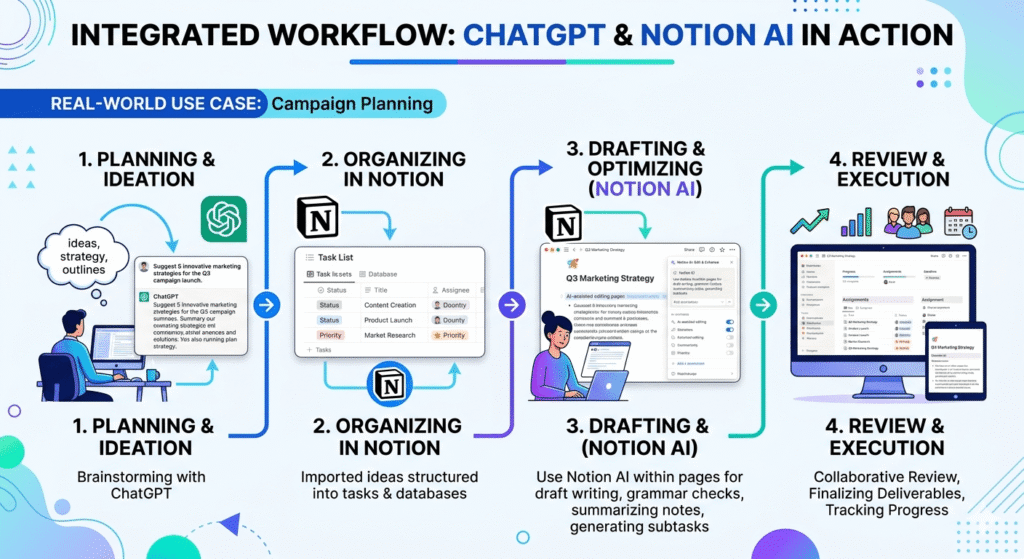
The three scenario workflows later in this article show ChatGPT and Notion AI operating within a specific business context. This workflow shows how a single piece of output moves through the full system from initial brief to finished deliverable to stored asset to derivative content and where each tool touches the process.
Use this as your implementation template. Adapt the prompt structures to your specific output type.
Stage 1: Context Assembly Notion (5 minutes)
Before opening ChatGPT, pull the context that already exists in your Notion knowledge base. Do not start the generation session without it. This is the step most operators skip, and it is why their ChatGPT output requires heavy editing, the tool is inferring context it should have been given.
What to pull from Notion:
- Your brand voice summary (3–5 sentences describing how your writing sounds, what it avoids, what it always includes)
- Any existing research, data points, or previous work directly relevant to this piece
- Audience profile for this output (role, knowledge level, what they care about)
- Any constraints: length, format, what to exclude
If your Notion knowledge base does not yet have this structure, the full architecture is in Building a Business Knowledge Base in Notion. For this workflow, the minimum you need is a brand voice summary and the relevant research, even if it is just a few bullet points.
Stage 2: First Draft Generation ChatGPT (10–15 minutes)
Open a new ChatGPT session. The first block of your prompt is always your context injection paste the material you pulled from Notion in Stage 1. Never begin with the task instruction alone.
Prompt structure:
[CONTEXT]
Brand voice: [paste your 3–5 sentence voice summary]
Audience: [role, knowledge level, primary concern]
Relevant existing research: [paste any data points or prior findings]
Constraints: [length, format, phrases to avoid]

[TASK]
Draft a [output type] on [topic].
Structure: [specify your preferred structure — e.g., Problem → Diagnosis → Recommendation → Next Step]
Length: [target word count or section lengths]
The conclusion should [specific instruction — e.g., "end with one concrete action the reader can take today, not a summary of what was covered"]
The context block is not optional. Without it, ChatGPT generates against a generic model of your audience and voice, and the editing burden in Stage 4 increases significantly.
What ChatGPT produces at this stage: A structured first draft with the right skeleton and reasonable content fill. Voice calibration and analytical depth will need attention. Do not try to perfect this draft now, move to Stage 3.
Stage 3: Structural Review Notion AI (5–10 minutes)
Copy the ChatGPT draft into a new Notion page. Run Notion AI on it with a structural prompt, not a content prompt. Notion AI is most reliable for structural operations on existing text, not for generating new content.
Notion AI prompt:
Review this draft for structural problems:
1. Does each section follow logically from the one before it?
2. Is there any section that could be cut without losing the core argument?
3. Is the opening paragraph doing enough work to earn the reader's attention?
Return a list of specific structural issues, not general suggestions.
Notion AI will surface 2–4 structural observations. Evaluate each one, not all will be relevant to your specific output. Accept the structural changes that are correct, and ignore suggestions that conflict with an intentional choice.
What Notion AI adds here that ChatGPT cannot: Notion AI operates on the specific document in front of it as a workspace object, making it well-suited for document-level structural review without the context-switching of returning to a ChatGPT session. This is a narrow but real advantage in an integrated Notion workflow.
Stage 4: Depth and Voice ChatGPT (15–20 minutes)
Return to your ChatGPT session (which still has your context block from Stage 2 in its history). Paste the structurally revised draft and run a depth-and-voice pass.
Prompt:
Review this revised draft against the brand voice and audience context from the beginning of this session.

Identify:
1. Any paragraph that sounds like generic AI writing rather than our specific voice — flag it with [VOICE]
2. Any claim that would be stronger with a specific example or data point — flag it with [DEEPEN]
3. Any sentence over 25 words that can be tightened without losing meaning — flag it with [TIGHTEN]

Do not rewrite the full draft. Flag and suggest only.
Work through the flagged sections manually. The [VOICE] flags require your own judgment, only you can resolve whether a paragraph sounds like your voice. The [DEEPEN] flags tell you where to add specificity from your own knowledge or from your Notion research database. The [TIGHTEN] flags are the easiest to accept wholesale.
Why manual resolution, not full AI rewrite: Asking ChatGPT to rewrite a flagged section reintroduces the voice drift problem you are trying to solve. The flags are a navigation tool. The resolution is yours.
Stage 5: Storage and Taxonomy Notion (5 minutes)
Once the draft is final, store it in Notion with structured properties. This is the step that transforms a one-time output into a reusable asset.
Minimum Notion page properties for any finished output:
| Property | Purpose |
|---|---|
| Output Type | Article / Proposal / SOP / Report / Email Template |
| Topic Tags | 2–4 tags describing the subject matter |
| Audience | Who this was written for |
| Key Claims | 3 bullet points summarizing the core arguments |
| Data Points Used | Any statistics or research cited, with sources |
| What Worked | One sentence: what element landed well (if applicable) |
| Date Published | For currency tracking |
| Status | Published / Draft / Archived |
The Key Claims and Data Points Used fields are the ones most operators skip and later regret. They are what make the next piece better because when you start Stage 1 of your next project, these fields are what Notion AI can synthesize across multiple past pieces.
Stage 6: Derivative Generation ChatGPT (10 minutes)
One finished piece of content contains enough material for 3–5 derivative assets. Most operators leave this value on the table because extraction feels like extra work after the main piece is done.
It is not extra work. It is one additional prompt.
Prompt (run in a new ChatGPT session, with the finished piece pasted in):
The following is a finished [article / report / proposal].

Extract:
1. A 280-character social post that captures the most counterintuitive point in the piece. Do not use hashtags or emojis.
2. A 5-bullet internal summary for a team briefing. Each bullet is one sentence.
3. A follow-up question this piece raises that we have not answered yet — stated as a potential next article topic.
4. One sentence that could serve as a pull quote.

Format each as a separate labeled block.
Each extracted asset goes into Notion: the social post into your content calendar database, the internal summary attached to the relevant project page, the follow-up question into your content pipeline, the pull quote into the Key Claims field of the piece’s storage page.
Stage 7: The Reuse Loop Notion AI (ongoing)
This stage runs automatically once your Notion knowledge base has 10 or more stored pieces. It is the compounding return on the retention investment.
When beginning Stage 1 of any new output, before pulling context manually, run this Notion AI query across your stored content database:
I am writing a [output type] on [topic] for [audience].
Search this database for:
1. Any stored piece that covers overlapping territory, summarize the key claims I already made
2. Any data point tagged with [relevant topic tag] that I have cited in past pieces
3. Any "What Worked" note from past pieces written for the same audience type
Notion AI returns a synthesis of your accumulated output that becomes the starting material for Stage 1. Over time, this means each new piece begins with more organizational knowledge than the last, the stack compounds rather than resetting.
What this full workflow produces that neither tool produces alone: Output quality that improves with each piece, rather than resetting to baseline each time. The ChatGPT layer generates at speed against increasingly rich context; the Notion layer ensures that speed compounds into accumulated organizational knowledge rather than disappearing into conversation history.
Three Scenario Workflows
The end-to-end workflow above is horizontal, it applies to any output type. These three workflows apply the same logic to specific business situations. Each one identifies the failure mode it fixes before describing the solution.
Scenario 1: Proposal System for a Solo Consultant
The failure mode: Writing every proposal from scratch using memory or a static template, producing inconsistent quality and losing the accumulated knowledge of what has worked with previous clients.
The architecture:
Stage 2 (ChatGPT) prompt for proposal generation:
[CONTEXT paste from Notion]
Client: [Name], [Industry]
Problem they described: [specific problem statement]
Our engagement model: [describe]
Past proposals that won in this industry: [paste Key Claims from 2–3 stored winning proposals]

[TASK]
Draft a consulting proposal. Structure: Executive Summary → Problem Diagnosis → Proposed Approach → Deliverables and Timeline → Investment → Next Step.
Length: 800–1,200 words.
Tone: [your voice description]
Do not use: "leverage," "synergy," "circle back," "touch base."
End the Executive Summary with the single most important reason this engagement has a positive ROI for the client.
Stage 7 (Reuse Loop) for proposals: after 5 stored proposals, Notion AI can surface patterns in your winning proposals versus the ones that did not close which Problem Diagnosis framing recurred in the wins, which Proposed Approach structure the client referenced positively. That synthesis informs the next proposal’s Stage 1 context.
Scenario 2: Editorial Pipeline for a Content Team
The failure mode: A team that produces good individual pieces but has no institutional memory. The researcher who produced a competitive analysis in Q1 cannot be referenced by the writer drafting the positioning piece in Q3 without manual excavation.
The architecture:
Add one field to your Notion content database: Research Status with values: Original Research / Builds on Previous / Duplicates Existing. When a new piece is added to the database, Notion AI checks for overlap with stored pieces and flags potential duplication before the research begins not after.
Notion AI query at the start of each content brief:
I am planning a piece on [topic] for [audience].
Check this database: has any stored piece covered this topic or a closely related one?
If yes: what claims did we already make, and what angle have we not covered yet?
This surfaces the unwritten angle, the part of the topic your team has gathered material for but not yet published which becomes the most differentiated starting point for new content.
Scenario 3: SOP Factory for an Operations Team
The failure mode: Tribal knowledge processes that exist in the heads of experienced employees but nowhere else. The cost surfaces when those employees leave or are unavailable.
The architecture:
Stage 2 (ChatGPT) prompt for SOP generation from a verbal walkthrough:
The following is a transcript of a verbal description of how we [process name].
Convert this into a structured SOP with these sections:
- Purpose (one sentence)
- When to Use This Process
- Prerequisites
- Step-by-Step Procedure (numbered, second-person imperative: "Open the dashboard" not "The operator opens the dashboard")
- Common Exceptions and How to Handle Them (top 3 by frequency)
- Escalation Path
- Version Date: [today's date]

Flag any step where the transcript was ambiguous with [CLARIFY] so a human can review those sections specifically.
Do not invent steps that were not in the transcript. If a step was implied but not described, flag it with [MISSING] instead.
The [CLARIFY] and [MISSING] flags make human review efficient, reviewers know exactly where their attention is needed rather than auditing the full document.
Notion AI maintenance prompt (run quarterly on each SOP):
This SOP was last reviewed on [date]. The following has changed since then: [describe change].
Which numbered steps in the Procedure section need to be updated based on this change?
Are there any steps that now contradict the change described?
The quarterly review cadence, surfaced automatically by a Notion filter on the Last Reviewed Date field, prevents SOP drift, the state where documented processes describe how things were done 18 months ago, not how they are done today.
The Narrow Scenario: When You Have to Choose
The workflows above assume you are using both tools. For operators with a genuine budget constraint one tool only, right now the answer depends entirely on your bottleneck diagnosis from the beginning of this article.
If your bottleneck is generation quality: ChatGPT Plus at $20/month. Use Notion Free as a manual knowledge base without the Notion AI add-on. The manual context injection described in Stage 1 of the end-to-end workflow works without Notion AI, you are pulling context manually rather than querying it automatically. The retention value is lower, but the generation quality improvement is immediate.
If your bottleneck is knowledge retention: Notion Free plus Notion AI at $10/month. Use ChatGPT Free for generation. The free tier of ChatGPT produces acceptable first drafts for most business tasks. The constraint is daily message volume not model quality. For moderate usage, the free tier is operationally sufficient for the generation stages of the workflow above.
The sequence that applies in most cases: ChatGPT first, Notion AI second. Operators in the first six months of AI-assisted workflows almost universally have a generation bottleneck, not a retention bottleneck, because the knowledge base has not yet accumulated enough content to make retrieval the constraint. Build the generation habit, produce content, and add Notion AI when you find yourself recreating work you know you have already done because at that point, the retention bottleneck has become the binding constraint and the Stage 7 reuse loop produces its full value.
The Honest Assessment: Where Each Tool Is Oversold
ChatGPT is oversold as a replacement for strategic judgment. It is an execution tool. When operators use it to substitute for the reasoning step asking ChatGPT “what should our content strategy be?” rather than “given our strategy, draft this piece” the output sounds confident but lacks the organizational context to be directionally correct. The failure mode is fast, polished, and wrong. ChatGPT accelerates the translation of thinking into structured output. It does not substitute for the thinking itself.
Notion AI is oversold as a standalone content generator. Notion’s own product positioning describes it as AI “within your workspace” that framing is accurate and important. Notion AI operates on content that already exists in Notion. Operators who expect ChatGPT-quality generation from a $10/month add-on to a workspace tool will be consistently disappointed. It is a different tool with a different function, and its value is zero if the Notion workspace it operates on is disorganized or under-populated.
Both tools are consistently undersold on their integration value. The strongest version of either tool is not the standalone version, it is the version that receives output from a well-designed upstream step and passes it cleanly to a well-designed downstream step. That is true of most infrastructure.
Frequently Asked Questions
Can I use Claude instead of ChatGPT in this workflow?
Yes, and in several stages, Claude is the stronger choice. For Stage 4 (depth and voice), Claude’s instruction fidelity and voice consistency over long documents is better than ChatGPT’s for most business writing contexts. The Claude vs ChatGPT for Business Writing article covers that distinction in detail with specific task mapping. The end-to-end workflow structure in this article applies regardless of which generation tool you use the layer logic does not change.
Does Notion AI use the same underlying model as ChatGPT?
No. Notion AI uses a combination of AI providers depending on the task, as of May 2026, Notion has not publicly specified the complete model lineup for all Notion AI features. It is not a direct interface to GPT-4 or any single model. This is one reason Notion AI behaves differently from ChatGPT on generation tasks, you are interacting with a different model configuration optimized for workspace-embedded operations, not standalone generation. Source: notion.so/product/ai.
Can ChatGPT and Notion be directly integrated without manual copy-paste?
Yes, via two methods. First, Notion has a native ChatGPT integration in its connected apps ecosystem that allows you to trigger ChatGPT from within Notion check notion.so/integrations for current availability, as integration features are updated regularly. Second, n8n or Make can automate the transfer between systems a ChatGPT output triggered by a Notion page creation, or a Notion database update triggered by a completed ChatGPT task. The automation architecture for this is covered in How to Build a $0 AI Stack That Replaces a VA.
How long does the Notion knowledge base need to exist before the reuse loop in Stage 7 produces value?
In practice, the Stage 7 reuse loop becomes noticeably useful at approximately 8–12 stored pieces in a given topic area. Below that threshold, Notion AI does not have enough material to produce meaningful synthesis, it returns what you already know. Above it, the queries begin surfacing non-obvious patterns and underused research. For a solo operator producing one or two pieces per week, this threshold is reached in 4–8 weeks. For a team producing more, sooner. Budget for a setup period where the retention infrastructure is being built but its compounding value has not yet materialized and do not evaluate the ROI of Notion AI during that setup period.
Is there a way to use both tools at $0 before committing to paid plans?
Yes. ChatGPT Free provides access to GPT-4o with daily message limits, sufficient for testing the generation stages of this workflow at moderate volume. Notion Free provides the full workspace without the Notion AI add-on, you can build the full knowledge base structure and run the manual stages of the workflow without paying anything. Run both free tiers for 30 days. The upgrade trigger for ChatGPT is hitting the daily message limit during normal usage. The upgrade trigger for Notion AI is finding yourself wishing you could query your Notion content automatically rather than reading through it manually. Both signals are unambiguous when they appear.
Decision Framework: Which Tool to Act on First
Act on ChatGPT (or equivalent generation layer) first if:
- You regularly face blank-page or blank-brief problems, tasks begin with insufficient raw material
- Your AI outputs require substantial editing before they are usable at a business standard
- You are producing AI-assisted output for fewer than six months and have no organized context system
Act on Notion AI (or equivalent retention layer) first if:
- You have identified specific instances of recreating work you know you have done before
- Your team produces individual work that does not build on previous work across projects
- You have been using AI generation tools for more than six months and still start sessions without a context layer
Act on both, in sequence (generation first, then retention), if:
- You produce substantive AI-assisted work daily
- You manage more than three active client relationships or projects simultaneously
- You have a team that should be building on each other’s work but is not
Action Step
Start simple:
- use ChatGPT for one real task
- store the output in Notion
- repeat the workflow
Because ultimately:
tools do not create productivity but systems do.
Related Articles in This Cluster
- How to Build a $0 AI Stack That Replaces a VA The automation architecture that connects ChatGPT and Notion without manual transfer. Read before building the end-to-end workflow above.
- Building a Business Knowledge Base in Notion: The Structured Context Guide Full implementation of the Notion retention layer referenced throughout this article.
- Claude vs ChatGPT for Business Writing If you are evaluating Claude as the generation layer instead of ChatGPT, this article maps each tool to specific writing task types.
- Best Free AI Tools in 2026: The Operational Viability Guide Free tier ceilings for both ChatGPT and Notion AI, and the upgrade trigger signals for each.
- Best AI Tools for Productivity 2026 The Net Productivity Yield framework for evaluating whether these tools generate positive ROI for your specific usage pattern.
Data Transparency and Methodology
Pricing figures: All pricing cited ChatGPT Plus at $20/month, Notion AI at $10/month is sourced from official pricing pages as of May 2026. Pricing changes without notice. Verify current figures directly with each platform before subscribing: openai.com/chatgpt/pricing and notion.so/pricing.
Cost calculations: The break-even table in the Cost Implication section is arithmetic applied to stated pricing figures. It contains no productivity claims. The scenario-based cost illustrations (proposal drafting time, research duplication) use explicitly labeled illustrative inputs, they are structural demonstrations of how to run the calculation with your own numbers, not claimed measurements from controlled tests.
Tool behavior assessments: Claims about ChatGPT and Notion AI behavior, context amnesia, Notion AI’s ceiling on original content generation, voice consistency patterns reflect editorial experience with these tools and are consistent with each platform’s documented product architecture. They are editorial assessments, not controlled research findings. Behavior may vary by account configuration, plan tier, and product updates.
Knowledge base threshold estimate: The 8–12 piece threshold for Stage 7 reuse loop utility is an editorial observation, not a measured finding. It is provided as orientation for setting realistic expectations during the setup period.
No external party paid to influence the tool assessments or workflow recommendations in this guide. This site participates in affiliate programs for some tools mentioned. Affiliate relationships do not influence editorial assessments. See the Affiliate Disclosure for full details.