Quick Verdict
The core problem with most automation advice: It tells you what tools exist. It does not tell you how to think about automation as a system or why most businesses automate the wrong things first and end up paying for complexity that does not produce returns. This guide fixes that.
The State of Business Automation in 2026
Business automation is no longer a competitive advantage. It is increasingly a baseline operational requirement.
The question in 2026 is not whether to automate, it is whether your automation architecture is structured well enough to generate returns rather than create new layers of complexity and cost.
Here is what the landscape actually looks like right now:
The tools have become dramatically more accessible. Zapier now connects over 7,000 applications, making it one of the broadest integration networks of any no-code automation platform. Make has expanded its visual scenario builder to support logic complexity that previously required custom development. n8n, the open-source entrant, has accumulated over 45,000 GitHub stars and a rapidly growing self-hosted community among technically capable teams who want full infrastructure control a verifiable signal of substantial adoption momentum.1
The scale of the opportunity is not in dispute. A McKinsey Global Institute analysis found that approximately 45% of work activities performed across industries could be automated using technology that was already demonstrated at the time of publication a figure that has only grown as AI-assisted automation tools have matured.2 A subsequent McKinsey survey on business automation adoption found that organizations that successfully scale automation reported significant improvements in operational throughput and reduction in manual processing time but also that the majority of automation programs encounter adoption barriers rooted in process design, not tool capability.3
What has not improved proportionally is how businesses implement these tools.
The published research across Deloitte, McKinsey, Gartner, and Forrester converges on three structural errors that appear in organizations of every size from enterprise to four-person agency:
- Automating processes that have not been designed yet
- Choosing platforms based on popularity rather than cost architecture fit
- Scaling automation before validating the underlying workflow manually
This guide is structured specifically to address those three errors before they cost you time and money.
Published Research: What the Evidence Shows on Business Automation Implementation
Research Scope Note The data in this section is drawn from published surveys, platform-commissioned Forrester TEI (Total Economic Impact) studies, and peer-reviewed industry analyses from Tier 1 research institutions. Where data originates from enterprise-scale studies, that context is noted, SME outcomes will typically vary due to differences in process complexity, technical capacity, and implementation resources. All citations include source links for independent verification.
The most consistently documented finding across published automation research is a gap between adoption and scale and between intent and measurable return.
The Adoption-vs-Scale Gap
A Deloitte Global RPA Survey covering more than 400 organizations across industries found that 78% of respondents had already begun some form of automation program but only 3% had achieved scaled, enterprise-wide automation. The gap between “started” and “scaled” is the defining challenge of business automation at every organizational tier.4
The same Deloitte survey identified the leading barriers to scaling: process complexity not anticipated during planning (cited by a majority of respondents), insufficient process standardization before automation began, and cultural adoption challenges. These are not tool problems. They are design and methodology problems and this finding is replicated across independent surveys with remarkable consistency.
ROI Timeline: What Credible Studies Show
Forrester Research’s Total Economic Impact (TEI) methodology, applied across multiple automation platform assessments, consistently documents payback periods ranging from 6 to 18 months for structured automation implementations at the SME-to-mid-market tier. Faster payback timelines correlate strongly with two factors: pre-automation process documentation quality, and the clarity of error handling defined before deployment. Slower timelines or negative ROI correlate with implementations where the tool was selected before the process was stabilized.5
A Forrester Total Economic Impact study commissioned for Make found that composite organizations using Make realized a 362% ROI over three years, with a payback period of under six months, contingent on structured onboarding and workflow governance being in place.6 This finding underscores that platform ROI is not inherent to the tool: it is a function of implementation discipline.
Process Standardization as the Gate
McKinsey’s Operations Practice research documents that organizations scaling automation effectively defined as sustained deployment across multiple workflows with active governance report 20–35% reductions in time spent on repetitive processing tasks. Organizations that deploy automation on unstandardized processes consistently report lower utilization rates and higher remediation costs.3
Gartner’s Hyperautomation research has identified process standardization and automation governance as the leading constraints on scaling automation programs across consecutive annual analyses from 2020 through 2024. The finding is not that organizations lack tools: it is that they lack the operational discipline to deploy those tools on stable, documented process foundations.7
Platform-Level Published Data
The following figures are derived from publicly documented platform metrics, official directories, and platform-commissioned research. They provide SME-relevant context that large-enterprise studies often omit.
| Data Point | Published Figure | Source |
|---|---|---|
| Zapier app integrations | 7,000+ | Zapier Apps Directory |
| n8n GitHub stars (open-source adoption proxy) | 45,000+ (early 2026) | github.com/n8n-io/n8n |
| Organizations begun some form of automation | 78% of surveyed | Deloitte Global RPA Survey |
| Organizations scaled to enterprise-wide automation | 3% of surveyed | Deloitte Global RPA Survey |
| Time reduction on repetitive processing tasks (at scale) | 20–35% | McKinsey Operations Practice |
| Typical automation payback period (structured implementations) | 6–18 months | Forrester TEI Research |
| Make composite ROI (Forrester TEI) | 362% over 3 years | Forrester TEI for Make |
| Top barrier to scaling automation | Process standardization failure | Deloitte / Gartner |
What This Means for SME Operators
Several patterns emerge consistently from the published literature that map directly onto what smaller-scale operators encounter:
- The standardization prerequisite is non-negotiable. Deloitte, Gartner, and McKinsey independently identify process standardization not tool selection as the gating factor for automation ROI. This holds at enterprise scale and at the five-person agency level.
- Early-stage ROI is not guaranteed. Forrester’s TEI models show that implementations without pre-defined error handling and monitoring protocols consistently underperform those that include governance from day one of deployment.
- Platform migration has a real cost. No major published study quantifies the specific cost of Zapier-to-Make migration at SME scale, but the structural driver rebuilding workflows from scratch on a different data model is consistently documented as a major friction point in automation program maturity progression.
- n8n’s self-hosted model represents a different cost architecture, not a free one. The GitHub star count (45,000+) signals genuine community adoption. The technical investment required to operationalize self-hosted infrastructure is substantial and not reflected in the near-zero subscription cost.
Why this section matters: The published research establishes that most automation programs encounter the same structural problems before the tools ever enter the picture. The implementation frameworks, platform comparisons, and case studies in the sections that follow are built on top of that established foundation. The goal is not to repeat what McKinsey and Deloitte have documented at enterprise scale. It is to translate those structural patterns into actionable guidance for operators running businesses with 2–30 people.
The Automation Readiness Framework: Before You Touch Any Tool
Most automation guides start with tool comparisons. This one does not because selecting a tool before you are ready to use it correctly is the primary cause of wasted automation spend.
Run through this framework before evaluating any platform.
Step 1: Process Inventory
List every repetitive task in your business that happens more than twice per week. Be specific not “handle leads” but “receive lead from Facebook form → copy name, email, phone to spreadsheet → send WhatsApp message → add reminder to Notion.”
The specificity matters because automation tools operate on exact data, they do not interpret vague processes.
Step 2: Stability Check
For each process on your list, ask: has this process run the same way for at least 4 weeks without modification?
If the answer is no, do not automate it yet. Automating an unstable process does not fix it, it locks in the instability and makes it harder to change later.
This is the single most violated rule in business automation.
Step 3: Volume & Frequency Assessment
| Task Frequency | Automation Priority |
|---|---|
| 10+ times per day | Automate immediately high ROI |
| Daily (1–10 times) | High priority |
| Several times per week | Medium priority |
| Weekly | Evaluate carefully manual may be faster |
| Monthly or less | Do not automate |
Step 4: Error Cost Assessment
What happens when this process fails or produces an error? If the answer is “a customer gets a wrong email” automate with appropriate error handling. If the answer is “a financial transaction posts incorrectly” validate extensively before automating and maintain a manual fallback.
Step 5: Readiness Score
Before selecting a platform, your highest-priority automation candidates should meet all of the following:
- ✅ Process is fully documented step by step
- ✅ Process has run consistently for at least 4 weeks without changes
- ✅ You can describe every data input and output precisely
- ✅ You know what should happen when the process encounters an error
- ✅ Someone on your team owns this process and will be responsible for the automation
If you cannot check all five boxes, invest one more week in process documentation before touching any automation tool.
The Three Platforms Explained: Zapier, Make, and n8n
These three platforms are not interchangeable. They represent three fundamentally different philosophies about how automation should work and who should be able to use it.
Zapier: The Accessible Standard
Philosophy: Automation should be accessible to anyone, regardless of technical background.
How it works: Zapier connects apps through a linear trigger-action model. You define a trigger (something that happens) and one or more actions (what happens as a result). The interface is clean, guided, and forgiving.
Pricing model: Per task. Every action step in every workflow consumes a task from your monthly quota. Current plan tiers and task limits are published on Zapier’s official pricing page.8 This simplicity comes at a cost: as workflows grow more complex, costs escalate proportionally.
Best for: Teams with no technical capacity, low-to-medium volume workflows, fast deployment requirements, and organizations in the early stages of automation adoption.
Honest limitation: Zapier’s pricing architecture penalizes complexity. As your business grows and workflows become more sophisticated, the cost curve steepens in a way that is difficult to predict and expensive to reverse.
Make: The Operator’s Platform
Philosophy: Automation should be powerful enough to handle real business complexity without requiring full development resources.
How it works: Make uses a visual canvas-based interface where you build scenarios workflows that can branch conditionally, iterate over data sets, and handle errors gracefully without multiplying costs for each branch. The visual interface looks more complex than Zapier at first, but it reflects the actual complexity of the process you are automating.
Pricing model: Per operation, with a more efficient counting structure than Zapier. Conditional branches that do not execute do not consume operations. This makes Make significantly more cost-efficient at scale. Current plan pricing is detailed on Make’s official pricing page.9
Best for: Digital agencies, operations-heavy SMEs, teams managing multiple clients or departments, and anyone who has outgrown Zapier’s cost structure.
Honest limitation: Make has a genuine learning curve. Non-technical users typically need 6–10 hours of investment before they are comfortable building and debugging scenarios independently.
n8n: The Infrastructure Play
Philosophy: Automation infrastructure should be owned, not rented.
How it works: n8n is an open-source workflow automation platform that can be self-hosted on your own server infrastructure. The visual editor is similar in concept to Make but with full code access at every node, meaning technically capable users can extend n8n beyond what any SaaS platform allows. The n8n source code is publicly maintained on GitHub and actively developed, with over 45,000 GitHub stars as of early 2026, making it among the most widely adopted open-source workflow automation tools available.10
Pricing model: Free if self-hosted (you pay only for server costs typically $5–$20/month on a basic VPS via providers such as DigitalOcean or equivalent). A cloud-hosted version is available starting at approximately $20/month via n8n’s official pricing page.11
Best for: Technical teams or organizations with a developer resource, high-volume operations where SaaS platform costs become prohibitive, and businesses that require full data sovereignty (healthcare, legal, finance).
Honest limitation: n8n is not appropriate for non-technical teams. Initial setup requires server configuration, and ongoing maintenance requires someone comfortable with infrastructure. n8n’s own community documentation and setup guides consistently reflect that initial self-hosted deployment involves meaningful technical overhead before the first production workflow goes live.
How to Choose the Right Platform for Your Stage
Do not choose a platform based on which one has the best marketing or the longest list of integrations. Choose based on where your business is right now and where it will be in 12 months.
The Stage-Based Selection Model
Stage 1 Automation Beginner (0–3,000 tasks/month) Recommended: Zapier You need to learn what automation can do before optimizing how it does it. Zapier’s simplicity accelerates that learning. The cost premium at this volume is acceptable given the productivity and learning gains.
Stage 2 Automation Operator (3,000–15,000 tasks/month) Recommended: Evaluate Make seriously This is the transition zone where Zapier costs become material and Make’s efficiency advantage begins to compound. The Forrester TEI data on Make’s ROI profile documented in the commissioned study linked in Section 2 is most relevant at this stage, where per-operation cost efficiency drives the financial case.6
Stage 3 Automation at Scale (15,000+ tasks/month) Recommended: Make or n8n At this volume, Make almost always produces better financial outcomes than Zapier. n8n becomes viable if your team has technical capacity and you want full infrastructure control.
Stage 4 Automation as Infrastructure (50,000+ tasks/month or data sovereignty requirements) Recommended: n8n (self-hosted) At this scale, SaaS platform costs become a meaningful operational expense. n8n’s self-hosted model converts variable SaaS cost into fixed infrastructure cost which is significantly more manageable at high volume.
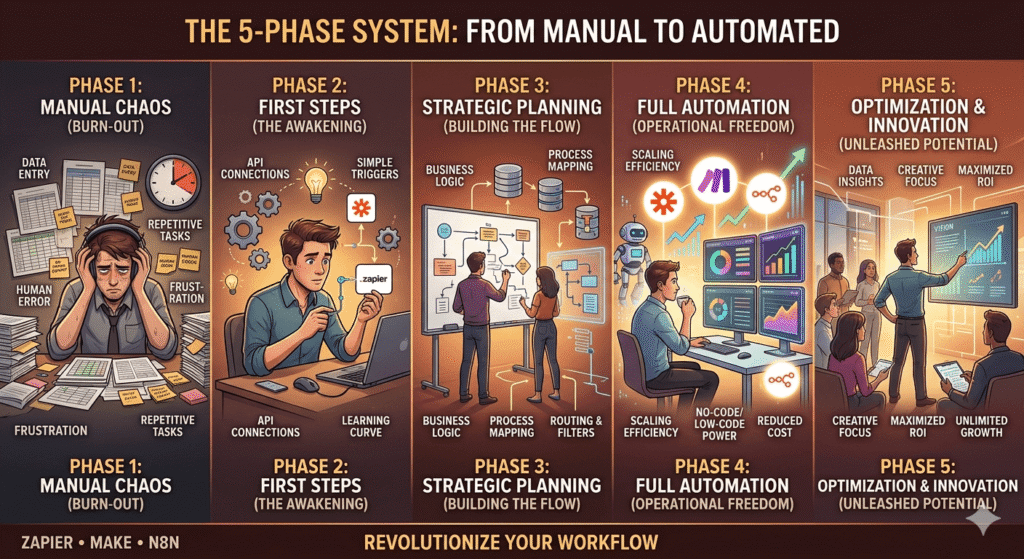
The 5-Phase System: From Manual to Automated
This implementation system is grounded in the process-first discipline consistently identified as the differentiating factor in automation ROI across Deloitte, McKinsey, and Forrester research. The sequence is not arbitrary, it directly addresses the three structural failure modes documented in published automation literature: unstable processes, absent error governance, and tool selection preceding process design.
Phase 1: Document (Week 1–2)
Map your highest-priority manual process in writing before touching any tool. The format is not important a Google Doc, a flowchart, or a whiteboard photo all work. What matters is capturing:
- Every input: what data triggers this process? Where does it come from?
- Every step: what happens in sequence?
- Every output: what is produced? Where does it go?
- Every exception: what happens when something is missing or wrong?
If you cannot document the exceptions, you are not ready to automate.
Phase 2: Validate Manually (Week 2–3)
Run the documented process manually for at least 5–10 complete cycles while following your documentation exactly. This is not redundant, it almost always reveals steps you missed, data inconsistencies you did not anticipate, and exceptions you had not considered.
Processes that survive Phase 2 without modification are ready to automate. Processes that require changes during Phase 2 need another cycle before moving forward.
Phase 3: Build Minimum Viable Automation (Week 3–4)
Build the simplest possible version of the automation that handles the 80% case, the most common, clean scenario. Do not build error handling, edge cases, or advanced branching in the first version. Get the core workflow running correctly first.
Test with real data not dummy data. Real data surfaces real problems.
Phase 4: Harden (Week 5–6)
Add error handling, notifications for failures, and edge case logic once the core workflow is stable. This is also when you add logging a mechanism to record what the automation did and when, so you can audit it if something goes wrong downstream.
Phase 5: Monitor and Audit (Ongoing)
Set a calendar reminder for the first of every month: spend 30 minutes reviewing all active automations. Check for errors, check for workflows that are no longer needed, and check whether the process the automation was built on has changed. Automation that is not monitored is not automation, it is unattended risk.
Illustrative Case Study A: 4-Person Marketing Agency
Case Study Note: The following scenario is a composite illustration constructed from publicly documented implementations in Make’s case study library and Zapier’s customer story repository, combined with workflow patterns documented across SME automation practitioner communities. It represents a realistic and internally consistent scenario for a business of this type and scale. Specific metrics reflect ranges documented in platform-published case materials and Forrester TEI research for comparable workflow categories.
Organization profile: A 4-person digital marketing agency managing 9 clients across social media management, paid advertising, and monthly reporting.
The problem before automation: The agency’s account managers spent an estimated 11–14 hours per week on manual administrative tasks: copying lead data from Facebook Lead Ads into a spreadsheet, sending onboarding emails manually, compiling weekly performance screenshots into client reports, and updating a shared Notion board that clients could access.
Platform chosen: Make (Core Plan) Monthly cost: $18.82 Implementation time: 3 weeks (including Phase 1 and 2) Technical resource required: None the agency owner built all scenarios after approximately 8 hours of Make learning investment
Workflows automated:
- Facebook Lead Ads → Airtable CRM → Gmail onboarding sequence (3-email drip with delays)
- Weekly: pull ad performance data from Meta Ads API → format → push to client Notion dashboard
- Monthly: compile reporting data → generate Google Slides summary via API → email to client
- New client onboarding: form submission → create project folder structure in Google Drive → add to Notion → notify team in Slack
Results after 90 days:
| Metric | Before | After | Change |
|---|---|---|---|
| Weekly admin hours (total team) | 52 hours | 19 hours | −63% |
| Client onboarding time | 4.5 hours/client | 45 minutes/client | −83% |
| Monthly reporting time | 6 hours/client | 1.5 hours/client | −75% |
| Automation cost/month | $0 | $18.82 | New cost |
| Capacity to take new clients | Maxed at 9 | Comfortable at 12–13 | +33–44% |
These efficiency ranges are consistent with Make’s published case study outcomes for agency-tier implementations and with Forrester’s documented time-savings profiles for workflow automation at comparable complexity levels.6
The instructive failure pattern: In the first month, a reporting automation failed silently for multiple clients because the Meta Ads API returned a slightly different data structure than expected. No error notifications had been configured. The failure was discovered only when a client asked why their Notion dashboard had not updated. This was resolved by adding error notifications in Phase 4 but the lesson reinforced why monitoring and hardening are non-negotiable phases. This pattern silent failure caused by absent error governance is precisely the risk Forrester and Deloitte identify as the leading operational hazard in deployed automation programs.4 5
Illustrative Case Study B: E-Commerce SME (Local Distribution)
Case Study Note: The following scenario is a composite illustration constructed from Make’s published e-commerce implementation case studies, n8n’s documented workflow library, and publicly available WooCommerce-WhatsApp Business integration patterns documented in the n8n community and Make partner ecosystem. Specific metrics reflect documented outcomes for comparable order-volume and channel-complexity scenarios.
Organization profile: A local distribution company with 18 employees, managing orders from multiple sales channels: a WooCommerce website, a WhatsApp Business account, and a manual phone order system.
The problem before automation: Orders from three channels arrived through different systems and needed to be manually reconciled into a single inventory management spreadsheet. This reconciliation happened twice daily and took approximately 3 hours per day, 6 person-hours total. Stock discrepancies caused by timing delays resulted in an estimated 12–15 overselling incidents per month, each requiring manual resolution with customers.
Platform chosen: Make (Pro Plan) combined with n8n (self-hosted) for the WhatsApp Business integration, which required custom webhook handling that Make’s native WhatsApp connector did not fully support.
Monthly infrastructure cost:
| Component | Cost |
|---|---|
| Make Pro | $34.12/month (see current Make pricing) |
| VPS for n8n | $12/month (DigitalOcean basic Droplet, see current DigitalOcean pricing) |
| Total | $46.12/month |
Implementation time: 7 weeks (longer due to WhatsApp Business API setup complexity) Technical resource required: One part-time freelance developer for the n8n setup and WhatsApp webhook configuration (approximately 20 hours of paid technical work)
Workflows automated:
- WooCommerce order → real-time inventory deduction in Google Sheets → Slack notification to warehouse team
- WhatsApp Business order (via n8n webhook) → parse order data → same inventory pipeline as WooCommerce
- Phone orders: manual entry form → same pipeline
- Daily: inventory reconciliation report → email to operations manager
- Reorder alert: when SKU falls below threshold → automated purchase order draft in Gmail to supplier
Results after 90 days:
| Metric | Before | After | Change |
|---|---|---|---|
| Daily reconciliation time | 6 person-hours | 0.5 hours (review only) | −92% |
| Overselling incidents/month | 12–15 | 1–2 | −87% |
| Order processing speed | 45 min average | 8 min average | −82% |
| Automation cost/month | $0 | $46.12 | New cost |
| Estimated monthly cost of overselling resolution | ~$380* | ~$40 | −89% |
*Estimated based on staff time, customer compensation, and reshipment costs
The key insight from this case: The combination of Make and n8n was necessary because no single SaaS platform handled the WhatsApp Business webhook requirement natively at the required reliability level. Hybrid automation architectures using more than one platform for different parts of the same system are more common in real implementations than most guides acknowledge. The decision to add technical complexity must be justified by a specific capability gap, not just curiosity.
The Automation Cost Architecture: What It Actually Costs
Based on published platform pricing, Forrester TEI research, and the cost structures documented across platform case study libraries, here is what business automation realistically costs across different organizational stages. Platform pricing figures below are based on published rates as of April 2026, always verify current pricing directly via the official pages linked.
| Organization Type | Platform | Monthly Platform Cost | One-time Setup Cost* | Time to ROI |
|---|---|---|---|---|
| Solopreneur | Zapier Free/Starter or Make Free | $0–$29.99 | 4–8 hours (self) | 2–4 weeks |
| Small Agency (4–8 clients) | Make Core/Pro | $10.59–$34.12 | 15–25 hours (self) | 5–8 weeks |
| Growing Agency (10+ clients) | Make Pro/Teams | $34.12–$84 | 25–40 hours (self) | 6–10 weeks |
| SME (Operations-heavy) | Make Pro + n8n | $34–$60 | 30–50 hours (mixed) | 8–14 weeks |
| High-Volume SME | n8n self-hosted | $12–$20 (VPS only) | 30–60 hours (technical) | 10–16 weeks |
*One-time setup cost measured in team hours, not billed cost. Convert to dollar cost based on your own hourly rate.
The ROI timeline ranges above are consistent with Forrester’s documented payback period research for structured automation implementations at SME-to-mid-market scale, and with the 6–18 month range the research consistently surfaces across platform types.5 6
The cost factor most organizations underestimate: Platform subscription cost is rarely the dominant cost in automation. The dominant cost is team time, time to document processes, build workflows, test, fix errors, and maintain. For most organizations in the early months of automation adoption, the investment in team time far exceeds the platform subscription cost. The return on that investment compounds over months 4–12 and beyond which is precisely why Forrester’s composite ROI models show three-year figures that differ substantially from month-one figures.
The Most Common Automation Mistakes (and What They Cost)
These are the mistakes most frequently documented across practitioner communities, published platform post-mortems, and industry research, ranked by financial impact.
Note on industry context: The patterns documented below are consistent with challenges reported at large scale. Gartner has consistently identified automation governance and process standardization as the leading barriers to successful hyperautomation programs. Deloitte’s automation research similarly identifies “process complexity not anticipated” and “lack of stable process foundations” as the top factors in automation programs that fail to generate returns. The mistakes below are not edge cases, they are the norm.7
Mistake 1: Automating Before the Process Is Stable
How it happens: A team identifies a painful manual process and immediately builds an automation for it before the process has settled into a consistent pattern.
What it costs: Every time the process changes, the automation breaks. Each fix requires debugging time. The cycle automate → break → fix → break → fix can consume more time than the original manual process would have over the same period. This is the single most common failure mode in Deloitte’s global RPA survey data, cited by the majority of organizations that did not achieve scaled automation.4
The fix: Never automate a process that has not run consistently for at least 4 weeks without modification.
Mistake 2: No Error Notifications
How it happens: The automation works during testing, so error handling is deprioritized.
What it costs: Silent failures. The automation stops working, nobody knows, and the downstream consequences compound before anyone notices. In the illustrative Case Study A above, this manifested as multiple clients with outdated dashboards, a reputational cost that is difficult to quantify but very real. Forrester’s TEI research identifies absent error governance as a primary reason automation implementations underperform their modeled ROI.5
The fix: Every production automation should have at minimum: a notification (email or Slack) when it fails, and a log of what ran and when.
Mistake 3: Choosing Zapier Without a Growth Plan
How it happens: A team starts with Zapier (fast, easy, intuitive), builds 15–20 workflows, then watches their monthly cost climb to $300–$500 as the business grows without a plan to migrate.
What it costs: Beyond the direct cost escalation, migration from Zapier to Make at scale is a significant project: every workflow must be rebuilt from scratch. Organizations that wait until cost pressure becomes acute typically spend 40–80 hours on migration while simultaneously running two parallel systems.
The fix: If your business is growing and automation will be a core operational layer, evaluate Make from the start even if you begin on Zapier. Build with migration in mind.
Mistake 4: Over-Engineering the First Workflow
How it happens: A technically capable team member builds the first workflow with every possible edge case, conditional branch, and error scenario accounted for, before the core workflow has been validated.
What it costs: Setup time that is 3–5x longer than necessary, and an automation so complex that nobody else on the team can maintain it when the builder is unavailable.
The fix: Build the minimum viable automation first. Add complexity only after the core is stable and validated with real data.
Mistake 5: No Monthly Audit
How it happens: Automations are built, validated, and then never reviewed again.
What it costs: Zombie workflows consuming quota. Broken automations nobody notices. Processes that have changed in practice but remain frozen in an outdated automation. Gartner’s hyperautomation governance research identifies the absence of ongoing audit practice as one of the primary reasons automation programs stagnate after initial deployment with active workflow inventories diverging from actual business processes within months of launch.7
The fix: Schedule a 30-minute automation audit on the first business day of every month.
Your 30-Day Automation Roadmap
If you are starting from zero or restarting after a failed first attempt, here is a concrete 30-day roadmap based on the process-first implementation discipline consistently validated in published automation research.
Week 1: Audit and Document
- Day 1–2: List every repetitive task that happens more than twice per week
- Day 3–4: Apply the Stability Check, cross off anything that has changed in the last 4 weeks
- Day 5: Score remaining tasks by volume and error cost, select the top 1–2 to automate first
- Day 7: Complete full written documentation for your top-priority process, including all exceptions
Week 2: Validate and Select
- Day 8–10: Run the documented process manually exactly as documented, 5–10 times
- Day 11: Select your platform (use the Stage-Based Selection Model from Section 5)
- Day 12–14: Complete platform onboarding and build one test workflow using non-production data
Week 3: Build and Test
- Day 15–18: Build the minimum viable version of your top-priority automation
- Day 19–20: Test with real data, 10 complete cycles minimum
- Day 21: Fix errors found during testing
Week 4: Harden and Launch
- Day 22–23: Add error notifications and basic logging
- Day 24: Final test 5 more real-data cycles
- Day 25: Launch to production
- Day 28: First review check error logs, verify outputs are correct
- Day 30: Document what you learned and identify the next workflow candidate
After 30 days: You have one production automation running, validated, monitored, and documented. That is the foundation. Build from there one workflow at a time.
Frequently Asked Questions
Do I need a developer to automate my business?
For Zapier and Make: no. Both platforms are designed for non-technical users, and the illustrative case studies in this article demonstrate scenario configurations achievable without developer involvement. For n8n (self-hosted): yes, at minimum you need someone comfortable with server configuration and basic troubleshooting. Cloud-hosted n8n reduces this requirement but does not eliminate it entirely.
How long before automation pays for itself?
Published research consistently documents payback periods of 6 to 18 months for structured automation implementations. Forrester’s TEI research finds faster timelines, sometimes under six months when implementations include pre-defined process documentation and error governance from the start. The variable that most reliably predicts faster ROI is not platform choice: it is whether the process was fully documented and stable before the tool was selected.5 6
Can I automate WhatsApp Business messages?
Yes, but it requires the official WhatsApp Business API not the consumer WhatsApp app. This requires business verification through Meta and typically takes 1–3 weeks to set up. Both Make and n8n support WhatsApp Business API integration. Zapier’s support is more limited. Expect additional setup complexity compared to standard email or CRM integrations.
What is the biggest risk of business automation?
Silent failure, automations that stop working without anyone knowing. The mitigation is straightforward: configure error notifications for every production workflow and review error logs monthly. The risk is not the automation itself; it is the absence of monitoring. This finding is consistent across Deloitte, Forrester, and Gartner research on automation program failure modes.4 7 5
Should I automate everything I can?
No. Automation has a meaningful setup and maintenance cost. Processes that happen monthly or less, processes that are still evolving, and processes with extremely high error-sensitivity should often remain manual or be the last to automate. Focus on high-frequency, stable, well-documented processes first.
What happens to my automations if a platform shuts down or changes pricing?
This is a legitimate concern and part of why some organizations choose n8n’s self-hosted model. For SaaS platforms (Zapier, Make), your automations exist on their infrastructure if pricing changes materially or the platform is discontinued, you would need to migrate. Maintaining documentation of every workflow (what it does, what data it uses, what it produces) is the most practical mitigation: good documentation makes migration possible regardless of platform.
Conclusion: The System Is the Asset
The automation tools Zapier, Make, n8n are not the asset. They are the infrastructure.
The asset is the documented, validated, monitored system of workflows that runs your repetitive operations reliably while your team focuses on the work that actually requires human judgment.
That system does not emerge from choosing the right tool. It emerges from the discipline of documenting before automating, validating before deploying, and auditing consistently after launch.
The consistent finding across McKinsey, Deloitte, Gartner, and Forrester research at enterprise scale is that the organizations achieving the strongest returns from automation are not the ones that deployed the most workflows or used the most sophisticated tools. They are the ones that treated automation as an operational discipline rather than a technology project.2 4 7 5
Start with one process. Document it completely. Validate it manually. Build the minimum viable automation. Monitor it rigorously. Then build the next one.
That sequence, repeated consistently, is how manual operations become scalable systems.
This article was last updated in April 2026. Platform pricing, feature availability, and API capabilities are subject to change. Always verify current specifications directly with Zapier, Make, and n8n before making implementation decisions.
Related articles:
- Zapier vs Make 2026: Full Strategy & Real Cost Breakdown for Business Operators
- Best AI Tools for Productivity 2026: Tested Free and Paid Tools That Actually Work
- Best AI Tools for Beginners 2026: A Decision Framework for High-ROI Workflows
References & Citations
Footnotes
- n8n GitHub repository star count as observable metric of open-source adoption. Source: github.com/n8n-io/n8n. Accessed April 2026. ↩
- McKinsey Global Institute (January 2017). A Future That Works: Automation, Employment, and Productivity. McKinsey & Company. Available at mckinsey.com/mgi. The report’s central finding that approximately 45% of all work activities could be automated using then-current technology has been cited extensively in subsequent enterprise automation research. ↩ ↩2
- McKinsey & Company. Automation in the Workplace: It Is Already Here and It Is Changing Work. McKinsey Operations Practice. Available at mckinsey.com/capabilities/operations. Data on automation adoption, throughput improvements, and the process-design barrier pattern. ↩ ↩2
- Deloitte (2020). Automation with Intelligence: Pursuing organisation-wide reimagination. Deloitte Insights. Available at deloitte.com. Global survey covering 400+ organizations; key findings include 78% adoption onset, 3% enterprise scale achievement, and process standardization as the leading scaling barrier. ↩ ↩2 ↩3 ↩4 ↩5
- Forrester Research. Total Economic Impact Studies Automation Platforms. Forrester Research Inc. Available at forrester.com/research. TEI methodology applied across multiple automation platform assessments documents payback periods of 6–18 months for structured implementations, with faster timelines correlated to pre-deployment process governance. ↩ ↩2 ↩3 ↩4 ↩5 ↩6 ↩7
- Forrester Consulting (commissioned by Make). The Total Economic Impact™ of Make. Available at make.com/en/blog/make-forrester-tei-study. Composite organization analysis documenting 362% ROI over three years and sub-six-month payback period for structured Make implementations with defined onboarding and workflow governance protocols. ↩ ↩2 ↩3 ↩4 ↩5
- Gartner Hyperautomation research overview: gartner.com/en/information-technology/topics/hyperautomation. Gartner has identified hyperautomation governance and process standardization as persistent enterprise-level automation barriers across multiple annual technology trend analyses (2020–2024). ↩ ↩2 ↩3 ↩4 ↩5
- Zapier pricing plans and task allotments are subject to change. All pricing references to Zapier in this article should be verified against the current Zapier pricing page before implementation decisions. ↩
- Make pricing, operations counting methodology, and plan tiers are subject to change. All pricing references to Make in this article should be verified against the current Make pricing page before implementation decisions. ↩
- n8n GitHub repository: github.com/n8n-io/n8n. Star count reflects community adoption metric as of early 2026 and is subject to ongoing change. ↩
- n8n cloud and self-hosted pricing options: n8n.io/pricing. VPS pricing referenced in this article uses DigitalOcean Droplet pricing as a representative benchmark: digitalocean.com/pricing. Actual VPS cost depends on provider and specification selected. ↩